|
Intel P4 vs AMD
|
|
|
thejazman
Suspended due to non-functional email address

|
28. December 2005 @ 12:21 |
 Link to this message

|
|
Sophocles
You've convinced me, I've just ordered two Opteron 280 dual core processors, Tyan Thunder K8WE motherboard, ThermalTake Liquid cooling Aluminum Tower and ThermalTake 680W PurePower.
p.s. You have probably guessed I like the ThermalTake tower as I already have one.
-----------------------------------------------------------
Supermicro X6DA8-G2 Dual Xeon
2x Intel Xeon 3.6GHz 800MHz 2MB cache
16GB Gold Series Gamer Extreme DDR 500Mhz
SLI 2x Gainward GF 7800GTX Ultra 3550PCX XP SLI, 512MB DDR3
4x 500 GB Seagate Barracuda
2x Pioneer DVR-110 MultiRecorder 16x DVD±RW 5X RAM
Creative Soundblaster X-Fi Series Elite Pro
ThermalTake Liquid cooling Aluminum Tower
ThermalTake 680W PurePower
|
|
Advertisement
|
|
|
|
AfterDawn Addict
1 product review

|
28. December 2005 @ 12:48 |
Link to this message

|
|
thejazman
I'm looking forward to hearing your results. Good luck!
" Please Read!!! Post your questions only in This Thread or they will go unanswered:
Help with development of BD RB: Donations at: http://www.jdobbs.com/. |
|
ScubaBud
AfterDawn Addict
|
28. December 2005 @ 15:16 |
Link to this message
|
I made a little tweak on my motherboard settings a got a little bit better score on my memory from before and wanted to post it here. But when I go into total manual mode and do the 2,3,2,6 settings it fails to boot up, even though these are the settings. One thing I cannot set to spec is the voltage since it wants 2.5 and the lowest I can set it at is 2.55 or auto. Either way it still won't boot.
Now...
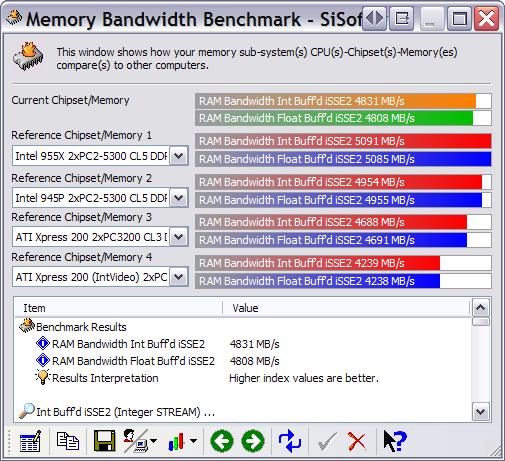
Before...
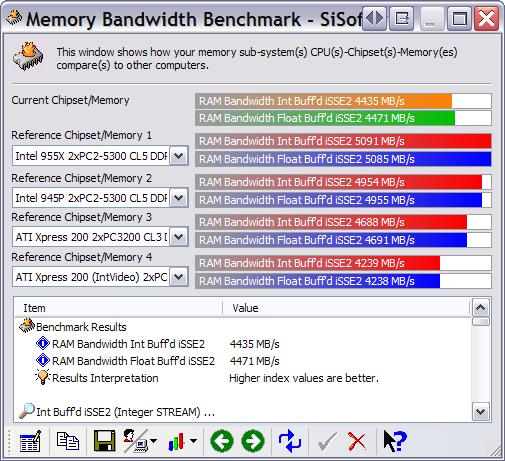
|
AfterDawn Addict
1 product review
|
28. December 2005 @ 16:01 |
Link to this message
|
|
ScubaBud
What make of memory are you using? Most quality memory can easily handle 2.7 volts without and serious stress.
" Please Read!!! Post your questions only in This Thread or they will go unanswered:
Help with development of BD RB: Donations at: http://www.jdobbs.com/. |
|
64026402
Senior Member
|
28. December 2005 @ 16:47 |
Link to this message
|
|
Dual core Optetrons are definitely the high end of the scale.
If I could I would too. Tyan server boards are usually rock solid and can take a beating. With that much power and bandwidth I don't think overclocking would be needed.
Donald
|
|
ScubaBud
AfterDawn Addict
|
28. December 2005 @ 16:51 |
Link to this message
|
@ Sophocles
Here is a link from Newegg.com. Funny thing is that for one piece the specs show 2.5 v and for the dual package, which is what I purchased way back, twice for 1 gig total, it shows 2.6 v
http://www.newegg.com/Product/Product.asp?Item=N82E16820144113
I'm going to try it at 2.7 and see what happens. :)
|
AfterDawn Addict
1 product review
|
28. December 2005 @ 17:06 |
Link to this message
|
|
scubabud
No need to jump to 2.7 if 2.6 or 2.65 will do, try them first but that memory should take 2.7. I have had mine up to 2.75 and I ran it for a while at that setting but I didn't need it so I dropped it to 2.7. LOL
" Please Read!!! Post your questions only in This Thread or they will go unanswered:
Help with development of BD RB: Donations at: http://www.jdobbs.com/. |
AfterDawn Addict
1 product review
|
28. December 2005 @ 17:17 |
Link to this message

|
|
6402
The bottom scale dual core Opteron's (single chip at a time only)are well within range. The i65 is going for on the net between $285 and $330 and the 170 is going for around $400. Both have 2 X 1 meg of L2 and do over clock quite well. I can't say this from a quotable source but I'm quessing that they're both Toledo cores. I've heard that they're multipliers are locked and that turns my eyes back to the X2 4400.
" Please Read!!! Post your questions only in This Thread or they will go unanswered:
Help with development of BD RB: Donations at: http://www.jdobbs.com/. |
|
ScubaBud
AfterDawn Addict
|
28. December 2005 @ 17:43 |
Link to this message
|
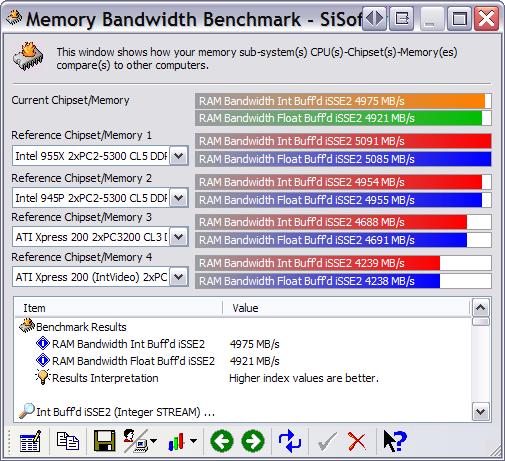
Sophocles, Thanks for the advice, but no matter what combination I try I still get a No Boot scenario. So for the time being I've gone the easier route and enabled a couple of enhanced modes to get a better score with my memory and still being stable. I?ll stick with this for a while and make sure it?s "completely stable". :)
Final results... for now <G>
|
AfterDawn Addict
1 product review
|
28. December 2005 @ 18:27 |
Link to this message
|
|
ScubaBud
And exactly what would those enhanced modes be?
" Please Read!!! Post your questions only in This Thread or they will go unanswered:
Help with development of BD RB: Donations at: http://www.jdobbs.com/. |
|
ScubaBud
AfterDawn Addict
|
28. December 2005 @ 18:42 |
Link to this message
|
|
Sophocles,
The only real change from before was to select "Enable" under Memory Acceleration Mode.
I've always had my settings under Advanced/Jumper Free Configuration for the DDR Voltage as "Auto" and under Chipset Settings the DRAM Timing by SPD set has been set to "Enable".
May I ask what your memory settings are on your Asus?
|
AfterDawn Addict
1 product review
|
28. December 2005 @ 19:15 |
Link to this message
|
My timings are 3-3-3-6, voltage is at 2.7, my front side bus is 1100 Mhz in dual mode (2200 Mhz). My Multiplier is 10X275 hence 2.75 Ghz. My DDR 400 memory is read as DDR 460. The speed I posted here is actually lower than an early setting I was using but I sacrificed a little memory for a considerable boost in CPU speed. I had reached with my other setting a speed bandwidth in excess of 6880 but my CPU speed was stalled at 2.64 Ghz so I traded off a bit.
This is what I have now. BTW, look at the numbers as well as the bars.

" Please Read!!! Post your questions only in This Thread or they will go unanswered:
Help with development of BD RB: Donations at: http://www.jdobbs.com/. |
|
navenoxin
Suspended due to non-functional email address
|
28. December 2005 @ 21:24 |
Link to this message
|
|
Im not saying that one brand of processors is better than the other, but many typical computer users are more familiar with Intel. Intel, although not nesicarily the best product, will still rule the market. The average computer user has no idea what the difference is between the two chips, and therefore picks the one better recognized (probably intel). Also people are often stubborn (some may call it loyalty but ignorance to change /= loyalty) and stick with what they know. Example: AOL. Why would anyone use AOL besides the fact that they used it when dialup was first used and have grown familiar with it (go mozilla). Intel is the same way without the negative connotations (although judging by the number or posts favoring AMD it may soon have a negative spin).
|
|
ScubaBud
AfterDawn Addict
|
29. December 2005 @ 01:40 |
Link to this message
|
Sophocles
Quote:
My timings are 3-3-3-6
When I looked up your memory from a link you provided way back when, it shows that your memory is 2-3-3-6 @ 2.75v. Is there a reason for setting it a tad lower at the 3-3-3-6 and then 2.7v? Maybe I need to do that as well if I keep having problems with bootup issues?
|
|
64026402
Senior Member
|
29. December 2005 @ 02:46 |
Link to this message
|
|
Sophocles,
The single optitrons aren't really of interest since there are better options from the Athlon64s.
The dual core multi-proc versions are nice but most can't afford 1300 dollars per proc for the 280s.
The Optitron should OC fine but Tyan doesn't keep many OC options on the boards.
Donald
|
AfterDawn Addict
1 product review
|
29. December 2005 @ 04:42 |
Link to this message
|
|
64026402
I was suggesting the 165 and 170 as an option for those like me who are interested in a single dual core AMD that might compete with the X2 3800 and the X2 4200 and 4400. The discussion about the 280 and Tyan board was a completely separate discusion, that you would have to go back quite a few posts to get up to speed on.
I would never recommend the 280 to a single user because it's way too expensive but it's the best alternative for a dual processor board. The person that I was helping was going to purchase two Opteron 888's for a dual proc board which are if he can get a deal about $2650 each. I then went on to explain that the 280's and the 888's have the same core speed, L2 cache, and that the 888's would be $2650 spent for no reason since the performance for both would be the same in a dual processor board.
" Please Read!!! Post your questions only in This Thread or they will go unanswered:
Help with development of BD RB: Donations at: http://www.jdobbs.com/. This message has been edited since posting. Last time this message was edited on 29. December 2005 @ 05:19
|
AfterDawn Addict
1 product review
|
29. December 2005 @ 04:45 |
Link to this message
|
|
ScubaBud
My early settings weren't 2-3-3-6 they were 2.5-3-3-6. If you relax your memory settings you can generally push your memory a little harder. But it's doubtful that you will reach the scores that I achieved because it's also partly an aspect of the current AMD's. The simply handle memory better than Intel's do.
" Please Read!!! Post your questions only in This Thread or they will go unanswered:
Help with development of BD RB: Donations at: http://www.jdobbs.com/. This message has been edited since posting. Last time this message was edited on 29. December 2005 @ 08:38
|
|
xenoalien
Suspended permanently
|
29. December 2005 @ 07:54 |
Link to this message
|
|
If you do a lot video processing such as picture editing, gaming, 3d animation ext you NEED AMD CPU
|
|
brobear
Suspended permanently
|
29. December 2005 @ 10:18 |
Link to this message
|
|
Since I have a few knowledgable types on here. I just hit a snag. I purchased a P4 3.4E Prescott to upgrade my Dell Dimension 8300, 0M2045 Dell board with the Intel 875P chipset. Sandra noted I should be able to upgrade to 3.6GHz+. The Intel chipset normally supports faster processors. Also, Dell had faster processors offered in the same model. There's a couple of clock settings in the BIOS, but there's no instructions on setting it or if I should even try. Dell is of no help here, they don't offer upgrades on processors. They want to sell complete PCs.
Speculation is okay, but I could use some help here. The only reason I went with the older 3.4E Prescott (socket 478) was because I was under the impression it should be a simple processor swap. It didn't turn out that way. I get an error warning the processor isn't supported and will run at a reduced speed (2.8GHz, same as the P4 Northwood that was replaced). Any ideas on a simple fix, or am I going to have to go on and get a new mobo and possibly have to build a system around this older CPU. Seems these companies don't like returns just because it turns out the processor doesn't fit the application.
|
AfterDawn Addict
1 product review
|
29. December 2005 @ 10:38 |
Link to this message
|
|
brobear
You probably need to update your bios so that your board can support it, try that first. The original speed projections for your board were probably based on the Northwood getting faster.
Your board should adjust to the correct speed automatically.
BTW, Newegg will let you return anything.
" Please Read!!! Post your questions only in This Thread or they will go unanswered:
Help with development of BD RB: Donations at: http://www.jdobbs.com/. This message has been edited since posting. Last time this message was edited on 29. December 2005 @ 10:46
|
|
KoOkOo67
Suspended due to non-functional email address
|
29. December 2005 @ 10:52 |
Link to this message
|
|
brobear & Sophocles & whoever else gave me info.
I just want to thank you yett again for helping me back on pg 33. (I was kookoo76 untill i got bann for having a cuss word in my sig lol bt w.e) I got my memory and video card both upgraded.(ex i didnt install the vcard *yet*.)
My memory is now upgrated 1gb, and geforce 6200..(Not that great, but i'm not going to buy a great card like the geforce 7800gtx yett, well i will when prices drop alote.) It still is an improvment from an integrated card that took up 64mb of my memory. It's still a pretty decent computer.
I just have this one question left.
Before i install my new video card in my Pc, would i have to disable the Intergrated one before, or after i have installed the new card? I dont want to mess anything up. It doesnt give any information about this in the instruction book they gave me.
Thankz again.
>_<
This message has been edited since posting. Last time this message was edited on 29. December 2005 @ 11:04
|
|
ScubaBud
AfterDawn Addict
|
29. December 2005 @ 11:04 |
Link to this message
|
|
|
AfterDawn Addict
1 product review
|
29. December 2005 @ 11:29 |
Link to this message
|
|
KoOkOo67
Turn your PC off, Install your card, boot up and it should be recognized and displayed on your first boot page. If you see it then disable the integrated card. It won't hurt you to disable the integrated card first because once you install your new card it will run in compatibility mode until you complete the driver installation. If for some reason it doesn't work and you've disabled your integrated card then remove your system battery for a few seconds and it'll reset your integrated video.
" Please Read!!! Post your questions only in This Thread or they will go unanswered:
Help with development of BD RB: Donations at: http://www.jdobbs.com/. |
|
KoOkOo67
Suspended due to non-functional email address
|
29. December 2005 @ 11:34 |
Link to this message
|
|
K thanks.
>_<
|
|
Advertisement
|
|
|
|
brobear
Suspended permanently
|
29. December 2005 @ 17:12 |
Link to this message
|
|
Sophocles and Scubabud
Since I posted, I tracked down my problem... Dell. I'd already updated the BIOS, shortly after the update was available. As far as adjustments, the OEM BIOS is locked. The OEM board supports a faster processor than the P4 2.8GHz Northwood I have in it. I could put a P4 3.4GHz Northwood in it and it would work. At least that is what the Dell tech told me; no BIOS adjustments necessary. The problem is, the CPU Dell has that would work with the board costs over $700 delivered. You can guess what I told them... Why not just buy a PC, it would be cheaper. I've not seen any other 3.4 processors besides the Prescotts like the one Newegg sells. I'm not sure that Dell doesn't have some more proprietary secrets they're not telling about. By the way, Newegg only wants $45 for the returned merchandise fee. Nice of them isn't it? ;) I've decided to just forget about it and live with the return fee. At least all won't be lost and I learned a lesson. I'll just live with what I have and build an AMD later.
I realize I could get a custom board, but then I'd get into issues of it possibly not fitting the Dell case. Then there's case issues and power supplies. If I'm going to build a new PC, it's not going to be around an obsolete socket 478 processor.
Thanks guys. Remind me not to buy any more off the shelf PCs, even if I am in a hurry.
Catch you guys in a few days or so... I'm going on a short vacation; a little sun, sand, and golfing.
This message has been edited since posting. Last time this message was edited on 29. December 2005 @ 17:19
|


