|
The (new) Official PC building thread!
|
|
AfterDawn Addict
6 product reviews

|
11. July 2008 @ 01:30 |
 Link to this message

|
any of the above mentioned mobo's will do. here are the features I like on the rampage formula and why I chose it:
firstly and most important to me: the bios. I'm an OC'er as most of you know
second: the included supreme II audio card.
third: the 3 usb headers. I had to have 3 and explained why in my previous post.
forth: the large heatsinks. I didn't want to be required to add NB, SB fans.
fifth: the 7 mobo controlled fan headers. most I have seen on any mobo. I'm using 6 of them.
and sixth: the LED poster. I could take or leave this but it does look cool and gives you an error code in the event something goes wrong.
I'm hooked on modular power supplies now and won't use anything else for my own builds. neat and tidy. there's enough wires in a computer case already without having a bunch of unused power connectors to tie up and stuff out of the way.
ok that's my reasoning and preferances. if anybody finds it useful great. if not, then no skin off back.
Rig #1 Asus Rampage Formula Mobo, Intel Core2Quad Q9450 CPU @ 3.55ghz, 2gb Corsair DDR2 1066 Dominator Ram @ 5-5-5-15, TR Ultra 120 Extreme w/ Scythe 9 blade 110 cfm 120mm Fan HSF, HIS Radeon 512mb HD3850 IceQ TurboX GPU, Corsair 620HX P/S, CM Stacker 830 Evo Case, Rig #2 Asus P5W DH Deluxe Mobo, Intel C2D E6600 CPU @ 3.6ghz, 2gb Corsair XMS2 DDR2 800 Ram @ 4-4-4-12-2t, Zalman CNPS9500LED HSF, Sapphire Radeon X850XT PE GPU, Corsair 620HX P/S, Cooler Master Mystique Case, Viewsonic 20.1" Widescreen Digital LCD Monitor, Klipsch Promedia Ultra 5.1 THX Desktop Speakers, http://valid.x86-secret.com/show_oc.php?id=348351 http://valid.x86-secret.com/show_oc.php?id=236435 |
|
Advertisement
|
 |
|
|
|
mrk44
Suspended due to non-functional email address
|
11. July 2008 @ 01:31 |
Link to this message

|
abuzar: I'm running my fan at it's highest, which is about 1500 RPM. But it still stays at 34-35C. Could it have anything to do with my high system temperature (which is about 46-47C)??
Cooler Master HAF 932 - Asus Maximus II Forumula - Intel Core 2 Quad Q9550 @ 4.00GHz - 2x2GB Corsair Dominator DDR2/8500 1066 Mhz - Corsair HX1000W PSU - Asus EAH5870 Graphics Card - Western Digital Velociraptor 300GB HDD - Western Digital Caviar Black 1TB WD1001FALS HDD - LG CH10LS20 Blu-ray Drive - Asus Xonar D2X Sound Card - Logitech X-540 5.1 Surround Speakers - Samsung P2370HD Monitor
|
AfterDawn Addict
2 product reviews
|
11. July 2008 @ 01:32 |
Link to this message
|
|
Your system temps are your northbridge temps. How hot is your room?
|
|
rick5446
Suspended due to non-functional email address
|
11. July 2008 @ 01:34 |
Link to this message
|
abuzar1..I looked at that board it doesn't have enough PCI16 SLOTS, only 1, I prefer 2 along with 2 PCI, and the rest what ever. Everything else looks great. Got another MOBO U CAN suggest
bigwill68..I use AVI ReCOMP, Auto GK, ConvertX, CCE, Quite a bit. As well as D/Ling, Plus Rip about 6 to 10 DVDs a day, all at the same time I've MAXed out my 2.66 quite a bit
I noticed quite a difference in the Quad Core 2.44 when I built a unit for my Son-In-Law. It was definetly 3 times faster on a one to one basis.
How about U there bigwill68, Got a suggestion on a good MOBO
|
Moderator
1 product review
|
11. July 2008 @ 01:35 |
Link to this message
|
|
I have to agree with the consensus here Rick. The X-XX chipped boards would be a lot of overkill for your needs. I have the EP35-DS3R running a Q6600 and do the same things you are doing....3 HDD's, 4 ODD's and constantly burning something. You'll be fine with a cheaper board.
|
AfterDawn Addict
2 product reviews
|
11. July 2008 @ 01:37 |
Link to this message
|
|
Rick, why do you need two PCI-16 slots? Those are used for graphics card. You aren't a gamer, so you shouldn't need more than one.
|
AfterDawn Addict
6 product reviews
|
11. July 2008 @ 01:39 |
Link to this message

|
rick,
tell us what you want/need. for example do you want to be able to control your case fan speeds through the mobo? how many SATA and usb connectors do you want/need?
Rig #1 Asus Rampage Formula Mobo, Intel Core2Quad Q9450 CPU @ 3.55ghz, 2gb Corsair DDR2 1066 Dominator Ram @ 5-5-5-15, TR Ultra 120 Extreme w/ Scythe 9 blade 110 cfm 120mm Fan HSF, HIS Radeon 512mb HD3850 IceQ TurboX GPU, Corsair 620HX P/S, CM Stacker 830 Evo Case, Rig #2 Asus P5W DH Deluxe Mobo, Intel C2D E6600 CPU @ 3.6ghz, 2gb Corsair XMS2 DDR2 800 Ram @ 4-4-4-12-2t, Zalman CNPS9500LED HSF, Sapphire Radeon X850XT PE GPU, Corsair 620HX P/S, Cooler Master Mystique Case, Viewsonic 20.1" Widescreen Digital LCD Monitor, Klipsch Promedia Ultra 5.1 THX Desktop Speakers, http://valid.x86-secret.com/show_oc.php?id=348351 http://valid.x86-secret.com/show_oc.php?id=236435 |
|
mrk44
Suspended due to non-functional email address
|
11. July 2008 @ 01:42 |
Link to this message
|
abuzar: Thermometer reads about 78-80F in my room...I know, it's hot.
Cooler Master HAF 932 - Asus Maximus II Forumula - Intel Core 2 Quad Q9550 @ 4.00GHz - 2x2GB Corsair Dominator DDR2/8500 1066 Mhz - Corsair HX1000W PSU - Asus EAH5870 Graphics Card - Western Digital Velociraptor 300GB HDD - Western Digital Caviar Black 1TB WD1001FALS HDD - LG CH10LS20 Blu-ray Drive - Asus Xonar D2X Sound Card - Logitech X-540 5.1 Surround Speakers - Samsung P2370HD Monitor
|
AfterDawn Addict
2 product reviews
|
11. July 2008 @ 01:43 |
Link to this message
|
|
Then that's why your temps are high. 9C over room temps is not that bad, considering your room is so hot.
|
|
rick5446
Suspended due to non-functional email address
|
11. July 2008 @ 02:00 |
Link to this message
|
abuzar1..TV card Plus Video card
Mort81..The more external USB the better I can get by on 6 SATA, with 1 IDE.But prefer 8.See right now I've got 6 and using them all, I've got an IDE HDD on one of them. I know I can add a USB card, But I don't really like doing that, on an older system I had to add an IDE CARD, that was OK
I've got a lot of external crap internet Telephone, 2 printers, 2 HDD, Macrovision Killer
Don't need fan controls
This message has been edited since posting. Last time this message was edited on 11. July 2008 @ 02:01
|
AfterDawn Addict
2 product reviews
|
11. July 2008 @ 02:01 |
Link to this message
|
|
I think TV cards use regular PCI, no?
|
AfterDawn Addict
2 product reviews
|
11. July 2008 @ 02:24 |
Link to this message
|
Yeah, I checked and I didn't find any x16 PCI-E TV cards. I found PCI, USB, and x1 PCI-E. You should be good.
|
|
mrk44
Suspended due to non-functional email address
|
11. July 2008 @ 02:36 |
Link to this message
|
|
Hey abuzar, really quick, there are three different torture test options. Which one should I choose?
Thanks for all your help, by the way.
Cooler Master HAF 932 - Asus Maximus II Forumula - Intel Core 2 Quad Q9550 @ 4.00GHz - 2x2GB Corsair Dominator DDR2/8500 1066 Mhz - Corsair HX1000W PSU - Asus EAH5870 Graphics Card - Western Digital Velociraptor 300GB HDD - Western Digital Caviar Black 1TB WD1001FALS HDD - LG CH10LS20 Blu-ray Drive - Asus Xonar D2X Sound Card - Logitech X-540 5.1 Surround Speakers - Samsung P2370HD Monitor
This message has been edited since posting. Last time this message was edited on 11. July 2008 @ 02:37
|
Moderator
1 product review
|
11. July 2008 @ 02:44 |
Link to this message
|
|
mrk....if you are using OCCT then CPU+Mem for an hour should be enough.
|
AfterDawn Addict
|
11. July 2008 @ 03:04 |
Link to this message
|
mrk44,
Quote:
I disabled c1e and eist, and my clock speed is back to 2.66. Thanks for the help on that.
Now the only thing is my CPU temp for some reason goes up to 35C (no higher) and stays there, even with both enabled and my clock speed at 2 GHz......and I have the xigmatek installed, so I don't know what I'm doing wrong here...
And, should I run prime95 before or after the OC?
I never see any temperature change between 2.66 and 3.5GHz. The temps stay about the same. It was the same way with my E4300, very little temperature difference between OC'd and not!
rick5446,
The GA-X48-DS4 would be your best all around choice for that CPU, and if you did decide to overclock it some day, it has almost the same bells and whistles as the Rampage Formula. I know because I downloaded both manuals and compared their sdjustments and settings. You will find that overclocking very much affects Encoding times, so it's something to give a thought to in the future, even if just a mild OC! Also the Q9450 is reported to run very well in that MB and X48-DS4 is all ready for the next generation CPUs, making it more future proof. The GA-P35-DS3R is a great MB but not near as future proof and the X48 chipset is better with that CPU!
Best Regards,
Russ
GigaByte 990FXA-UD5 - AMD FX-8320 @4.0GHz @1.312v - Corsair H-60 liquid CPU Cooler - 4x4 GB GSkill RipJaws DDR3/1866 Cas8, 8-9-9-24 - Corsair 400-R Case - OCZ FATAL1TY 550 watt Modular PSU - Intel 330 120GB SATA III SSD - WD Black 500GB SATA III - WD black 1 TB Sata III - WD Black 500GB SATA II - 2 Asus DRW-24B1ST DVD-Burner - Sony 420W 5.1 PL-II Suround Sound - GigaByte GTX550/1GB 970 Mhz Video - Asus VE247H 23.6" HDMI 1080p Monitor
 |
|
mrk44
Suspended due to non-functional email address
|
11. July 2008 @ 03:32 |
Link to this message
|
|
OK, I tried to OC...I enabled OC in BIOS, changed FSB to 375 x 8 for 3GHz, set voltages to auto to optimize them.....and my computer rebooted a couple times, disabled the OC, and went back to default clocks when I checked in BIOS again....
Can anyone tell me what happened?
Cooler Master HAF 932 - Asus Maximus II Forumula - Intel Core 2 Quad Q9550 @ 4.00GHz - 2x2GB Corsair Dominator DDR2/8500 1066 Mhz - Corsair HX1000W PSU - Asus EAH5870 Graphics Card - Western Digital Velociraptor 300GB HDD - Western Digital Caviar Black 1TB WD1001FALS HDD - LG CH10LS20 Blu-ray Drive - Asus Xonar D2X Sound Card - Logitech X-540 5.1 Surround Speakers - Samsung P2370HD Monitor
|
AfterDawn Addict
|
11. July 2008 @ 04:16 |
Link to this message
|
mrk44,
Quote:
Can anyone tell me what happened?
First thing you need to do in this instance is go into the setup/PC Health and see what the CPU and Memory Voltages are at. It took me +4 to hit the stock memory voltage of 2.1v I'll bet at least one of them is too low! I would set the CPU to about 1.32 or around there. My rule of thumb is that I don't exceed 1.35v, no matter what with the 45nm chips! No comments please, troops! It's just my rule of thumb, and I stick by it!
Then you go down to the memory and change the memory from auto to manual and set the first 4 settings to your memory's timings, like mine is 5-5-5-15. Set the memory multiplier to 2.0 for now and boot it up! It should boot right up at those settings.
BTW rick, you can confirm the new voltage settings without having to go into windows. When you save the changes and the computer re-boots, just hit the delete key to get into the setup again at the post. All the changes you made you set will be confirmed in the set up and you can see if you need more memory voltage and let you know if you have to raise the voltages anymore. Don't be afraid of the red flashing thing. It's not an actual warning other than as a message. It takes me a +5 setting to get a hair under 2.2v, which is overvolted by 0.1v. The Dominators run barely warm to the touch anyway and they don't feel any hotter at 2.2v! I have an occasional re-boot problem and I figured I would try it with a little more voltage on the memory and see if it repeats itself again. If that doesn't work I'll lower the memory back to 2.1v and increase the CPU voltage up one click. I had been lowering it one click at a time and then using it. I'm at 1.30-1.44v. I suspect I may have to raise it just a bit.
Anyway, give that a try and I'm sure it will boot right up!
Best Regards,
Russ
GigaByte 990FXA-UD5 - AMD FX-8320 @4.0GHz @1.312v - Corsair H-60 liquid CPU Cooler - 4x4 GB GSkill RipJaws DDR3/1866 Cas8, 8-9-9-24 - Corsair 400-R Case - OCZ FATAL1TY 550 watt Modular PSU - Intel 330 120GB SATA III SSD - WD Black 500GB SATA III - WD black 1 TB Sata III - WD Black 500GB SATA II - 2 Asus DRW-24B1ST DVD-Burner - Sony 420W 5.1 PL-II Suround Sound - GigaByte GTX550/1GB 970 Mhz Video - Asus VE247H 23.6" HDMI 1080p Monitor
|
Member
|
11. July 2008 @ 04:33 |
Link to this message
|
hey ppl
as some of your prob know my pc died recently. I was about quite old so i'm bothering spending any money on it.
I'm now looking to getting one of mates build me a new one.
I'd like to get a few ideas off you guys as to what spec I should have on it. My budget is about £500-£600.
I want it to be fast, big ram, good graphic & sound cards, used for home computing, downloading games, music, etc
|
|
mrk44
Suspended due to non-functional email address
|
11. July 2008 @ 05:17 |
Link to this message
|
|
theonejrs: My memory voltage is already at 2.1v and my CPU was at 1.30v. And I think you were talking about this earlier...should I set the memory multiplier to 2.0A, 2.0B, 2.0C, or 2.0D?
And by the way, if it doesn't post, will it go back to default settings and turn on again? I don't wanna screw anything up here.
Cooler Master HAF 932 - Asus Maximus II Forumula - Intel Core 2 Quad Q9550 @ 4.00GHz - 2x2GB Corsair Dominator DDR2/8500 1066 Mhz - Corsair HX1000W PSU - Asus EAH5870 Graphics Card - Western Digital Velociraptor 300GB HDD - Western Digital Caviar Black 1TB WD1001FALS HDD - LG CH10LS20 Blu-ray Drive - Asus Xonar D2X Sound Card - Logitech X-540 5.1 Surround Speakers - Samsung P2370HD Monitor
This message has been edited since posting. Last time this message was edited on 11. July 2008 @ 05:18
|
AfterDawn Addict
|
11. July 2008 @ 06:07 |
Link to this message
|
mrk44,
Quote:
My memory voltage is already at 2.1v and my CPU was at 1.30v. And I think you were talking about this earlier...should I set the memory multiplier to 2.0A, 2.0B, 2.0C, or 2.0D?
And by the way, if it doesn't post, will it go back to default settings and turn on again? I don't wanna screw anything up here.
2.0B should be the 1066 bootstrap!!
You can't hurt anything so don't worry about it. If it doesn't boot it will reset the cpu and memory to Auto, that's all! Give it about 1.32 on the CPU volts and it should boot unless you have more than 2 sticks of memory in it! Be sure the CPU plug is plugged into the MB!
Best Regards,
Russ
GigaByte 990FXA-UD5 - AMD FX-8320 @4.0GHz @1.312v - Corsair H-60 liquid CPU Cooler - 4x4 GB GSkill RipJaws DDR3/1866 Cas8, 8-9-9-24 - Corsair 400-R Case - OCZ FATAL1TY 550 watt Modular PSU - Intel 330 120GB SATA III SSD - WD Black 500GB SATA III - WD black 1 TB Sata III - WD Black 500GB SATA II - 2 Asus DRW-24B1ST DVD-Burner - Sony 420W 5.1 PL-II Suround Sound - GigaByte GTX550/1GB 970 Mhz Video - Asus VE247H 23.6" HDMI 1080p Monitor
|
AfterDawn Addict
1 product review
|
11. July 2008 @ 07:11 |
Link to this message
|
rick
I remembered that you said you weren't going to overclock, but abuzar is still right from a sensible point of view. Both of the X48 boards are costing you money for features you aren't going to use, but then who said a PC build is sensible. The X48 chipsets only real major benefit is 16X16 crossfire.
Those who are recommending Gigabyte, probably own Gigabyte boards, and those who recommend Asus no doubt have Asus boards. In truth the lower priced Gigabyte board is the more sensible purchase but sensible aside of the two boards of equal price comes down in favor of the Asus Rampage.
" Please Read!!! Post your questions only in This Thread or they will go unanswered:
Help with development of BD RB: Donations at: http://www.jdobbs.com/. This message has been edited since posting. Last time this message was edited on 11. July 2008 @ 07:13
|
AfterDawn Addict
4 product reviews
|
11. July 2008 @ 07:49 |
Link to this message
|
Originally posted by rick5446:
P.S. I'm 62yrs young and their is ONE Game I still enjoy, but alas my wife died 12yrs ago, and at my age its hard to find anybody that wants too play my game. All these Old ladies nowadays only want to sit around and see who can fart the loudest, and the young ones just want to go to Raves.Although I do get to see some TITS every so often. I trade a peek for a DVD
now it dont get any better than that right there. keep on rockin young man rick!!!!!!
inshort Rick, if you got the cash and dont mind spending it. you cant go wrong with either of the b2 boards(top end Gigabyte or ASUS)
if the Gigabyte has the features you want and need thats the one to get. either one with that Q9450 you will have a screaming Rig.
once you get it built you should try thr OC. as Russ pointed out a small OC will help out even more with the encodeing times alot....
i heard you in what you said about your not going to OC, but i said the same thing once i got my Rig built about 3 days afterwards i was learning how to OC.
EDIT:
ive had the big red machine up and running now for about a hour now. ive mad a couple little blocks about a inch and half tall and set my case on it to let some extra air under it with the better fan on the bottom sucking in cool air. i now have the 2 140mm aerocool streamliners on top sucking out the hot air. the sidepanel is on now and my temps are down about 5 degrees. from previous setups ive had tried.
right now in realtemp my core temps are both 39c yesterday at this time they were 44c.

here is everest. it is lower to about 3-5degrees lower

these are with only 5 fans running instead of 7(not counting the cpu fan)
This message has been edited since posting. Last time this message was edited on 11. July 2008 @ 07:58
|
AfterDawn Addict
|
11. July 2008 @ 08:17 |
Link to this message
|
Originally posted by icemen:
hey ppl
as some of your prob know my pc died recently. I was about quite old so i'm bothering spending any money on it.
I'm now looking to getting one of mates build me a new one.
I'd like to get a few ideas off you guys as to what spec I should have on it. My budget is about £500-£600.
I want it to be fast, big ram, good graphic & sound cards, used for home computing, downloading games, music, etc

all from overclockers.co.uk
and just clock the E7200 to about 3.3GHz (im sure it will hit 3.6) and your flying
 MGR (Micro Gaming Rig)
 .|. Intel Q6600 @ 3.45GHz .|. Asus P35 P5K-E/WiFi .|. 4GB 1066MHz Geil Black Dragon RAM .|. Samsung F60 SSD .|. Corsair H50-1 Cooler .|. Sapphire 4870 512MB .|. Lian Li PC-A70B .|. Be Queit P7 Dark Power Pro 850W PSU .|. 24" 1920x1200 DGM (MVA Panel) .|. 24" 1920x1080 Dell (TN Panel) .|. |
AfterDawn Addict
6 product reviews
|
11. July 2008 @ 11:07 |
Link to this message
|
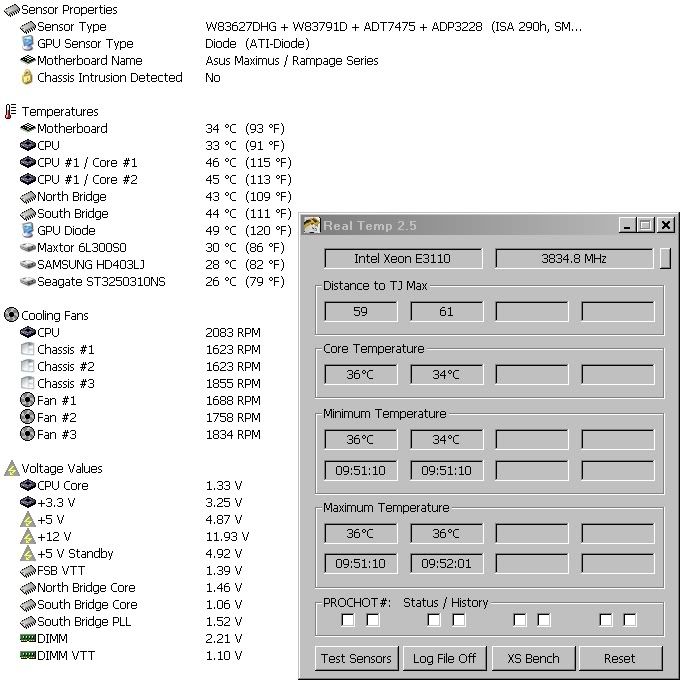
one more thing I forgot to mention that I like about asus is that they will report more temps and voltages. if you are not going to OC then this is no biggie and should play no part in your decision. I'm going to OC and want/need to know these additional temps and voltages.
Rig #1 Asus Rampage Formula Mobo, Intel Core2Quad Q9450 CPU @ 3.55ghz, 2gb Corsair DDR2 1066 Dominator Ram @ 5-5-5-15, TR Ultra 120 Extreme w/ Scythe 9 blade 110 cfm 120mm Fan HSF, HIS Radeon 512mb HD3850 IceQ TurboX GPU, Corsair 620HX P/S, CM Stacker 830 Evo Case, Rig #2 Asus P5W DH Deluxe Mobo, Intel C2D E6600 CPU @ 3.6ghz, 2gb Corsair XMS2 DDR2 800 Ram @ 4-4-4-12-2t, Zalman CNPS9500LED HSF, Sapphire Radeon X850XT PE GPU, Corsair 620HX P/S, Cooler Master Mystique Case, Viewsonic 20.1" Widescreen Digital LCD Monitor, Klipsch Promedia Ultra 5.1 THX Desktop Speakers, http://valid.x86-secret.com/show_oc.php?id=348351 http://valid.x86-secret.com/show_oc.php?id=236435 |
|
Advertisement
|
|
|
AfterDawn Addict
4 product reviews
|
11. July 2008 @ 11:23 |
Link to this message
|
|
Mort
and you say you can control your fan speed in your bios? i see you have 7 fans running at a good speed. i can only have 4 fans on my mobo.only have 3 hooked up to it now. but i cnat control them. either set at auto and the mobo adjust them or set to rn at full speed.
|



