|
Controlling Write Speed for DLs in Nero
|
|
Senior Member

|
21. February 2007 @ 09:46 |
Link to this message

|
Hi All!
I have recently encountered something which is quickly turning into a problem for me.
I am doing/trying to do full, uncompressed backups of my DVDs to Double Layer and/or Dual Layer disks. I am using Nero 6.6.0.18 writing to a Benq 1655, either Verbatim or Ritek disks (I have both).
The issue I am having is that with the newer 8x disks, I seem to have gone into the coaster business because I cannot set the write/burn speed in Nero, it is set (and grayed out) at maximum. Last night I made three, lovely looking coasters out of 8x media before I grabbed one of my few 2.4x media I have left and got a successful burn.
This is going to become more of an issue as the 2.4x media fades into the past and becomes unavailable.
This is not an issue with DVD+/-R disks, I have full speed control over them, only the DLs.
I am seriously considering learning to knit so I can edge these disks in yarn and give them away as Christmas presents this year!
Any suggestions, comments or even rude noises would be appreciated!
|
|
Advertisement
|
  |
|
|
Senior Member
|
21. February 2007 @ 12:40 |
Link to this message

|
For some reason Nero 6 has a problem with Dual Layer DVD writing. The best program to use is ImgBurn. It is a free program that you can download here. http://www.afterdawn.com/software/cdr_so...ols/imgburn.cfm
You can set your book type if using +R media and the program writes better than Nero 6 to Dual Layer. I know because I made a few coasters myself! Give ImgBurn a go and see what your results are.
|
|
Saltgrass
Senior Member
|
21. February 2007 @ 12:45 |
Link to this message
|
|
It may not help, but you might check to see if your firmware for the burner is updated.
Nero 7 v7.10.1.0
P4 2.4GHz 1 Gig RAM
NEC ND3550A DVD Burner
|
AfterDawn Addict
|
21. February 2007 @ 12:53 |
Link to this message
|
I'm with syxguns on this one Nero has a problem with D/l burning FULL STOP.
|
Senior Member
|
21. February 2007 @ 16:30 |
Link to this message
|
@ Syxguns, Gwendolin,
Will give Imgburn a try, nothing really to lose. I do have a copy of Nero 7 Ultra around here someplace. Installed it way back when and had a terrible experience with it so uninstalled, cleaned and reloaded my Nero 6. Would be nice if Nero and Recode would allow speed control on the DLs as I keep finding out new and interesting things to try with them.
Should be able to give an update tomorrow, will try some new disks then.
@ Saltgrass,
I've got my burner, (Benq 1655)flashed to BCIB already. I've learned to stay ahead of the curve with respect to the firmware aspect of the burners.
|
AfterDawn Addict
|
21. February 2007 @ 16:49 |
Link to this message
|
@hobbit112
Your benq 1655 will love ImgBurn and Verbatim discs. I have the 1650 Benq and imgburn is the ticket to building and writing the ISO file to make an exact copy on a DL disc. One thing about speed setting, do you have a blank disc in Nero when you try to set the speed? Some programs won't let you set the speed without a blank to give you the options.
|
Senior Member
|
22. February 2007 @ 04:19 |
Link to this message
|
Originally posted by garmoon:
@hobbit112
Your benq 1655 will love ImgBurn and Verbatim discs. I have the 1650 Benq and imgburn is the ticket to building and writing the ISO file to make an exact copy on a DL disc. One thing about speed setting, do you have a blank disc in Nero when you try to set the speed? Some programs won't let you set the speed without a blank to give you the options.
@garmoon
Yep, sure do. After ripping the dvd, I open Nero Recode 2, load the dvd and wait for Recode to analyse, then I insert a blank disk and wait for the drive to initialize before going to the next page on Recode (for the burn). When using DLs, the speed is grayed out on maximum. On DVD-Rs it allows me to choose my burning speed.
I agree about the Verbatims, it does love them, also loves to Taiyo Yudens, too bad they're not making DLs, I would pay the premium(for printables, that is)! I've also had fairly good results with the Riteks generally, I usually get scan scores in the low 90's with them.
Also too bad no one is making hub-printable DLs (at least the DLs I would use!)
Looking forward to this evening, I've already installed ImgBurn and looked it over. Hoping for good things.
|
Senior Member
|
22. February 2007 @ 05:25 |
Link to this message
|
|
hobbit112-
ImgBurn has the capability to create the ISO image for burning if you are just burning a VIDEO_TS folder. If you have questions on how to do that let us know.
|
AfterDawn Addict
|
22. February 2007 @ 10:38 |
Link to this message

|
|
@syxguns
He's using ImgBurn to copy DVDs to DL discs. No reason to use anything but ImgBurn's ISO built files and then write them with ImgBurn. Can't get any easier.
|
Senior Member
|
22. February 2007 @ 10:57 |
Link to this message
|
garmoon-
You and I understand that, however, someone that is new to ImgBurn might not know how to use the build feature. You see I don't compress to an ISO file. I compress to a VIDEO_TS folder. If you want to burn a VIDEO_TS folder you have to use the build feature in ImgBurn.
My buddy "alkohol" wrote a guide that is useful.
Example: http://my.afterdawn.com/alkohol/blog_entry.cfm/1405
|
AfterDawn Addict
|
22. February 2007 @ 11:25 |
Link to this message
|
|
Syxguns
Of course you're right. there is a learning curve to the build feature. it took me a while to figure it out. The guides will help.
|
Senior Member
|
22. February 2007 @ 14:10 |
Link to this message
|
|
garmoon-
Yeah, it took me a while to figure it out also. I learned a long time ago that no matter how I explain something that pictures paint a thousand words. Because hobbit112 is new to ImgBurn I thought he might need a little help with the procedure. He/she has the link now if he/she decides that he/she needs it!
|
AfterDawn Addict
|
22. February 2007 @ 15:16 |
Link to this message
|
|
I just showed my daughter an hour ago, how to build and write the ISO with ImgBurn. She took a page of notes; but once you learn it, it's an easy and excellent program.
|
|
forktine
Newbie
|
22. February 2007 @ 15:54 |
Link to this message
|
I use "Folder2Iso Version 1.3" ( Freeware ) http://www.trustfm.net/divx/index.html It will as name says turn any type of folder into an ISO even direct from DVD If I want to reduce DVD9 I mount image with Daemon Tools and Shrink it... 99.9% of what I burn is done with ImgBurn. Folder2ISO and Decrypter are where ISO creation is concerned just Jorge Schilling's "mkisofs" with a frontend, as are a lot of commercial rip-offs. Always have Nero in but rarely use it. Imgburn is far and away the best tool for handling D/L that I've come across... and I've tried nearly every trialware that had a KG or was free that I've seen.
|
Senior Member
|
22. February 2007 @ 16:09 |
Link to this message
|
|
Thanks for the link to the guide, it's already come in handy.
Garmoon is correct, I am backing up my DVDs to DLs, no compression/shrinking. I did a couple of shrinks & burns and wasn't too thrilled with the results I got (pixelation mainly), and went back to straight backup. (I already had a bunch of DL disks on hand from converting my VHS video library to DVD).
Am playing with ImgBurn right now an have encountered something not in the guide. ImgBurn is asking for me to create the layer break position.
Any ideas?
|
AfterDawn Addict
|
22. February 2007 @ 16:57 |
Link to this message
|
|
Let imgburn select the layer break. Under setting write tab, top right of window> options: layer break (for DL media) check "calculate optimal"
|
Senior Member
|
22. February 2007 @ 17:08 |
Link to this message
|
Originally posted by hobbit112:
Garmoon is correct, I am backing up my DVDs to DLs, no compression/shrinking. I did a couple of shrinks & burns and wasn't too thrilled with the results I got (pixelation mainly)
The guide is for using the build mode not for compressing the DVD. The reason you probably had pixelation issue's was because you were compressing your images too much. There are programs that we are familiar with to help you with that issue. As far as the DL mode in ImgBurn. Let it do it for you. There is a layer break area under options where you can tell it to calculate for optimal performance or something like that. I don't burn very many DL's
garmoon could tell you for sure!
|
Senior Member
|
22. February 2007 @ 17:26 |
Link to this message
|
Originally posted by garmoon:
Let imgburn select the layer break. Under setting write tab, top right of window> options: layer break (for DL media) check "calculate optimal"
ImgBurn still wants me to select the layer break. The "calculate optimal" selection is under "write". Apparently it doesn't apply when you are doing a build.
|
Senior Member
|
22. February 2007 @ 17:57 |
Link to this message
|
|
You know the old saying "If all else fails, read the instructions", well I finally went to the imgburn website and read their guide for buring DLs. It states you need to select a layer break and give some slight hints on which one to choose if given a selection.
Got one burning now, with let you know how it turns out.
|
AfterDawn Addict
|
23. February 2007 @ 01:58 |
Link to this message
|
|
It usually gives 2 or 3 choices. I usually pick the best one it picks. So much for automation. It should just select the best one it finds and continue on.
|
Senior Member
|
26. February 2007 @ 05:48 |
Link to this message
|
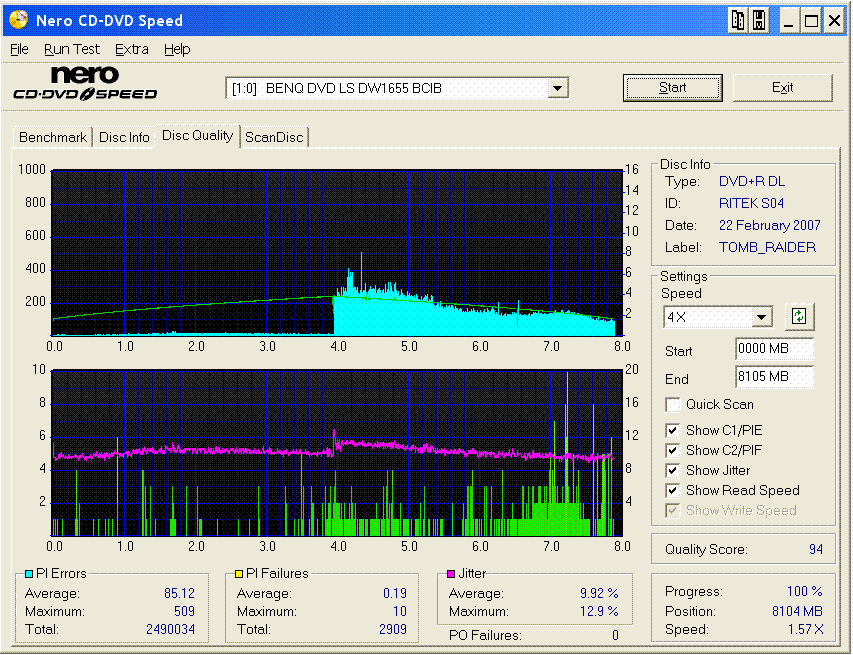
Well, the results are in! The burn failed at the last moment during writing the leadout but the disk is still playable. I have since burned another, different movie with sucess. but with the same, following result.
I have noticed an interesting thing, it seems that ImgBurn has difficulty burning after the layer break. (I'd post an image, but my screen capture is a .rtf and can't get it uploaded). Most of the errors detected are there. Even with the fail on the lead-out, Nero CD-DVD Speed gave the disk a 94 rating on a Ritek S04 disk.
Here's the scan:

This message has been edited since posting. Last time this message was edited on 26. February 2007 @ 07:13
|
Senior Member
|
26. February 2007 @ 07:42 |
Link to this message
|
hobbit112-
Maybe try something a little different. Use PgcEdit to manipulate the layer break before using ImgBurn to do the burning. You can find a guide on using it here: http://www.digital-digest.com/~blutach/d..._pgcedit_v2.htm
Maybe PgcEdit will give you the quality in the layer break that you need. Good luck!
|
Senior Member
|
27. February 2007 @ 05:04 |
Link to this message
|
WTF???!!!
I just got the same scan result with burning a different movie to disk with Nero!
I'm starting to suspect that my drive is packing it in! And only a year old too! Or maybe a flaky power supply (though thats newer than the drive and a monster 650 watt).
Any suggestions for a new drive? Have a Sony DRU-800 in another machine which I also think is flaky (the drive, that is). Paid a pretty penny for the Sony which lasted shorter than the Benq (actually the reason I bought the Benq). Don't want to spend a ton on a new drive because of the experience with the Sony. Lightscribe would be nice as I have about 200 blank DVD and CDs lying around.
I have a Windows XP Home legacy, i.e., ATA, system with an AMD XP 2600, 1 gig ram, NVidia 5200 video, SoundBlaster Audigy 4 audio.
|
Senior Member
|
27. February 2007 @ 08:12 |
Link to this message
|
|
|
|
Advertisement
|
|
|
Senior Member
|
27. February 2007 @ 09:16 |
Link to this message
|
Quote:
Your drive should be fine. It may be that you do not have the latest firmware update. Go here for your update: http://forum.rpc1.org/dl_firmware.php?ca...ctor=30[/quote]
I agree the drive should be fine, I've only burned 300-400 disks with it. I'll check the firmware site for an updated firmware but believe I do have the latest. The site is down now, will check it again later.
Found another thread mentioning potential problem with dust. I will blow it out and see if that helps too.
Will also double check my ASPI to make sure it isn't corrupt.
|






