|
Video Card Thread (Mostly Gecube x1950xt)
|
|
|
harvrdguy
Senior Member

|
17. September 2007 @ 14:32 |
 Link to this message

|
Kardson
Travis, how are the removed teeth working out? Have the meds been helping? Are you back with the living? Ready for the BF2 matchup with Raymond? (Did you guys ever private message and xchange email so you can jump on the same server?)
You've still got the stock Gecube, so in that regard it's just going to be you and me, so I have one more question about cooling for you, or for anybody else here who wants to help out. I'm going to have a well-ventilated case by the time all the parts arrive, including the kama bay. By the way, did you originally mean for me to mount the fans in the lower hard drive bay, and let them draw from wherever, pointing back to the graphics card, without worrying about a path to the outsid? Is the front of my case "leaky" enough that this would have pulled fresh air in? If not, is that why some reviews say that front fans only recirculate hot case air?
Anyway, I always thought, maybe correctly, that you wanted me to suck fresh air in from an opening in the front, which is why I abandoned the idea of putting fans down below.
Anyway, I'm now waiting for the kama bay to arrive. I'll be using up 3 of my 4 5.25" upper bays (I moved the burner to a different computer - just burned a graphics cd for Sam) with the kama bay 120mm scythe (only 800 rpm - I might upgrade per Sam to 1600), so all kinds of fresh air will be pouring in the front.
But thinking back to the Gecube - is there any room under the stock TEC cooler to thermattach 412 little heat sinks to the memory chips? (I already picked up the Thermattach 412 per a post of yours - thanks.) If so, what little heat sinks could you link me to?
Thanks,
Rich
|
|
Advertisement
|
 |
|
|
Senior Member
|
17. September 2007 @ 16:28 |
Link to this message

|
|
Yes, there is room under the x1950xt's TEC cooler to place heatsinks on the Vram. There is one chip (that is in the middle I think) that you have to place the heatsink off to the side a tiny bit, it will cover about 7/8 of the chip.
|
|
harvrdguy
Senior Member
|
17. September 2007 @ 18:29 |
Link to this message

|
|
Hey thanks, Raymond. I imagine frozen PC has the little sinks - I guess I'll go over there and see, unless you have a different suggestion. -Rich
|
|
harvrdguy
Senior Member
|
17. September 2007 @ 19:17 |
Link to this message
|
Waymon
Check this out.
passive ram sinks from frozen cpu
(Bottom of page.) Nothing is better than copper, right, so I might as well go $7.99 for the thermaltake
...................
instead of $11.99 for the zalman
...................
Or is there something I'm missing?
They talk about the zalman being very lightweight and designed to work on both sides of the board. Do I need to be concerned about the copper ones falling off because of the weight, and is there vram on both sides of the board anyway?
Rich
|
Senior Member
|
18. September 2007 @ 02:38 |
Link to this message
|
|
Well I have those exact same copper heatsinks, the ones from thermaltake, and they've been staying on pretty well... They also fit under the TEC cooler, so you dont have to worry. I would go with the copper ones.
|
AfterDawn Addict
4 product reviews
|
18. September 2007 @ 04:03 |
Link to this message
|
|
If there's one thing that dis-satisfied me with my Thermalright HR-03 cooler it's that the sticky compound on the RAMsinks was terrible, and half of them are now on the bottom of my case floor. However, with them on or with them off, my GPU is still stable and it overclocks exactly the same!
If you go with copper ones, get some good stuff to attach them with (but make sure you get it right, they might not come off!)
|
|
harvrdguy
Senior Member
|
18. September 2007 @ 11:06 |
Link to this message
|
|
waymon
sammorris
Thanks guys. Ok I'll get the copper. Do you have any idea if the thermattach is sticky enough to keep the things on? Hey Raymond, I don't know how I missed your other link about that $228 gigabyte mobo - the cooling looks really nice. How has it been reviewed?
Rich
|
|
harvrdguy
Senior Member
|
18. September 2007 @ 11:27 |
Link to this message
|
|
sammorris
waymon
Hey guys - just out of curiousity - I hit the link that was supposed to pull up all threads updated during last 24 hours - other than by myself. Sam has a post on here today - and I think you also do, Raymond. But under Pc hardware - other - I see sam is on two other threads, power supplies and something else, but there is no mention of your thread, right here, the x1950xt question, Raymond. What gives with that? - Do you guys know?
|
|
harvrdguy
Senior Member
|
18. September 2007 @ 13:26 |
Link to this message
|
sammorris
waymon
kardson
dinc
Hey guys,
If you haven't already come across this case - I thought you might find it interesting that the pelt is back!
Sam - you said they were used in mini-fridges. Well, you can now update that, dude. They are now used in computer cases:
Here's a review:
air-conditioned computer case
and here's a composite picture:
....
(The cooling information is a little confusing - 120watt power consumption, but then they say 52 watts - must be a typo because the fans don't consume anything. By the way, they have two fans just in front of this tec cooler. The normal radial fan sits above, and without the tec just pulls ambient air in. Below that sits a squirrel cage intake blower that comes on when the tec turns on, blowing air past the hot side of the tec, out the bottom past some ridges that divert it to the sides! They have a normal case fan in the back, and of course the psu - only 460 watts but they say "true watts" - which has a couple of fans.)
And just a couple quick things about mobos: Here's the one that Raymond just linked us to:
gigabyte mobo
....
and this is the roller coaster from msi:
msi roller coaster
which is mentioned again in this review of the abit:
abit review mentions msi roller coaster again
................
and finally here is the abit: (very highly reviewed - editor's choice somewhere - great for overclocking they said.)
....
-rich
|
Senior Member
|
18. September 2007 @ 16:13 |
Link to this message
|
Hmm, I'm really not to sure about that old mobo I wanted... Right now I need 2 pci slots, one for my wireless network card and one for my sound card, and then I would like to have at least 1 more if I ever needed to upgrade to something else, like a physx card...
This is kind of a dumb question, but If I bought a SLI mobo, could I use one of the slots as a PCI slot? - Or are those only limited to graphic cards? As I said, I wont be doing cross fire with the 2900XT, ts just to expensive, but every board I look at and like has SLI, and a very small amount of PCI slots...
Btw, this is the mobo I've now been looking at:
http://www.newegg.com/Product/Product.aspx?Item=N82E16813128012
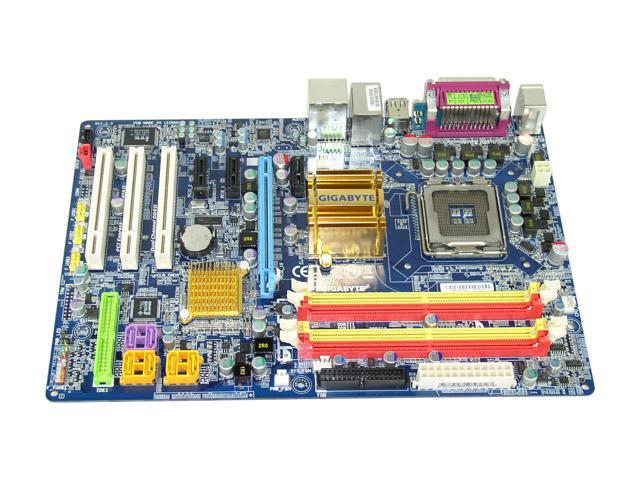
It has one PCI-e slot, and 3 PCI slots, which is perfect.
Also, one other part I was really liking are the 2 PCI-e 1x slots under the video card slot, and since the 2900 takes up 2 spaces, it wont cover a very needed PCI slot. You know what I'm saying?
But yeah... The only thing I dont like about is is that it doesnt have the copper heatsinks all around it, which I kinda want because I would like to overclock my quad core from 2.4Ghz to 3Ghz... But I need the extra cooling. (I also think the heatsinks on the mobo make it look a lot cooler too!)
Any other ideas on a mobo?
EDIT: I like this one too:
http://www.newegg.com/Product/Product.aspx?Item=N82E16813131025
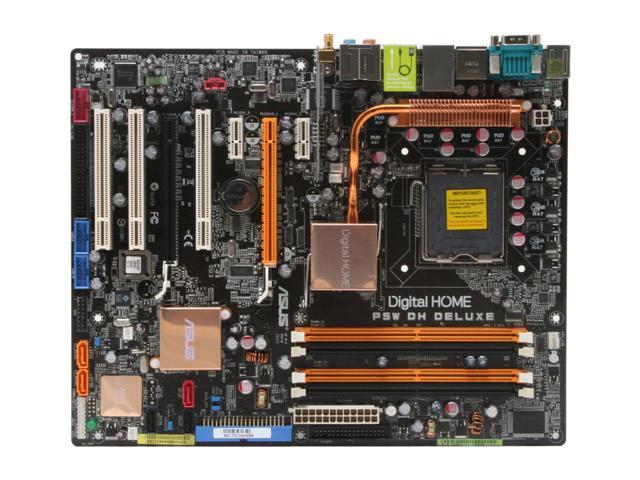
and this one:
http://www.newegg.com/Product/Product.aspx?Item=N82E16813128044
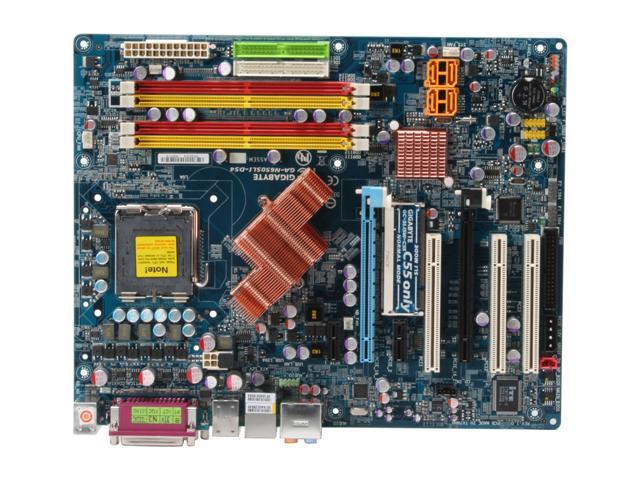
One last thing: A 680i SLI mobo can run crossfire right? OR do I need to find a specific cross fire board, or a mobo that will be compatable with ATi. Basically, are all mobos backwards compatable with ATi and nVidia?
What one should I pick? I think the ASUS P5W DH DELUXE is the best out of all...
This message has been edited since posting. Last time this message was edited on 18. September 2007 @ 16:26
|
AfterDawn Addict
2 product reviews
|
18. September 2007 @ 19:35 |
Link to this message
|
|
A SLI motherboard wont run crossfire and a crossfire mobo wont do SLI. Oh and you can't use PCI-E slots for PCI, only PCI-E peripherals which are not limited to GFX cards.
|
Senior Member
|
19. September 2007 @ 02:37 |
Link to this message
|
|
Can a SLI mobo run 1 ATi card then? Or are their different kinds of mobos for different cards?
|
AfterDawn Addict
4 product reviews
|
19. September 2007 @ 04:36 |
Link to this message
|
Harvrdguy: I wouldn't know about the stickiness of the RAMsinks, but if you get some Thermal Epoxy they won't be falling off any time soon.
No idea about why this thread doesn't appear in a search I'm afraid...
I think what they mean in that case is that it uses 52W of power but can get rid of 120W of heat.
The silly thing about the MSI rollercoaster is that it's obviously focusing on good motherboard cooling, now surely that goes hand in hand with good CPu cooling? What's the point in doing all that for the motherboard when there's only room for a stock-sized cooler?
Waymon: You can use PCI express slots for PCI express devices at or below the rated speed. (e.g. a 16x slot can take 16x, 8x, 4x, 2x or 1x, whereas a 4x can only take 4x, 2x and 1x), but you can't use PCI in them. You'll need to get PCI express 1x devices instead.
The Gigabyte Motherboards are very good, and as you can see they offer you the right number of slots, and nicely 6 S-ATA ports.
Let's clear up the dual graphics card issue:
SINGLE SLOT: one ATI, or one Nvidia. This is the case for any chipset
TWO SLOT: one ATI, or one Nvidia, in conjunction with a non-graphics 16x device. If a board has two PCIe 16x slots, don't assume it's SLi or crossfire unless it mentions it!
SLI: Two nvidia, or one nvidia or one ATi
CROSSFIRE: Two ATI, or one ATi, or one nvidia.
I'm not going into triple graphics or what have you, it's not common enough,
With regard to the motherboards, it's usually best to buy the one that suits you best, if the cooling's not sufficient change it yourself, for something like a Thermalright HR-05.
|
AfterDawn Addict
2 product reviews
|
19. September 2007 @ 04:47 |
Link to this message
|
|
Like sam already said a crossfire mobo will run one Nvidia card fine but it wont do SLI, and a SLI board will run one ATI card fine but it wont do crossfire. Just clearing that up.
P.S. I didn't know your name was Raymond. Not very common these days.
|
AfterDawn Addict
4 product reviews
|
19. September 2007 @ 05:05 |
Link to this message
|
|
so what's your first name abuzar, or is it abuzar?
|
|
MaccerM
Member
|
19. September 2007 @ 05:12 |
Link to this message
|
|
My good God! I thought I?d drop back and see what happened on this post after being away for a while, I think I left it at pg. 17 of 26! I blame Harvard, huge posts, good ones tho (not that I?ve read the whole lot ? you could turn this thread into a book and they?d split it into volumes!)
Thought I?d just update on progress with my system now I?ve finally stabilised everything. Cpu (E6320 1.86ghz) is running quite happily at 2.07ghz (295 fsb), I have had it at 2.11 but my m/b hits it?s fsb wall at 302mhz without pencil modding resistors or attacking it with a soldering iron. I?m quite happy at 2.07 anyway, I?ve no desire to cook the cheap vrm?s on the m/b either!
Fiddling with airflow (mainly hardisks/front fan placement) I now run the x1950 at speeds between 675/702 and up to 730/830 and the core/pcb average load temps are 55/41c. I did put vrm sinks on the back of the card and one of the spare ramsinks from the HR03 on the bridge chip though.
Finally what?ve I got? Well 3dmark @ 2.07, 722/801 and I get 5848, but I wish I could play DiRT with all candy at 1280x1024. I can play high settings with medium shadows at 1280x1024 OR all high settings at 1024x768 with reasonable 25-35 frame rates. A trade off between sharpness and effects detail I wish I didn?t have to make, but then I guess that?s the difference between a £300 upgrade and a £700 one.
Anyway I?m happy for the meanwhile. I find it interesting how everyone?s just got their X1950?s and they?re dreaming up their new system! Don?t think I?ll be able to afford that for some time but I think I?ll deffo be waiting for mainstream PCI-E v2 and the second gen dx10?s before I spend anymore money! (or at least that?s what I?m gonna tell myself!)
So have you guys got round to that BF2 sessh yet?
Q9550 @ 3.4Ghz-1.275v & TRUE, Asus P5N-T Deluxe, 4Gb Dominator 1066 (5-5-5-15), Inno3d OC 8800GTs in SLi with TT Duorbs, 580w 5.1 Setup, 2x DVD-RAM, 320&160Gb SATA2 HDDs, 17" 3ms Hyundai TFT, 700w Jeantech PSU.
|
AfterDawn Addict
2 product reviews
|
19. September 2007 @ 05:17 |
Link to this message
|
|
Haha, neither, it's Abuzar.
|
AfterDawn Addict
4 product reviews
|
19. September 2007 @ 05:18 |
Link to this message
|
|
Considering not only am I not entirely satisfied with my motherboard, I haven't even worked hard to find it's max overclock, I find it disturbing a lower clocked processor than yours is running clocked 930mhz higher! That board really is suck, you can get so much more out of a 6320!
5848 3dmarks? Not bad at all! In fact that's worrying because your CPU's only 2/3 the speed of mine, your GPU can only be a couple of hundred marks off mine! Finally we got there! Nice one!
|
AfterDawn Addict
2 product reviews
|
19. September 2007 @ 05:21 |
Link to this message
|
|
I doubt asrock boards are made for OCing.
|
AfterDawn Addict
4 product reviews
|
19. September 2007 @ 05:31 |
Link to this message
|
|
They aren't, they're made to be cheap.
|
|
MaccerM
Member
|
19. September 2007 @ 05:55 |
Link to this message
|
|
Yeah, my motherboard?s like the budgie ? cheap. But it does the job for the interim, and I can take the cpu and ram with me into a new board with pcie gfx card, which means I suppose it?s sort of half done it?s job as it is meant to be a halfway board. I was just a little disappointed with the o/c. I reasoned that putting the 6320 and DDR667 together should easily let me hit speeds of 2.5ghz, and it probably would ? infact it would probably go a lot faster in a decent board. My ASRock is rated as maxing 340 Fsb, but in reality they can?t achieve above 300 with C2Ds fitted.
For anyone who?s interested head over to VRforums and they have a guide that will let you get a 4CoreDual mobo up to 315 with a pencil mod but i also read that 3dmark scores start coming down after you clock near-to and over the wall (after modding) I?d rather just sell the 1950 and the mobo when I can afford new bits ? until then I?m happy as is! Sam, I can?t tell you exact scores (at work) but I think scores are approx: SM2 2100s SM3 2400s CPU 1800s
Q9550 @ 3.4Ghz-1.275v & TRUE, Asus P5N-T Deluxe, 4Gb Dominator 1066 (5-5-5-15), Inno3d OC 8800GTs in SLi with TT Duorbs, 580w 5.1 Setup, 2x DVD-RAM, 320&160Gb SATA2 HDDs, 17" 3ms Hyundai TFT, 700w Jeantech PSU.
|
Senior Member
|
19. September 2007 @ 13:13 |
Link to this message
|
So I would have to buy 2 nvidia cards to take full advantage of the ASUS P5W DH DELUXE? I really want the 2900XT, actully, that card is real good and I should never need to do cross fire, and if I do I would go with like 2 7950s or 2 8800gts 320 megs. I want the 2900 because it has 1GB of ram, and it is tide with the 8800GTX, and its cheaper!
So it is confirmed that I can put one (1) 2900XT in the ASUS P5W DH DELUXE which is SLi and thats it? Right?
|
AfterDawn Addict
4 product reviews
|
19. September 2007 @ 15:47 |
Link to this message
|
|
the P5W DH isn't SLI, but you can put a 2900XT in it.
|
Senior Member
|
19. September 2007 @ 16:07 |
Link to this message
|
I'm going to have to disagree... It is this:
It has to PCI-e 16x slots, for 2 graphic cards... If im wrong then does that mean you can put a 2900 and a 8800gtx in there?!?
|
|
Advertisement
|
|
|
Senior Member
|
19. September 2007 @ 16:19 |
Link to this message
|
|




