|
Video Card Thread (Mostly Gecube x1950xt)
|
|
Senior Member

|
26. September 2007 @ 05:24 |
 Link to this message

|
Yeah, but the clocks were allways at 499/594, which is the default 2d mode. The card is supposted to switch to the 3d clocks, which are the standard ones and are higher, at 648/702. I had ATi Tray Tools running and I saw that it never changed to 3d mode when I entered the game. Also, the clocks for my overclock are 648/848 I think. I used to have the core at 702, but that was near the line where it would become unstable. (I think the max is like 722Mhz for the core) The max on the memory for me was 855 stable.
What do you think I should run my overclock at?
Heres another interesting thing: I played the World In Conflict video card stress test 2 times, with same settings each time (medium/some high, 800x600) and got the same average fps at the end, with the 2d mode enabled, and then the 3d mode. (I can do this with Ati Tool. I choose to load either 499/594, or 648/702, and as long as you dont close Ati Tool, the clocks stay that way for ever, well, untill you close that app or load a different setting.)
This is real weird... Hmm, when I get home I'll try to run the stress test again, one with the standard 2d clock, then 3d clock (standard), and then my overclock, 675/848. Ill post the benches when I get home, prolly around 730-8pm EST
|
|
Advertisement
|
 |
|
|
|
harvrdguy
Senior Member
|
28. September 2007 @ 14:11 |
Link to this message

|
|
Hmmm. I had a similar little problem with ATT not going into 3d mode (increasing gpu and Vram clocks). I wrote the author, Ray Adams about it, on his forum, and he answered back that he didn't know why. It happened after I had crashed, which was when I was running the Ati Tray tool charts. (I don't run the charts anymore.) I have a jet plane wav when it goes to 3d, and a lesser plane sound when it comes out.
Every time I rebooted, and started 3dmark, for example, it would play the lesser sound, the sound of coming out of 3d, not going in. Strange! I thought it was a bug in the program, some key left in the registry that wasn't correctly updated after the crash. Anyway, like I say, Ray Adams was also confused as to why that was happening.
Anyway, if you use 3dmark as a test for going into 3d, remember that coming out of the benchmarks back to the desktop, doesn't return you to 2d - you have to completely exit 3dmark, to get back to the 2d settings.
I would suggest, Ray, that you use a wav file to let you know when you go into 3d, and a different one, for when you come out. Then test ATT with 3dmark, until you get it working right.
Lately, because I have not been crashing anymore, it seems to always correctly put me in the 3d settings, and then take me out, playing the correct sounds each time. Plus of course I have the on-screen display (my hot keys are Ctrl with numpad-) showing me the gpu and Vram clock settings so I can also tell that way.
Rich
|
Senior Member
|
29. September 2007 @ 12:32 |
Link to this message
|
Wow, I just got 4800 on 3dmark06! That was with 675/837 and 3.75Ghz processor.
--------------
Ok, this is starting to annoy me... I start up ATiTool and Ati Tray Tools, and load my defaults for my card through Ati Tool (648/702), and its supposted to stay like that untill I close down Ati Tool, but when I go to play company of heroes, I get around 30fps, which is nice, but thats with medium/some high settings... Then, I minimize COH and look at my monitoring graphs, and find that the gpu and memory clocks have dropped down to the 2d clocks, about right when I opened the game it seems. This is so annoying... I could be playing COH with near max details with 30fps, instead I am left playing with a couple of options on medium...
I need to find out how to make the clocks stay the same for how ever long I want them too. Any ideas?
|
|
kardson
Junior Member
|
29. September 2007 @ 13:19 |
Link to this message
|
|
Use ATI Tray Tools, when it starts tell it to disable ATI Hotkey Poller
Or you can find the option located at ...
Tools & Options --> General Options --> Advanced Tab --> Near the bottom you will see the option to Kill ATI Hotkey Poller.
What this does is prevents ATI from changing the clock speed on you.. Its how it detects if your in a 3d game and upclocks for you.
Then, in ati tray tools, go to
Hardware --> Overclock Settings... --> and set your clock speeds in there.
This SHOULD work :)
Never argue with an idiot. They drag you down to their level, then beat you with experience.
|
Senior Member
|
29. September 2007 @ 18:06 |
Link to this message
|
|
Oh thanks! That took care of it! So I have to do that everytime I want a game to run in the 3d mode? Thats gonna be a pain... Oh well!
------------------
I am starting to reconsider the 2900XT now, after seeing benchmarks of Company of hereos with the 8800GTX, the Ultra, and the GTS. I think I might go with an Ultra, but not intirely sure yet, I still want the 1GB of vram.
Do any of you know when the nvidia's and ATi's next series of cards are coming out?
|
AfterDawn Addict
2 product reviews
|
29. September 2007 @ 19:19 |
Link to this message
|
|
They say Q4 2008, so the last quarter this year. Seems like they should be out before the holidays. Not a long time to wait, till then you can hold out with an old video card or just hold off building your PC.
|
AfterDawn Addict
4 product reviews
|
30. September 2007 @ 03:29 |
Link to this message
|
|
Which benchmarks did you look at? The 1GB version of the HD2900XT is streets ahead of the original.
|
Senior Member
|
30. September 2007 @ 07:07 |
Link to this message

|
I was just watching some Crysis beta videos that people had posted, and there was one where he wasnt playing it with any AA, but then he switched to the max AA, and he got like 5 frames through the whole game.
Video part 1: http://video.google.com/videoplay?docid=...earch&plindex=2
Video Part 2: http://video.google.com/videoplay?docid=...earch&plindex=0
It looks pretty good in the first video, before he turns the AA on, but I guess when they say "the 8800GTX can play crysis maxed, without problems", then they mean with full AA too.
-------------------------
I was just looking for a picture of a graph where the 2900XT isnt that good, and couldnt find one lol. I found so many before, but from what I can remember, I think it was Company Of Heroes, and the 2900XT 1GB got the worst out of the 8800s... Maybe it was driver issues?
Maybe thats it? Driver issues? I was watching another video with the 2900XT in lost planet, and at first he was getting about 5fps, and then he switched to some other driver (cant remember which one, sorry) and he was getting above 20fps constant, or at least thats what it looked like.
EDIT: here is one of the graphs: 
I guess that was driver related too?
This message has been edited since posting. Last time this message was edited on 30. September 2007 @ 07:36
|
AfterDawn Addict
4 product reviews
|
30. September 2007 @ 08:27 |
Link to this message
|
|
well crossfire is still problematic in most games, but bear in mind the drivers for that card are new, so expect some problems early on. The 8800GTX is still the mainstream product though. The 1GB 2900XT is kind of like the X1950XT AGP in respect to where it sits in the market, and we all know what software issues we had with that. I'm not saying it'll be as bad, but it's worth bearing in mind.
|
Senior Member
|
30. September 2007 @ 08:38 |
Link to this message
|
Well I was just reading about the new nvidia 8950GX2, and now I'm thinking about that. It's coming out in november, and its $600USD, which is where the 8800GTX is priced right now. The 8950GX2 is 2 cards in 1, so it has 1GB of GDDR4. I am thinking of that...
Heres a link: http://www.theinquirer.net/en/inquirer/n...-details-listed
What do you think sam?
|
AfterDawn Addict
4 product reviews
|
30. September 2007 @ 08:46 |
Link to this message
|
|
I was never a great fan of the 7950GX2, simply because it required SLi to work. I know support for SLI is improving, but I didn't like the fact that in some games I would just have to accept a graphics card being half as powerful. The 8950GX2 is just a more powerful version of the same.
|
Senior Member
|
30. September 2007 @ 09:16 |
Link to this message
|
but its 2 8800GTX in 1, and you can hook to of the 8950X2s up in SLi, and have quad sli, which I would never do, way to expensive. I guess we'll just have to wait and see for the reviews...
One more thing sam, do you think the antec neopower 650watt will handle that card, a quad core and 3 HDDs?
Btw, I reupdated my list:
WD Raptor X 10,000rpm
Antec NeoPower 650watt
Crucial DDR2 800 pc 6400 RAM
ASUS P5W Deluxe mobo
Intel Core 2 Quad Q6600 @ 2.44Ghz
here is something new:
Swiftech H20-220-APEX-GT CPU Liquid Cooling Kit
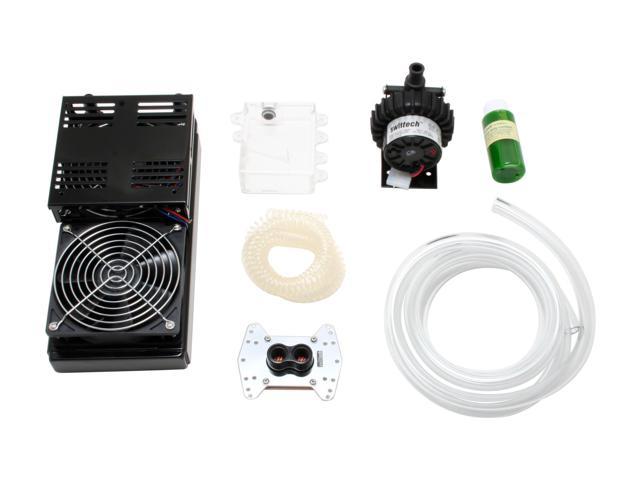
No graphics card yet, but I'm looking at the 8950GX2
I am thinking of that cpu cooling kit, looks pretty good, and do you think I could overclock the Q6600 to 3Ghz? I saw someone over clocked theirs to 5Ghz, and got the new highest 3dmark06 score.
What do you think?
This message has been edited since posting. Last time this message was edited on 30. September 2007 @ 09:17
|
AfterDawn Addict
4 product reviews
|
30. September 2007 @ 11:20 |
Link to this message
|
|
My only concern is, if the 8950GX2 is two 8800GTXs in one, there'd be no point in buying the separate cards. That means nvidia stand to lose a lot of money, since quite a few people run two 8800GTXs and you can bet anything the 8950GX2 won't be anywhere double the cost of the 8800GTX. Are you sure it's not two 8800GTSs? After all the 7950GX2 was two 7900GTs, not 7900GTXs.
|
Senior Member
|
30. September 2007 @ 12:09 |
Link to this message
|
Quote:
The Geforce 8950 GX2 is a dual-chip card based on a new 80 nanometre G80 chip, probably codenamed something else. Both GX2 GPUs are clocked at 550MHz and the difference is GDDR4. The card comes with 2x512MB of 256-bit GDDR4 memory clocked at 2000MHz. The card has 96 Shaders, per chip. It will be priced at $600.
Thats what the article said, so I am assuming that it is 2 8800GTXs, but in the size of 1 card, like the 7950GX2, which was fairly slim. If you bought 2 GTXs today, they would be around $1200USD, and for half that price, in november, you can get the 8950GX2 for 600. I hear Ati is coming out with something like that too.
|
AfterDawn Addict
4 product reviews
|
30. September 2007 @ 12:12 |
Link to this message
|
|
All the info out there is rumour and speculation, I wouldn't take anything as certain yet. Also don't forget how much heat the 8800GTX puts out, it wouldn't be realistic to have that much in one card.
|
Senior Member
|
30. September 2007 @ 12:20 |
Link to this message
|
|
I think that when they get realeased, I'll get one and see how hot it gets. Then. I may add a gpu waterblock to the card and have the swift tech system cooling it as well as the cpu. Will I need 1 or 2 waterblocks?
Also, do you know how hot a 8800GTX gets? I think around 65-70C load right?
|
AfterDawn Addict
4 product reviews
|
30. September 2007 @ 12:27 |
Link to this message
|
|
Probably a bit more than that, maybe in the 70s, I don't own one so I couldn't say.
You need a water block for every device you cool, a radiator, a reservoir, a pump and some pipes. A fill and drain cap is always useful to have as well.
|
Senior Member
|
30. September 2007 @ 12:35 |
Link to this message
|
|
Yeah, it all comes in that kit, but the gpu block isnt included. We'll just have to see what the temps are when the card get released.
|
AfterDawn Addict
4 product reviews
|
30. September 2007 @ 12:39 |
Link to this message
|
|
The temps will be fine, water cooling graphics cards is usually only done for extreme overclocks, for people who want quiet PCs (and there are far cheaper ways) or for fun.
|
Senior Member
|
30. September 2007 @ 12:46 |
Link to this message
|
|
Ok, but I would definetly want to water cool the Q6600, if I want to get to 3Ghz right?
|
AfterDawn Addict
4 product reviews
|
30. September 2007 @ 13:04 |
Link to this message
|
|
I reckon you could air cool a Q6600 at 3Ghz. I barely break 40C at 3Ghz with my E4300 if I turn the fan up, and that CPU started at a much lower clock speed.
|
|
harvrdguy
Senior Member
|
30. September 2007 @ 18:03 |
Link to this message
|
waymon
kardson
sammorris
dinc
abuzar
hey guys,
Ray, you shouldn't have to use Travis' disable ATI hotkey poller each time you want to play a 3d game. If you have it set in the preferences, the way kardson told you, then I believe that as long as you are loading ati tray tools on bootup, (for example with a shortcut in the startup folder) it will sit there in memory and defeat the ati hotkey poller. You'll never have to set it again. (Correct me if I am wrong on that Travis.)
That one graph you showed came from that one review I was talking about, but as I recall, Ray, that one game, company of heroes, showed very low because they couldn't defeat the 60fps lock for the 2900 for some reason that they couldn't figure out.
In general the 2900 did pretty well in those tests, although the ultra is pretty strong though, and it did come out ahead of the 2900xt on a lot of tests. (Again, though, with all the parallel shader operations that the 2900 can support, I wonder if all the developers have begun to use its full capabilities.)
Rich
|
AfterDawn Addict
2 product reviews
|
30. September 2007 @ 19:22 |
Link to this message
|
|
Hey sam I heard that the Quad cores don't overclock as well as the Dual core cpus. So I'm not sure about the 3 Ghz quad core on air cooling. Could be wrong though, but I remember reading somewhere that it is very hard to do on air cooling.
|
AfterDawn Addict
4 product reviews
|
1. October 2007 @ 05:29 |
Link to this message
|
|
I was under the impression that 3Ghz was the air cooled limit for quads, in the same way that 3.5-4.0 depending on the model is the air cooled limit for duos.
|
|
Advertisement
|
|
|
|
kardson
Junior Member
|
1. October 2007 @ 06:14 |
Link to this message
|
|
Waymon3X6,
Exactly what harvrdguy said, follow the directions I gave you and you shouldn't have to set it each time. There is also a checkbox to choose "Do this evertime ATT starts"
This will have it kill the poller on Ati Tray Tools startup.
The only Side effect from doing this is that the card will stay at whatever clock you set and will not downclock out of game.
So instead of having cool 500mhz card while not in game, it will be sitting at whatever clock you hardset it too.
Though, typically the heat output still won't be that high as the card will not be under a heavy load while at the desktop.
Never argue with an idiot. They drag you down to their level, then beat you with experience.
|




