|
|
|
Intel P4 vs AMD
|
|
|
brobear
Suspended permanently

|
20. March 2006 @ 23:44 |
 Link to this message

|
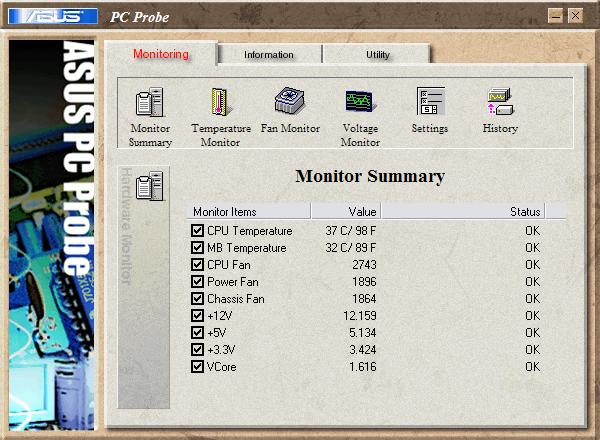
Earlier there was a discussion on CPU temps and what the monitor software is reading. I've had my system running for a few hours with typical use. I've not done any encoding yet, that's next. I was just doing some checks. Seems my build is complete except for putting in a new psu and HD when they show. Well back to temps. The BIOS shows the CPU running 36.5 to 38 C and the MB at 31 C with a mild 5% OC. (I'm not going to crank it up till I get more power.) Here's a shot of the Asus Probe, that 5 C less than the BIOS reading on the CPU. The MB temp seems to be right on at 32C, the BIOS was reading the same (31 to 32 C). 
Here's a shot of SpeedFan. My HDs should run cooler when I get the power to run the case fan into the HD cage. 
This message has been edited since posting. Last time this message was edited on 20. March 2006 @ 23:45
|
|
Advertisement

|
|
|
|
AfterDawn Addict
4 product reviews
|
21. March 2006 @ 00:35 |
Link to this message

|
Quote:
Nice to know how you like the software, but that wasn't what we were talking about
I'm not trying to sell the software, but a few reputable reviews of the software itself may re-assure those who wish to use it.
|
|
ScubaBud
AfterDawn Addict
|
21. March 2006 @ 02:13 |
Link to this message
|
Brobear,
When Sophocles stated in one of his posts about IDLE temperature differences in Bios setup then when using Asus Probe or a Windows program he was correct since the bios cannot put the CPU in a low power state, only Windows can.
Here is a temp check I just did with. (10% OC to 3.74GHz) Room temp at 79 Fahrenheit/26 Celsius
sammorris
My program of choice is still Drive Image 7.0.1 which is now Ghost only because I didn't have success with Acronis software when it was needed, (on a re-install of a backup.) The look and feel of Acronis is much better IMO then Drive Image software and I will try it once again after a newer version comes out.
This message has been edited since posting. Last time this message was edited on 21. March 2006 @ 02:24
|
AfterDawn Addict
1 product review
|
21. March 2006 @ 04:26 |
Link to this message

|
Quote:
When Sophocles stated in one of his posts about IDLE temperature differences in Bios setup then when using Asus Probe or a Windows program he was correct since the bios cannot put the CPU in a low power state, only Windows can.
There are no commands that Windows or any other operating system can make on hardware without going through the bios first. The bios sends a signal to Windows, Windows makes a decision and returns a command back through the bios. The bios is the input and output to all hardware.
So as not to make this an exetended debate I broke down and surfed to find some info on how it all works.BTW.
http://www.acpi.info/presentations/ACPI_Overview.pdf
" Please Read!!! Post your questions only in This Thread or they will go unanswered:
Help with development of BD RB: Donations at: http://www.jdobbs.com/. |
|
ScubaBud
AfterDawn Addict
|
21. March 2006 @ 05:03 |
Link to this message
|
|
Here is a much cleaner explanation of what I stated to Brobear, no debate needed since this has nothing to do with my comments on sensors used by Software or Hardware Monitor under bios.
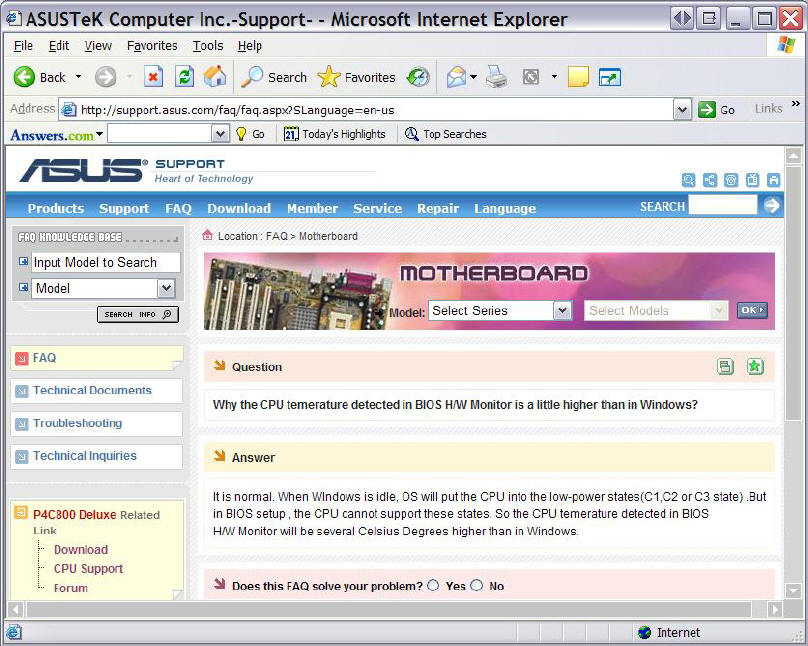
When WIndows is idle, OS will put the CPU into the low-power states(C1,C2 or C3 state). But in BIOS setup, the CPU cannot support these states. So the CPU temerature detected in BIOS H/W Monitor will be several Celsius Degrees higher than in Windows.
|
|
brobear
Suspended permanently
|
21. March 2006 @ 05:08 |
Link to this message
|
|
After a couple of hours encoding with RB/CCE (with the mild 5% OC to 3.57GHz) I turned on the Asus Probe and the temp was running consistently at 41 C. I'm waiting to see what happens when I get the power to crank things up and run all the fans. If it matters, constant room temp is about 21.1 C/70 F.
Scubabud
My system must cool down fast. I did the BIOS check and as soon as I booted into windows I turned on Asus Probe and got the temp. According to what you're saying, hours of encoding at 5% OC only drives up my CPU temp 3 C over what going into the BIOS does. Now that's running cool.
This message has been edited since posting. Last time this message was edited on 21. March 2006 @ 05:14
|
|
ScubaBud
AfterDawn Addict
|
21. March 2006 @ 05:12 |
Link to this message
|
|
Brobear,
I believe that the highest I've seen my go to was 125-128F or max at around 53 Celsius.
|
|
brobear
Suspended permanently
|
21. March 2006 @ 05:17 |
Link to this message
|
|
41 C/105 F should be the high spot for mine until I do more OCing.
|
|
brobear
Suspended permanently
|
21. March 2006 @ 05:18 |
Link to this message
|
|
I can't believe encoding doesn't drive the temps up much more than just going into the BIOS.
|
AfterDawn Addict
4 product reviews
|
21. March 2006 @ 05:40 |
Link to this message
|
|
It's obviously just a very powerful heatsink!
|
|
ScubaBud
AfterDawn Addict
|
21. March 2006 @ 06:05 |
Link to this message
|
|
Brobear,
What brand of heatsink and fan are you using? I know that it's not the stock or retail setup since you only purchased the chip.
|
AfterDawn Addict
1 product review
|
21. March 2006 @ 06:17 |
Link to this message
|
brobear
That cooling system cnps7700 is almost as good as a water cooling and in some cases actually beats water cooling.
Quote:
When WIndows is idle, OS will put the CPU into the low-power states(C1,C2 or C3 state)
By communicating with the bios. C1, C2, and C3 states are functions of ACPI which takes you back to the PDF that I posted. I will say this again. Windows can't do anything without first goin through the bios.
" Please Read!!! Post your questions only in This Thread or they will go unanswered:
Help with development of BD RB: Donations at: http://www.jdobbs.com/. |
|
ScubaBud
AfterDawn Addict
|
21. March 2006 @ 06:30 |
Link to this message
|
Quote from Brobear
Quote:
Here's a shot of the Asus Probe, that 5 C less than the BIOS reading on the CPU. The MB temp seems to be right on at 32C, the BIOS was reading the same (31 to 32 C).
Quote from Scubabud
Quote:
When WIndows is idle, OS will put the CPU into the low-power states(C1,C2 or C3 state). But in BIOS setup, the CPU cannot support these states. So the CPU temerature detected in BIOS H/W Monitor will be several Celsius Degrees higher than in Windows.
Sophocles
I believe that the above answered Brobear?s possible concern. The last post, last paragraph was word for word from a support page on Asus?s site. Since I never professed to be an Oracle I will continue to add to my knowledge from threads, other members, the Internet and my IT people. I hope that this reassures you that what was stated is correct. <G>
|
AfterDawn Addict
4 product reviews
|
21. March 2006 @ 09:49 |
Link to this message
|
|
So brobear, what do we say to people who have paid a fortune for water cooling?
|
AfterDawn Addict
4 product reviews
|
21. March 2006 @ 10:30 |
Link to this message
|
|
sorry double post
This message has been edited since posting. Last time this message was edited on 21. March 2006 @ 10:31
|
AfterDawn Addict
1 product review
|
21. March 2006 @ 11:05 |
Link to this message
|
Quote:
Here's a shot of the Asus Probe, that 5 C less than the BIOS reading on the CPU. The MB temp seems to be right on at 32C, the BIOS was reading the same (31 to 32 C)
I explained that already, the temperatures won't be the same as it boots because the degree of stress changes. Usually the temperatures will actually be a little hotter when just booting into windows and then the cool down begins.
Quote:
When WIndows is idle, OS will put the CPU into the low-power states(C1,C2 or C3 state). But in BIOS setup, the CPU cannot support these states. So the CPU temerature detected in BIOS H/W Monitor will be several Celsius Degrees higher than in Windows.[/quote
Wrong again, without an ACPI enabled bios Windows can't do anything the CPU PERIOD, including C1, C2, and C3 power states. In fact without the bios Windows can't boot, it can't communicate with memory, it can't communicate with the hard disk, it can't communicate with add on cards, it can't communicate with the CPU.
Did you even read or look at the PDF file that I posted? It has a block diagram in it explaining how ACPI works along with its paths and C1, C2, and C3 absolutely requries it because it is a function of the bios and the bios must be ACPI capable or it won't work.
" Please Read!!! Post your questions only in This Thread or they will go unanswered:
Help with development of BD RB: Donations at: http://www.jdobbs.com/. |
|
ScubaBud
AfterDawn Addict
|
21. March 2006 @ 11:25 |
Link to this message
|
Whatever makes you feel warm and fuzzy. Should we include that the PC must be turned on as well? Below is an image taken from Asus website.
|
|
arvinf
Newbie
|
21. March 2006 @ 12:28 |
Link to this message
|
|
I can confirm that my Athlon 64 3500+ Venice core CPU does not generate a lot of heat - around 43 degrees celcius after 2 hours gaming (108 degrees F) on a cheap Akasa heatsink. This is with the heatsink fan running at a quiet 1500 rpm. It is especially great in comparison to my old Sempron 3000 socket A. That was a terrible CPU for heat and being unbearably slow. But I really do love the socket 939 Athlons. I recommend them for anyone building a quiet/silent PC, or overclockers.
By the way, bear in mind the slow 1500rpm heatsink fan, and the fact that there is a fanless power supply dissipating lots of heat right next to the cpu. My 3500 idles at 36 degrees C with cool and quiet enabled. My sempron used to reach full-load temperatures of around 52 degrees C in the same kind of weather, yet it gave terrible performance.
My Rig:
AMD Athlon 64 3500+ Venice @ 2.21GHz,
512MB Elixir RAM (gotta do something about this),
2x 80GB Samsung Spinpoint (RAID 0 Array),
Powercolor ATi Radeon X800GTO
Asus A8N-SLi Premium Motherboard,
E-MU 0404 Sound Card
17" Unbranded 13ms TFT (as my budget dictates)
Pioneer DVR-109XLA1 DVD±RW,
'Nicely Modded' SuperFlower SF-464T2-G Case
Silverstone ST30NF 300W Fanless PSU (With Custom UV Braiding)
Windows XP Pro (legit believe it or not!)
This message has been edited since posting. Last time this message was edited on 21. March 2006 @ 12:37
|
AfterDawn Addict
4 product reviews
|
21. March 2006 @ 12:56 |
Link to this message
|
|
But of course bear in mind you're using a stock heatsink for the Sempron 3000, a proper Arctic cooling heatsink on my XP 3000+ is making 59C at idle now, but then again I obviously didnt do a great job of thermal paste - it's been climbing...
You're also forgetting the Sempron is a budget CPU, less than half the value of the 3500+ and I'll bet you it was more than half as fast.
|
|
brobear
Suspended permanently
|
21. March 2006 @ 14:53 |
Link to this message
|
Seems I'm getting slow at posting to the thread. Sophocles had it right. I'm using the big Zalman CNPS7700-Cu FHS to cool things down. http://www.zalmanusa.com/ Doesn't hurt that there's a big exhaust fan (120x120x25mm at 1300 rpm and 17 dBA) right behind the cooler. There'll be another fan the same size in the front of the case as an intake that cools the hard drive cage (when I get the power to hook everything up. The case also has 2 90x90x25 mm exhaust fans top and rear (sort of overkill for this cool CPU). I'm using an Armor Super Tower from Thermaltake. http://www.ajump.com/ajump/product.asp?dept%5Fid=2027&pf%5Fid=973... Newegg has better pictures if anyone wants to see what it looks like from all angles. http://www.newegg.com/Product/Product.asp?Item=N82E16811133163 For those wondering about the pricing, Ajump is $10 higher, but they shipped for free and Newegg charges $23 for shipping. That makes the Ajump cheaper by $13 (always watch those S&H charges). Zalman and Thermaltake adhere to quiet technology, so things run quiet.
|
AfterDawn Addict
|
21. March 2006 @ 16:09 |
Link to this message
|
Brobear,
As long as you are using the same computer, what new hard drive you use doesn't matter. The size doesn't matter either as long as it's large enough. Acronis True Image 9.0 will clone drives as well. The last time I backed up directly to another hard drive. If the OS has problems I would just install the drive and run the boot CD to access the data. In about 35 minutes, all your data will be restored. I usually run Eraser or Kill Disk first on the partition I'm recovering just to be on the safe side.
Originally I purchased 8.0 and within 3 weeks I got an e-mail telling me that version 9.0 had just come out. I bitched a little bit about my new purchase being obsolete already so Acronis gave me 9.0 for free (I had to show proof of purchase). They sent me a link to download it right from their site. Worked perfect the first time and every time. I've never lost a bite! It's not expensive either!
smmmorris,
Quote:
So brobear, what do we say to people who have paid a fortune for water cooling?
I just giggle a lot and count my savings!
Happy Computering,
theonejrs
GigaByte 990FXA-UD5 - AMD FX-8320 @4.0GHz @1.312v - Corsair H-60 liquid CPU Cooler - 4x4 GB GSkill RipJaws DDR3/1866 Cas8, 8-9-9-24 - Corsair 400-R Case - OCZ FATAL1TY 550 watt Modular PSU - Intel 330 120GB SATA III SSD - WD Black 500GB SATA III - WD black 1 TB Sata III - WD Black 500GB SATA II - 2 Asus DRW-24B1ST DVD-Burner - Sony 420W 5.1 PL-II Suround Sound - GigaByte GTX550/1GB 970 Mhz Video - Asus VE247H 23.6" HDMI 1080p Monitor
 This message has been edited since posting. Last time this message was edited on 21. March 2006 @ 16:21
|
|
brobear
Suspended permanently
|
21. March 2006 @ 16:17 |
Link to this message
|
I'm not having backup problems. I didn't mean to give that impression, if I did. It was just a matter of changing drives from one machine to another (which is slightly different). Not only did I have to update the info on my Norton ware, I had to reactivate the XP OS as it was noting the change in the system environment. What I was more or less getting at is that some software makes it a bit of work changing a hard drive from one PC to another.
Quote:
I've never lost a bite!
Well... glad to see it didn't cause you to lose your apetite, but how bout them bytes? LOL
This message has been edited since posting. Last time this message was edited on 21. March 2006 @ 16:21
|
AfterDawn Addict
|
21. March 2006 @ 16:25 |
Link to this message
|
|
Brobear,
I stand corrected, Byte not bite! Must have gotten bitten by those dyslexic eyes! No wonder I'm so damn hungry!
Happy Computering,
theonejrs
GigaByte 990FXA-UD5 - AMD FX-8320 @4.0GHz @1.312v - Corsair H-60 liquid CPU Cooler - 4x4 GB GSkill RipJaws DDR3/1866 Cas8, 8-9-9-24 - Corsair 400-R Case - OCZ FATAL1TY 550 watt Modular PSU - Intel 330 120GB SATA III SSD - WD Black 500GB SATA III - WD black 1 TB Sata III - WD Black 500GB SATA II - 2 Asus DRW-24B1ST DVD-Burner - Sony 420W 5.1 PL-II Suround Sound - GigaByte GTX550/1GB 970 Mhz Video - Asus VE247H 23.6" HDMI 1080p Monitor
|
|
brobear
Suspended permanently
|
21. March 2006 @ 16:45 |
Link to this message
|
|
Just kidding around with you. I learned not to get upset with typing from my experience with my old compadre, Sophocles. ;) I have to admit though, Sophocles typing has seemed to improve some over the past year or so. At least nowadays he types my name right occasionally. ;)
|
|
Advertisement
|
|
|
AfterDawn Addict
1 product review
|
21. March 2006 @ 17:48 |
Link to this message
|
I said in my last post that the reason that the temperatures were lower in brobears bios than i twas in windows was because he let it idle for a while in Windows. That's exactly what your image capture shows, it supports what I've been saying all along, including ACPI which is the daddy of C1,C2, and C3 power downs and windows still adjusts it through the bios. Bios, bios, bios, bios, bios, bios, bios, bios, bios,biosBios, bios, bios, bios, bios, bios, bios, bios, bios,biosBios, bios, bios, bios, bios, bios, bios, bios, bios,biosBios, bios, bios, bios, bios, bios, bios, bios, bios,biosBios, bios, bios, bios, bios, bios, bios, bios, bios,biosBios, bios, bios, bios, bios, bios, bios, bios, bios,biosBios, bios, bios, bios, bios, bios, bios, bios, bios,biosBios, bios, bios, bios, bios, bios, bios, bios, bios,biosBios, bios, bios, bios, bios, bios, bios, bios, bios,biosBios, bios, bios, bios, bios, bios, bios, bios, Bios, bios, bios, bios, bios, bios, bios, bios, bios,bios
bios,Bios, bios, bios, bios, bios, bios, bios, bios, bios,Bios, bios, bios, bios, bios, bios, bios, bios, bios,biosBios, bios, bios, bios, bios, bios, bios, bios, bios,bios
Get it?;)
bios
bios
Quote:
I explained that already, the temperatures won't be the same as it boots because the degree of stress changes. Usually the temperatures will actually be a little hotter when just booting into windows and then the cool down begins.(as windows relaxes and communicates with the BIOS)
Thanks for your support but I don't need help with the facts!!
" Please Read!!! Post your questions only in This Thread or they will go unanswered:
Help with development of BD RB: Donations at: http://www.jdobbs.com/. This message has been edited since posting. Last time this message was edited on 21. March 2006 @ 17:51
|
|


