|
Intel P4 vs AMD
|
|
|
RebelRide
Newbie

|
19. March 2006 @ 06:06 |
 Link to this message

|
|
Room temp is actually 20C not the 22C I referred to earlier. Set up is as follows:
Gigabyte Titan series mobo(second one this cpu has been installed in),3.2E 478 pin Intel Prescott cpu, rocket fan on the cpu, Atop X-blade case with 120CM fan(additional 80CM fans in the hard drive bay).
This cpu has run at this temp (32C @ IDLE) since I purchased it just over a year ago. My 2.4 prescott does run slightly higher (gigabyte mobo, generic mid tower w/80CM fans, stock chip cooler) but still idles under 38C. My temp threshold stays set @ 48C with audible alarm. So.... I don't know why, but these are the temps I'm running on this setup.
|
|
Advertisement
|
|
|
|
AfterDawn Addict
|
19. March 2006 @ 10:22 |
Link to this message

|
|
RebelRide,
I'm not questioning you word, I'm questioning the accuracy of your temp probes or MB. I've run P4s from 1.4 to 3.0 and I have never seen or heard of temps that low. Especially the case temps. I put the thermol probe in my clock radio (radio off) and it's 36C! You have too many sources of heat in a running computer for it to show a temp of 28C. It's just not possible! Even if you cooled the CPU with Liquid Nitrogen there is still the heat of the chipset, memory, hard drive(s), video card and the remaining electronics that needs to be removed! All the heat from that wattage should be up around 36C-37C inside the case.
On mine I use a Zalman 9500 LED CPU cooler. This is a "Premium" Top Rated Cooler! It's solid copper and fairly large. It dropped my CPU temp 10C at max and 8C at idle. This was tested and confirmed using an electronic thermal probe from my work and I keep a scientific mercury thermometer inside the case window. This was while I was running the SisoftSandra Burn-In test at 100% CPU usage for 20 min. Try running that test and see what your temps do! My bet is that they won't go up much! That's why we think there is something wrong with your temp probes or your MB!
Happy Computering,
theonejrs
GigaByte 990FXA-UD5 - AMD FX-8320 @4.0GHz @1.312v - Corsair H-60 liquid CPU Cooler - 4x4 GB GSkill RipJaws DDR3/1866 Cas8, 8-9-9-24 - Corsair 400-R Case - OCZ FATAL1TY 550 watt Modular PSU - Intel 330 120GB SATA III SSD - WD Black 500GB SATA III - WD black 1 TB Sata III - WD Black 500GB SATA II - 2 Asus DRW-24B1ST DVD-Burner - Sony 420W 5.1 PL-II Suround Sound - GigaByte GTX550/1GB 970 Mhz Video - Asus VE247H 23.6" HDMI 1080p Monitor
 This message has been edited since posting. Last time this message was edited on 19. March 2006 @ 10:23
|
AfterDawn Addict
1 product review
|
19. March 2006 @ 10:36 |
Link to this message
|
|
RebelRide
Theonjrs is right, you have a problem with your thermal sensors. I have an Asus PSP800SE board with a Northwood 2.8 Ghz clocked at 3.2 GHz and I'm getting full load temps of 22 degrees celsius in a room that's 2 degrees celsius warmer. Yea right!! LOL That doesn't mean that your board is bad and thermal sensors are usually inaccurate to begin with. To get around my problem I stressed the hell out of my system to determine where it crashes and then set my shut off values to a couple of degrees cooler using Asus probe and all is well.
" Please Read!!! Post your questions only in This Thread or they will go unanswered:
Help with development of BD RB: Donations at: http://www.jdobbs.com/. |
|
ScubaBud
AfterDawn Addict
|
19. March 2006 @ 13:05 |
Link to this message
|
|
Sophocles
It?s not a mistake, you?re just one real cool Dude with the COOLEST Over Clocked CPU setup available today! <G>
22 Celsius/71.6 degrees, man that?s cooler then my Den with two PC?s running! That?s a great example of how everything is not always as it seems.
RebelRide
What you might be able to do is see what your temps show while inside your BIOS. Most M/Boards have a BIOS heading ?Power? and under that heading might be an option to display your temps, (my Asus P4P800 Deluxe is called Hardware Monitor under the Power Heading,) it would be interesting to see what they show as Idle temps for your Prescott. If the same then it would be your sensors and if different it might be your software. Trust me when I say that your Prescott shows temps lower then the Northwoods and that just doesn't happen in the real world for many reasons, one major one is just the power consumption or wattage they use in the first place, even at idle.
Like everyone states, it?s not that we don?t believe you, we just don?t believe your MB results based on your sensors or software.
|
AfterDawn Addict
4 product reviews
|
19. March 2006 @ 13:15 |
Link to this message
|
|
Heh, having a small house we don't have A/C, and in the summer, albeit in the UK, it probably reaches and exceeds that 38C that intel states. Whenever my desktop PC is on, this room is sweltering, because the case temp of my PC is usually only about 30-32C. Should think so too with 8 fans!
The SF-464T2S is a great case for airflow and cooling, if only my heatsink/my job at fitting it with thermal paste was better!
|
|
brobear
Suspended permanently

|
19. March 2006 @ 15:13 |
Link to this message
|
|
Just got an unwanted surprise. I ordered up a new Antec 550 watt power supply to go with my Asus P4P800. Had everything wired up and guess what. Though the power supply is supposed to work with the ATX boards, this thing doesn't have the 4 wire connection to power the mobo. It takes the extra 4 pin connector besides the 20 pin connector or the board doesn't boot up. While the thing was powering up the case fans it stopped working and wouldn't even run the fans. Not a day old and I have to send it back. I had to rob the Dell for a power supply to get it up and running. Have to be careful what I run as it doesn't have enough watts.
|
AfterDawn Addict
1 product review
|
19. March 2006 @ 15:54 |
Link to this message

|
brobear
Quote:
this thing doesn't have the 4 wire connection to power the mobo.
Yes it does it's just clipped to another larger power connector. Look at them and you'll see that some of them are clipped on and just snap off.
scuba
Quote:
What you might be able to do is see what your temps show while inside your BIOS.
The sensor in the bios is the same as that used by Asus probe and the only one.
" Please Read!!! Post your questions only in This Thread or they will go unanswered:
Help with development of BD RB: Donations at: http://www.jdobbs.com/. This message has been edited since posting. Last time this message was edited on 19. March 2006 @ 15:58
|
|
ScubaBud
AfterDawn Addict
|
19. March 2006 @ 16:10 |
Link to this message
|
Sophocles
Quote:
If the same then it would be your sensors and if different it might be your software.
Thanks for pointing out what I already stated. :)
|
|
RebelRide
Newbie
|
19. March 2006 @ 16:15 |
Link to this message
|
|
OK, you guys win...Scuba... bios temp shows 37C idle while monitoring software is showing 32C, guess they didn't get the calibrations quite right. Anyway's still under 38...
|
AfterDawn Addict
|
19. March 2006 @ 16:16 |
Link to this message
|
|
Sophocles & Scuba,
It's true, the probe is the same. However it's read by software programing when using Asusprobe. In the bios there is no "middle man", it reads the probe sensors directly from the bios via the bios instruction set. Whatever the problem is with RebelRides computer, something is not reading properly. The temps reported are just too low, even by Intels standards!
Happy Computering,
theonejrs
GigaByte 990FXA-UD5 - AMD FX-8320 @4.0GHz @1.312v - Corsair H-60 liquid CPU Cooler - 4x4 GB GSkill RipJaws DDR3/1866 Cas8, 8-9-9-24 - Corsair 400-R Case - OCZ FATAL1TY 550 watt Modular PSU - Intel 330 120GB SATA III SSD - WD Black 500GB SATA III - WD black 1 TB Sata III - WD Black 500GB SATA II - 2 Asus DRW-24B1ST DVD-Burner - Sony 420W 5.1 PL-II Suround Sound - GigaByte GTX550/1GB 970 Mhz Video - Asus VE247H 23.6" HDMI 1080p Monitor
|
AfterDawn Addict
1 product review
|
19. March 2006 @ 16:16 |
Link to this message
|
Quote:
What you might be able to do is see what your temps show while inside your BIOS.
Then what was the point of this completely pointless statement. It is both misleading and confusing and suggests that there is a difference between the two measures!!!!!!!!!!!
" Please Read!!! Post your questions only in This Thread or they will go unanswered:
Help with development of BD RB: Donations at: http://www.jdobbs.com/. |
|
ScubaBud
AfterDawn Addict
|
19. March 2006 @ 16:18 |
Link to this message
|
|
Sophocles
You are wrong! Read the above posts please.
This message has been edited since posting. Last time this message was edited on 19. March 2006 @ 16:19
|
AfterDawn Addict
1 product review
|
19. March 2006 @ 16:19 |
Link to this message
|
|
theonejrs
Asus probe reads directly from the bios and reports exactly what is being reported in the bios at that time. There is no difference between Asus probe and the bios in reporting temperatures.
" Please Read!!! Post your questions only in This Thread or they will go unanswered:
Help with development of BD RB: Donations at: http://www.jdobbs.com/. This message has been edited since posting. Last time this message was edited on 19. March 2006 @ 16:19
|
AfterDawn Addict
1 product review
|
19. March 2006 @ 16:26 |
Link to this message
|
scuba
Quote:
You are wrong! Read the above posts please
A declarative sentence is a declarative sentence. I quouted from you directly.
And then it was followed by this line.
Quote:
If the same then it would be your sensors and if different it might be your software.
Again the software makes no difference it reads directly from the sensor.
That with the first sentence was why I posted what I did.
" Please Read!!! Post your questions only in This Thread or they will go unanswered:
Help with development of BD RB: Donations at: http://www.jdobbs.com/. |
|
ScubaBud
AfterDawn Addict
|
19. March 2006 @ 16:32 |
Link to this message
|
For those having a hard time understanding what I stated in my first post I will provide a link from other individuals that believe their software gives a different reading then what their bios readings state. You can make your own determinations from that. Of course if this link is not to ones liking there are many other google searches one can do as well.
http://www.computing.net/cpus/wwwboard/forum/11444.html
Software and Hardware readings can be different.
|
AfterDawn Addict
1 product review
|
19. March 2006 @ 16:40 |
Link to this message
|
Quote:
Software and Hardware readings can be different
Once again Asus probe reads directly from the bios, when that changes 1 degree then so does the software reading, no more and no less.
The link to posts from newbies won't change that.
Now tell me this! How can a person monitor both their bios and their probe at the same time? The answer is that they can't. When one reboots their system the CPU fan drops in speed just before things come back up and that causes a rise in CPU temperatures.
Try this go to your bios and look around for a minute or so and then reboot and then record your temperatures right when you come into windows. It will be higher than normal but after about 5 minutes it will drop just as it is doing in your bios at the same time. Asus probe just reads what is in your bios and that is all.
" Please Read!!! Post your questions only in This Thread or they will go unanswered:
Help with development of BD RB: Donations at: http://www.jdobbs.com/. This message has been edited since posting. Last time this message was edited on 19. March 2006 @ 16:40
|
|
ScubaBud
AfterDawn Addict
|
19. March 2006 @ 17:11 |
Link to this message
|
|
It is my understanding that an ASUS MB has both a socket thermistor and also reads the cpu temp diode. I also believe the bios is reading the cpu diode and Asus probe reads the socket thermistor, so Asus probe can read lower than what the actual core temps can be.
|
AfterDawn Addict
1 product review
|
19. March 2006 @ 17:19 |
Link to this message
|
|
The Asus probe only reports what it reads from the bios and nothing more and the bios reads directly from the thermal sensor(s). Some processors come with their own sensor but in the end it's all reported to the bios first and Asus probe is just monkey read monkey do straight from the bios.
" Please Read!!! Post your questions only in This Thread or they will go unanswered:
Help with development of BD RB: Donations at: http://www.jdobbs.com/. This message has been edited since posting. Last time this message was edited on 19. March 2006 @ 17:23
|
|
ScubaBud
AfterDawn Addict
|
19. March 2006 @ 17:42 |
Link to this message
|
Sensor(s) as in both a socket thermistor and also the cpu temp diode.
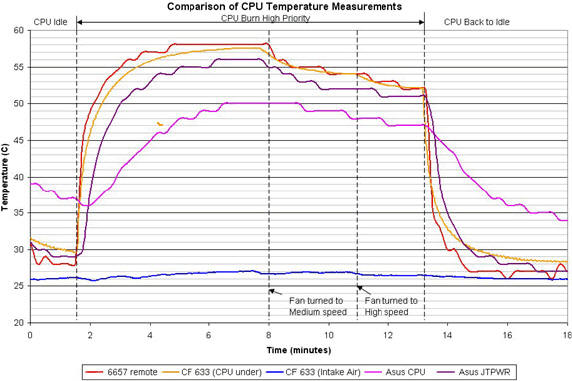
Above is a comparison of CPU temperature taken from the ASUS internal diode (6657 remote), the backside of CPU ceramic (CPU under), the side of CPU with a flat thermistor(Asus JTPWR), and the Asus socket probe (Asus CPU.)
|
AfterDawn Addict
1 product review
|
19. March 2006 @ 17:44 |
Link to this message
|
Scuba
Quote:
Sensor(s) as in both a socket thermistor and also the cpu temp diode.
Agreed but Asus probe still reads from the bios. And quoting stuff you don't understand doesn't improve your point.
All this surfing must be killing you.;)
I'll check on you tomorrow.
" Please Read!!! Post your questions only in This Thread or they will go unanswered:
Help with development of BD RB: Donations at: http://www.jdobbs.com/. This message has been edited since posting. Last time this message was edited on 19. March 2006 @ 17:47
|
|
ScubaBud
AfterDawn Addict
|
19. March 2006 @ 18:03 |
Link to this message
|
|
You like the facts and so do I so I just wanted to point out what I believe is a bit of dancing on your part, ?sensor(s).?
I stated from the beginning that the bios takes it's reading from the internal diode and Asus Probe takes it from the socket thermistor, (bios vs software.)
Maybe you can provide a link as well that states Asus Probe takes it readings from the exact same sensor as the bios. What I stated and what I show are pretty simple to understand for most.
Thanks for checking in on me, much appreciated. <G>
|
|
64026402
Senior Member
|
19. March 2006 @ 18:15 |
Link to this message
|
|
The Asus software has no direct connect to any sensors. Everything goes through the Bios.
Most of the time it mirrors properly. I have seen the occasional update for temp accuracy problems but for the most part if the bios is accurate the Asus probe is also.
Donald
|
AfterDawn Addict
1 product review
|
19. March 2006 @ 20:21 |
Link to this message
|
|
Scuba
Then reason this, 100% of all motherboard processes that can be read in windows are read through the bios, there is no other way for the motherboard to communicate with Windows or any other software but through the bios. When they come out with a system that allows one to boot into the bios and windows at the same time then one can say with certainty that there is or is not a difference between measures. But Asus probe just mimics what it is reading from the bios.
" Please Read!!! Post your questions only in This Thread or they will go unanswered:
Help with development of BD RB: Donations at: http://www.jdobbs.com/. |
|
brobear
Suspended permanently
|
19. March 2006 @ 23:17 |
Link to this message
|
|
Sophocles
Getting back to that Antec power supply; I'm not overly dumb (against popular belief) and I noticed the 4 pin connector that separates from the 20 pin connector. Only one problem; the Asus board 4 pin connector requires 2 12V+ and 2 GRND and the Antec has a 12, 5, and 3 volt along with a ground. The power supply from the Dell was set up for a similar board and just plugged in and started running things straight away. That's what I'm on now till I get the replacement.
|
|
Advertisement
|
|
|
|
ScubaBud
AfterDawn Addict
|
20. March 2006 @ 01:24 |
Link to this message
|
|
Sophocles
Good morning :)
I don't disagree with what you just said in the least. Now how about this:
I stated in my First Post about Hardware Monitor vs Software. Let me clarify what I was trying to explain once more.
Hardware Monitor, (positioned in the bios,) takes it's reading from the internal diode and Asus Probe, (software, a program that is accessed within Windows,) takes it?s readings from the socket thermistor, two totally different sensors. My point to RebelRide was the possiblity of obscure temp readings from either bad sensors or bad software readings taken from those sensors. I believe you stated that they both take their readings from the same sensor, monkey see monkey do.
|


