|
Post your Nero cd/dvd speed quality scans here
|
|
Senior Member

|
24. December 2006 @ 09:59 |
Link to this message

|
This message has been edited since posting. Last time this message was edited on 24. December 2006 @ 10:01
|
|
Advertisement

|
 |
|
|
|
Allen42
Newbie
|
24. December 2006 @ 18:04 |
Link to this message
|
|
Thanks, but they're out of stock.
What is the next best one, and will it support DVD-ROM booktyping?
|
Senior Member
|
24. December 2006 @ 18:12 |
Link to this message
|
|
AfterDawn Addict
4 product reviews
|
25. December 2006 @ 08:01 |
Link to this message
|
ive just downloaded smartburn for the liteon..i dont really know what it is supose to do anyone who does mind putting some insite on it for me.. here is a screen shot of the 3 stages. where should i have them set at?


dont know if i should have had this going from the first burn i tried with the liteon... or if it will help these new verbs MCC03RG20
|
Senior Member
|
25. December 2006 @ 11:27 |
Link to this message

|
|
Never heard of this before Rob, let me look into it,
by the way,
Merry Christmas to all from "Sunny" CHarlotte, NC.
|
AfterDawn Addict
4 product reviews
|
25. December 2006 @ 11:42 |
Link to this message

|
|
i just went to the liteon website just checking for firmware update, like i do every now and then... seen this smart burn thing... seems to remember the media it has burned and keeps the settings for that media to keep quality burns... kinda like the benQ drives.... what made me look for it. i seen that new 20x liteon and it said something about smart burn. so i looked to see if our Drive had this also and it does so i downloaded it but dont really know what to do with it
This message has been edited since posting. Last time this message was edited on 25. December 2006 @ 11:44
|
AfterDawn Addict
4 product reviews
|
25. December 2006 @ 19:07 |
Link to this message
|
|
from what i just read again at the liteon site. all the smartburn is , is a program to tell you what kind of media you have..
|
Moderator
|
26. December 2006 @ 13:45 |
Link to this message
|
@cincyrob
Yeah that's all I think that utility does.
The smartburn option that LiteOn's have assesses the dvd for the proper writing strategy and it's the buffer underrun prevention - something along those lines.
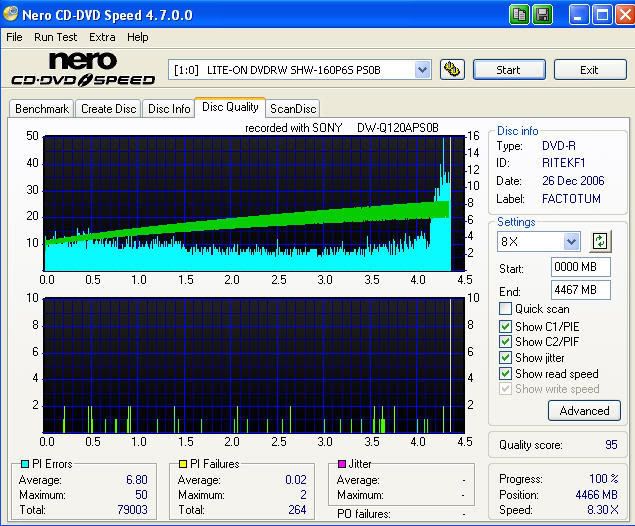
Here's a scan of those Memerox my kid bought me - not bad - at least they're Ritek.
|
AfterDawn Addict
4 product reviews
|
26. December 2006 @ 14:08 |
Link to this message
|
|
so its not really gonna do anything to help with the qualit of a burn, or remembering when it has a good burn and keeps that info for future burns.....
not a bad scan at all. how does it play? im still not sold on these new verbs MCC03GR20...gonna do a few movies tonight should be off work early to get some in..
be a shame if these disc arent that good(which is what i think).granted i have only burnt 4 of them on the liteon drive..the only thing thats been in this drive is the hub printable 8x verbs i got from neweeg and the 16x+r verbs i got from best buy.. and 3 or for TY's thats it... am getting low on the hub printable only about 10-12 left.
like i said before about them.. the scans i have done look bad but they play great.... just wonder how they will play down the road..
|
Moderator
|
26. December 2006 @ 14:45 |
Link to this message
|
|
Nope - not from what I found. The SmartBurn 'technology' is part of the drive itself - not a utility.
I skimmed thru the disc and all seemed ok - I'm going try and watch it tonite.
Yeah the MCC03 - I just slowed the burn speed down to 8x and they're doing better - or maybe it's just cause I'm using a new spindle. Could be that too.
I think we'll be fine down the road with them - but only time will tell :)
|
AfterDawn Addict
4 product reviews
|
26. December 2006 @ 14:58 |
Link to this message
|
|
my first burn with them i did at 8x.. scan was bad got a 84.. went up to 12x and got a 90.. but alL Of them play fine
|
AfterDawn Addict
4 product reviews
|
26. December 2006 @ 19:26 |
Link to this message
|
|
just did all the kings men and invincable..kingsmen @8x not to good of a scan but is playing perfectly right now...invincable i burnt @12x and so far the scan looks great. will post both scans when done
This message has been edited since posting. Last time this message was edited on 26. December 2006 @ 19:27
|
AfterDawn Addict
4 product reviews
|
26. December 2006 @ 19:44 |
Link to this message
|
ok here we go
all the kings men burnt @ 8x. dont look good but playsgreat

and invincable here. started off great them got hit with some bad PIF's still not that bad of a scan. it was burnt @12x. i think the 12x is a good speed for these. might try 16x and see

|
AfterDawn Addict
4 product reviews
|
27. December 2006 @ 03:00 |
Link to this message
|
heres another one on those crappy verbs.one of the boys movies. the wiggles.

|
AfterDawn Addict
4 product reviews
|
27. December 2006 @ 05:42 |
Link to this message
|
now this is the way they are supose to look.. had to get a real disc to burn on....8x+r hub printable verb....MMM MMM good.

gonna do a multiple burn next. one for the boys and gran parents...gonna use the mcc03gr20 and the regular 16x+r verb
|
AfterDawn Addict
4 product reviews
|
27. December 2006 @ 07:36 |
Link to this message
|
well here is the last of the crappy MCC03GR20's that i burn...
they shouldnt be allowed to have verbatims name on these, and if it is verbatims doing then shame on them....
the first scan is of the 16x+r's MCC004 pretty desent scan
second is the same movie on the nasty MCC03GR20


even without a receipt im gonna try and take these back to office max and see if they will let me trade for a 50pc cake of the +r verbs
|
|
aabbccdd
Suspended permanently
|
27. December 2006 @ 08:01 |
Link to this message
|
|
think i will cancel my order
|
Junior Member
|
27. December 2006 @ 08:02 |
Link to this message
|
Cant say anything bad about these Verbatims from Office Max. So far about 30 burns and everything is great. 93-98 quality rate.

NOW THIS IS BAD SCAN :) BAD MEDIA.... (one of my first years ago)

|
AfterDawn Addict
|
27. December 2006 @ 08:34 |
Link to this message
|
|
That's one funky scan you got going on there! ;P
|
AfterDawn Addict
4 product reviews
|
27. December 2006 @ 09:16 |
Link to this message
|
|
granted the last 2 are a multiple burn 2 at once. but my other multiple burns dont look like that.... i did call office max and they told me to bring them back and they will give me a gift card to get something else.
|
AfterDawn Addict
|
27. December 2006 @ 11:07 |
Link to this message
|
I can't let ya'll have all the fun here without me, especially this thread LOL. By the way; "Happy New Year" to all.
Since I'm sucha "Hitachi Maxell-holic" beside YUDENs, I'll spice up this thread with a recent backup of mine "THE DESCENT."
Don't get me wrong ladies and gentlemen, I love VERBs. especially "Advanced Azo" -- matter of fact, Taiyo Yuden, Verbatim and Hitachi Maxell (MIJ) are the only 3 media I use now. With that in mind, I've used tons, at least close to hundred (MCC004) and for some odd reason I've noticed that the Verbs has got more "PI" than YUDENs and Hitachi Maxells. No biggie though, still plays flawlessly on any of my DVD players.


|
|
aabbccdd
Suspended permanently
|
27. December 2006 @ 11:46 |
Link to this message
|
|
i canceled my Verbatims from officemax ,not going to take the chance with 350 of them .gonna stick with the Taiyo Yudens
|
AfterDawn Addict
4 product reviews
|
27. December 2006 @ 13:08 |
Link to this message
|
|
good call aabbccdd. im takeing the ones i didnt open back tomorrow. they told me they couldnt take back the ones open cause of it being electronic's???dvd's have electricity in them,????? oh well its only 7.98...
i hope when i get there they forget to see they were on sale when my parents bout them.. take em back and get at least 100 +r's might have to toss in a couple bucks but worth it... once again ya get what ya pay for..
i was wrong earlier i said a had some of the hub printable verbs left.. ouch im down to only 5....
This message has been edited since posting. Last time this message was edited on 27. December 2006 @ 16:56
|
Senior Member
|
27. December 2006 @ 14:07 |
Link to this message
|
heres one of mine verbatims


EDIT this is my first scan. what effects quailty score? and how important are they?
This message has been edited since posting. Last time this message was edited on 28. December 2006 @ 04:00
|
|
Advertisement
|
|
|
|
aabbccdd
Suspended permanently
|
27. December 2006 @ 14:56 |
Link to this message
|
|
yeah mine were backed ordered thank God so i called them a few hours ago and said the reviews have been poor so far. so just cancel my order i have 600 TGO2s anyway
|






