|
|
|
The (new) Official PC building thread!
|
|
AfterDawn Addict
4 product reviews

|
19. March 2008 @ 23:54 |
 Link to this message

|
|
Duly noted, I'll pass that on.
|
|
Advertisement

|
|
|
|
AfterDawn Addict
|
20. March 2008 @ 02:05 |
Link to this message
|
cincyrob,
Quote:
is it better to use a lower or higher multi # when OC'ing? i know ive asked this but i dont really remember the answer...loli set at me 3.6ghz but i would like to get my mem up a little bit more above the 800mhz its at now. granted its stable.well not sandra stable...lol
Last thing first! If it's not Sandra stable, then it's not stable, period! I'm even more critical, as if it won't pass 12 hours of Orthos, then it isn't stable. Even then, if it won't complete the work units folding, then it still isn't stable! This is a job that the computer should do without error, and in Folding's case, it happens to show that there are errors that don't show in orthos. I've been there and done that, so I know!
Second issue
I'm not looking for an argument so if someone wants to argue, don't direct it at me as this is not open for discussion! It's my opinion and I'm entitled to it! I prefer to use the highest CPU multiplier, as do most of the folks I know that overclock, and I know some of the best, including the good Doctor! One of two things is happening here. Either you have a CPU that just won't overclock as much as you want, or something in your CPU settings is causing the problem. It may be something as simple as a poor caliber Power supply! Voltages are more critical as you increase your overclock! My advice to you is to set it at the default settings and start from there, set the CPU voltage to default, carefully checking all the settings. It should reach at least 3.5GHz at that voltage! Intel only guarantees that the CPU will run properly at it's native speed. They don't give a rats a$$ one way or another as long as it runs stock speed properly. Leave the memory at the 2.0 multiplier and concentrate on getting the CPU speed up until it fails and then lower the fsb a couple of MHz. I generally like to drop a couple of more MHz to be safe. No sense dangling your feet over the edge of a cliff!
I know Abuzar is screaming right now, but he lacks patience and the day he majorly blows something up with his approach of setting it to what he wants to get out of it, and firing it up! He'll get a chance to learn some patience as he's waiting and hoping that Intel will replace the CPU he damaged by being foolish. He's been lucky so far, but that luck won't last forever. He's fortunate that this isn't 10 years ago and that OCing is much easier and more forgiving today, but that luck won't last forever! Sooner or later he will learn a valuable and hopefully not expensive lesson. I'm not picking on Boozer, but just telling it like it is!
Intel has been very liberal with their exchange policy, but they know exactly why any CPU failed. Anyone that thinks otherwise, don't know didly! Intel damn well knows if you upped the voltage too far. The reason we can overclock at all is because Intel designs their CPUs and sets the published voltage limits lower than they know the CPU will safely run. The E6750's published voltage limit is 1.35v. We all know that it's safe to go as high as 1.50v with that CPU, but given tolerances and minute differences in all CPU's, that doesn't mean you can go over that voltage. I know some of the Extreme overclocking forums advocate voltages as high as 1.60v. I also think that they are damn foolish!
I have a question! If it's not Sandra stable, why do you want to muck around with the memory speed right now. If the CPU isn't stable enough for Sandra, then what's the point of increasing the memory speed? It still won't be stable. I think that goes under the heading of absolute futility! LOL!!
Quote:
and on your Red and Black NZXT case a Raiders LOGO would look nice...
You best be meaning Silver and Black, as they would tear your heart out in Oakland for saying that! LOL!! I'm an original Oakland Raider fan from day one, so watch it! ROFLMAOTIP!
Best Regards,
Russ
GigaByte 990FXA-UD5 - AMD FX-8320 @4.0GHz @1.312v - Corsair H-60 liquid CPU Cooler - 4x4 GB GSkill RipJaws DDR3/1866 Cas8, 8-9-9-24 - Corsair 400-R Case - OCZ FATAL1TY 550 watt Modular PSU - Intel 330 120GB SATA III SSD - WD Black 500GB SATA III - WD black 1 TB Sata III - WD Black 500GB SATA II - 2 Asus DRW-24B1ST DVD-Burner - Sony 420W 5.1 PL-II Suround Sound - GigaByte GTX550/1GB 970 Mhz Video - Asus VE247H 23.6" HDMI 1080p Monitor
 This message has been edited since posting. Last time this message was edited on 20. March 2008 @ 02:18
|
AfterDawn Addict
2 product reviews
|
20. March 2008 @ 06:15 |
Link to this message

|
|
Hey now, I'm not screaming right now lol.
I actually started off at 3.4 and up it up for there slowly. So I'm not being as impatient as before and setting it to my goal. It's pretty stable. I will download sandra and post some benches soon.
|
AfterDawn Addict
|
20. March 2008 @ 07:40 |
Link to this message
|
abuzar1,
Quote:
I actually started off at 3.4 and up it up for there slowly. So I'm not being as impatient as before and setting it to my goal. It's pretty stable. I will download sandra and post some benches soon.
You do realize the 3.4 for that processor is 1GHz over stock speed? That's a 42% OC as a starting point, with a CPU that has a reputation of not being the best overclocker around. It turned out all right as nothing blew up, but that's just too high a speed to start with. At that point you have no idea whether all the parts will even work properly together, or mesh with one another! Long term, doing something like that will eventually burn you! It's a bit like jumping into a strange car without checking to see if all the important things are working properly and finding out the hard way that the brakes don't work.
I know some really good, highly experienced overclockers, and not one of them would have ever started out at such a high speed. There must be some reason for that! The main reason that you can exchange most computer parts within 30 days without going direct to the manufacturer as the percentage of failure is highest during that time period. The sole reason they do it that way is to take care of you the customer, without the hassle and time usually involved with going through the manufacturer. My replacement D-940 was shipped today from Intel. Had it been purchased less than 30 days before the failure, I would have had it about a week ago. No complaint there as Intel did take care of my problem, and failures like that don't happen that often. Usually if something electronic lasts 30 days, it will usually last for years!
You can usually get your overclock to about 90% done, in reasonably short amount of time. The last 10% or so takes a bit longer, like months. The reason is that the changes you make are usually much smaller, and each change you make takes time to test. That perfect running computer like my D-940 was at 3.94GHz ran flawlessly until I tried to fold with it. It passed every test and benchmark with flying colors, yet it wouldn't complete the Work Units, which means that there were errors that went unseen in all the other tests. I eventually had to back it down to 3.71 to get it to do that properly. If you can get it to fold properly, it will do just about anything with no problems at all. You know that it's stable and don't wind up with any surprise glitches. I'm not saying that something can't go wrong, but your chances are very good that nothing will!
As I've said before, memory is the darkest art in overclocking. It takes a considerable amount of time as you can't make large changes without creating problems. You may not improve the processor speed, but you will improve the throughput, usually by improving the memory bandwidth. This means that you improve the overall speed at which the computer executes it's instructions by shortening the amount of clock cycles it takes to to do the same amount of work. ie: A faster computer!
Best Regards,
Russ
GigaByte 990FXA-UD5 - AMD FX-8320 @4.0GHz @1.312v - Corsair H-60 liquid CPU Cooler - 4x4 GB GSkill RipJaws DDR3/1866 Cas8, 8-9-9-24 - Corsair 400-R Case - OCZ FATAL1TY 550 watt Modular PSU - Intel 330 120GB SATA III SSD - WD Black 500GB SATA III - WD black 1 TB Sata III - WD Black 500GB SATA II - 2 Asus DRW-24B1ST DVD-Burner - Sony 420W 5.1 PL-II Suround Sound - GigaByte GTX550/1GB 970 Mhz Video - Asus VE247H 23.6" HDMI 1080p Monitor
|
AfterDawn Addict
4 product reviews
|
20. March 2008 @ 08:27 |
Link to this message
|
@Russ
speaking stability here.i'v had it runnning orthos for allmost 14 hrs and it is fine there at my current settings, but this is what i get with sandra.
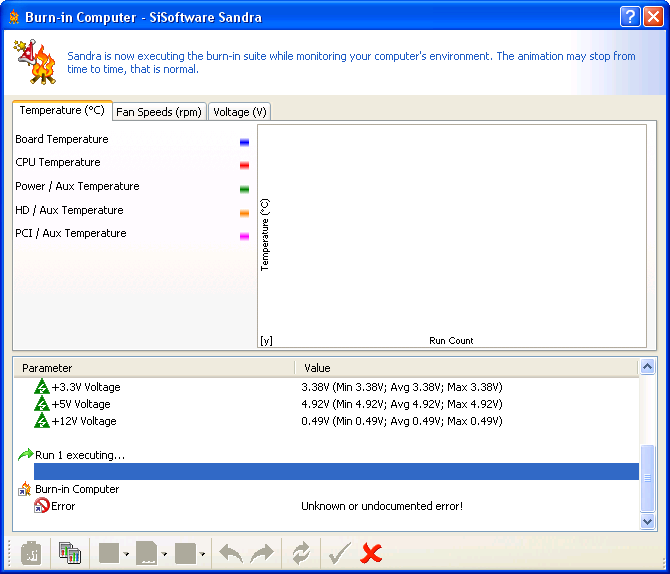
now i dont know much about sandra so i dont know what is that is giving the error. is there a report of some sort that tells me what caused the error?
should i put it all back to stock settigns and try and run sandra? will that be stable at those settings???
as for the Oakland Raiders.. of course i was meaning a Silver and Black logo..lol skull and crossbones...
|
AfterDawn Addict
2 product reviews
|
20. March 2008 @ 09:32 |
Link to this message
|
|
Anyway, back to what I was saying. The NEW Ballistix 800 don't overclock well at all. I've bought about 4 sets in the past few months and these the ones the by far the worst.
|
AfterDawn Addict
4 product reviews
|
20. March 2008 @ 10:09 |
Link to this message
|
guess im gonna need to take this thing to someone who knows what the hell there doing. i ran the analysis and advice and man is there a boat load of stuff i have no idea what it means, and it cant be good..i see this all over in the analysis
Quote:
Notice N224 - SMBIOS/DMI information may be inaccurate. This information is reported verbatim and cannot be checked by Sandra. While brand-name companies set this information most generic manufacturers use generic data that is meaningless. This issue generates more technical support queries than all other issues combined.
Fix: If the information is not correct, check for a BIOS update (clear DMI pool) or fix any errors using the DMICFG tool provided with the board. Alternatively, disable Sandra?s DMI/SMBIOS reporting from module Options.
and this in the mainboard section
Warning W214 - The BIOS can be updated (flashed) but is surface mounted. If the update goes wrong you may not be able to get a new chip to replace the old BIOS. This does not mean that you cannot recover from an unsuccessful flash but it removes an option. (Intel main boards and those using AWARD BIOS have a recovery option)
Fix: You cannot fix this - but keep it in mind when your buy your next main board.
then i have this here about the BIOS update i did from F9 to F11
Tip T212 - The BIOS can be shadowed. Shadowing is a technique of copying the BIOS program from slow EPROM or EEPROM to RAM. This may yield some increase in performance.
Fix: Go to BIOS set-up and make sure that System BIOS is both shadowed and cached
how and where do i do this?
these are a few of many errors/tips/warnings?
any tips for fixing this stuff?
also im at default settings right now and its still not stable in sandra
This message has been edited since posting. Last time this message was edited on 20. March 2008 @ 10:46
|
AfterDawn Addict
4 product reviews
|
20. March 2008 @ 11:15 |
Link to this message
|
I followed Russ' mentality about the overclock. The highest speed my CPU will reach at the voltage I use now (1.4V, that's as high as I want it going) is 3170mhz stable. I run it at 3150mhz to be assured stability, and it's also noticeably faster than at 3170mhz.... :S
As far as I'm concerned, being a full 100mV under the "general best practice" limit, and only a third of the way up said scale, I'm expecting the CPU to last sufficiently long before it becomes outdated. Sure, it's not going to make the average 15-20 years a stock CPU will last, but I figure 5 years is probably plenty. 5 years ago puts me back at an Athlon XP 2000+ or something along those lines, and I sure wouldn't be using one of those now... Given that CPU development doesn't seem to have been hit by the stagnation of the other PC component industries, I expect in 5 years time this CPU will also seem like a snail. Within a year or so I'm hoping to upgrade to a Q9450 anyway, but that certainly isn't going to be imminent. I've got to get Crossfire sorted first! :)
Believe it or not when I first started overclocking this CPU, I went for 2.25Ghz initially at stock voltage, then 2.66Ghz, which I left it at for quite some time, this was at 1.42V (stupid P5N-E board.. lol), I eventually managed to get it to 3.0Ghz, but the main reason for the slow progress was trying to weave my way through all the FSB black holes that the P5N-E had. When I got my Gigabyte board, I immediately chose the 3Ghz settings that I had for the Asus board, didn't POST. Forgot to change the memory multiplier! lol! Changed it to something reasonable and it worked right off the bat. After a couple of days stability testing I upped it to 3.15Ghz where it sits now. I've occasionally tried tinkering to get it higher, but without more voltage, I don't think it's going anywhere. Personally, I'm more than happy with 3.15, that's a full 75%, or 1.35Ghz above stock!
Originally posted by cincyrob:
the BIOS can be updated (flashed) but is surface mounted.
Ah, so that's why I didn't spot the BIOS chip on my board! That kinda sucks. Yeah I'm definitely not risking a BIOS flash on this board now.
Does anybody know if the X38-DQ6 supports the 45nm chips off the bat with no flash required?
Rob: None of that is actually a problem, it's all just notifications. Nothing is actually wrong there, per se.
|
AfterDawn Addict
4 product reviews
|
20. March 2008 @ 11:28 |
Link to this message
|
well ive had it running at the 3.6ghz 800mhz on the mem and its been stable in orthos but i get that unknown error in sandra????
i have it back at 3.6 right now. gonna run orthos on it again for 24 hrs...should i use the blend. to test cpu and mem or just the small fft's and test CPU only?
also should i back it down to say 3.5ghz?
i hate not knowing enough about this stuff. trying to figure it out is a pain in the azz when i dont have enough time to really learn it
|
AfterDawn Addict
4 product reviews
|
20. March 2008 @ 11:36 |
Link to this message
|
|
when i went in to change the mem volts i forgot it is supose to be 2.2v i have it at 2.1 should i change it to the 2.2v(rated) or is it ok there?
|
AfterDawn Addict
4 product reviews
|
20. March 2008 @ 11:40 |
Link to this message
|
|
based on other people's reviews I think you should use 2.2V, it's not going to cause any harm when it's what the memory's rated for.
|
AfterDawn Addict
|
20. March 2008 @ 15:59 |
Link to this message
|
cincyrob,
Boy, you sure get your panties in a knot easy! LOL!! Most of the errors you are getting are virtually meaningless, in general!
Quote:
Warning W214 - The BIOS can be updated (flashed) but is surface mounted. If the update goes wrong you may not be able to get a new chip to replace the old BIOS. This does not mean that you cannot recover from an unsuccessful flash but it removes an option. (Intel main boards and those using AWARD BIOS have a recovery option)
Our boards have a recovery option which saves the bios, so it doesn't mean very much. Just because you can't change the bios chip doesn't mean you have a lousy motherboard. I've managed to blow up exactly "one" bios in over 250 builds and thousands of repairs. This was on an inexpensive BioStar GForce motherboard with an AMD Athlon 64, 4000+, so the risk is highly overblown! It wasn't even my fault as Biostar accidentally had the bios for the TForce in the downloads for the GForce. They overnighted me a new MB and gave me 30 days to return the old one without charge. PITA? Yes, but not really that big a problem!
Quote:
Tip T212 - The BIOS can be shadowed. Shadowing is a technique of copying the BIOS program from slow EPROM or EEPROM to RAM. This may yield some increase in performance.
Fix: Go to BIOS set-up and make sure that System BIOS is both shadowed and cached
More often than not this can cause stability problems and crashes! Same goes for shadowing the Video bios. On my DS3R 2.0, there is no shadowing for either. With the speeds we run the fsb these days and the performance of the modern Intel chips, being able to use shadowing is close to meaningless, unless you are counting every MIP. It just doesn't mean that much! I tried shadowing the bios and the Video bios on the "Retro", and it crashed with either or both turned on! It happens more often than not. Back in the days of the 133 fsb it was helpful to the performance, if it didn't crash the computer. More often than not it caused problems.
It's rare that you get a meaningful message in any of those so called errors and warnings. They also often warn you about the processor speed being higher than rated, or the fsb is to high! DUH!! Of course it is! We overclock! ROFLMAO!
These error messages are caused, for the most part because of software that has to make many allowances because of all the different platforms, chipsets and bios. Usually these messages and errors are not errors at all, but are more in the area of opinions that reflect the CPU manufacturers recomendations for their CPUs. It's the board manufacturers way of saying to them that "we don't really advocate overclocking"! It's a bit of A$$-Kissing and nothing more!
sammorris,
Quote:
Ah, so that's why I didn't spot the BIOS chip on my board! That kinda sucks. Yeah I'm definitely not risking a BIOS flash on this board now.
Does anybody know if the X38-DQ6 supports the 45nm chips off the bat with no flash required?
That's a bit silly! Flashing a bios on one of these motherboards is not a very high risk at all. I've done it many times with my DS3R. The only way to wind up in trouble is if the wrong bios is used, or the power goes off while you are flashing. I have a UPC, so it shouldn't be a problem, ever! It's not the "Peril" of the old days. I do it right from the setup program with Q-Flash
Best Regards,
Russ
GigaByte 990FXA-UD5 - AMD FX-8320 @4.0GHz @1.312v - Corsair H-60 liquid CPU Cooler - 4x4 GB GSkill RipJaws DDR3/1866 Cas8, 8-9-9-24 - Corsair 400-R Case - OCZ FATAL1TY 550 watt Modular PSU - Intel 330 120GB SATA III SSD - WD Black 500GB SATA III - WD black 1 TB Sata III - WD Black 500GB SATA II - 2 Asus DRW-24B1ST DVD-Burner - Sony 420W 5.1 PL-II Suround Sound - GigaByte GTX550/1GB 970 Mhz Video - Asus VE247H 23.6" HDMI 1080p Monitor
This message has been edited since posting. Last time this message was edited on 20. March 2008 @ 16:15
|
AfterDawn Addict
2 product reviews
|
20. March 2008 @ 16:14 |
Link to this message
|
|
Well turns out everything was stable at 3.6... except for prime 95. I've lowered it down to 3.3ish, gonna do a 10 hour burn in with Prime 95. If it's stable I'll go from there.
Hey Russ, what's the most you would turn up the volts on this thing?
|
AfterDawn Addict
|
20. March 2008 @ 16:30 |
Link to this message
|
abuzar1,
Quote:
Hey Russ, what's the most you would turn up the volts on this thing?
I wouldn't exceed 1.50v! The Q6600 has a fairly broad range, from .85v to 1.5v, same as my E6750. I keep mine a few clicks below that and have no problems at 1.47v (reported in Everest and CPUz). I prefer to go by what's reported, rather than what you actually set it at in the bios!
I'm not even fussed anymore about not having the 1066 memory. When the price is right and I have the money, I'll get it. I'm so pleased with how nice it runs, I may never get it for this machine! It's plenty fast enough for me as it is!
Best Regards,
Russ
GigaByte 990FXA-UD5 - AMD FX-8320 @4.0GHz @1.312v - Corsair H-60 liquid CPU Cooler - 4x4 GB GSkill RipJaws DDR3/1866 Cas8, 8-9-9-24 - Corsair 400-R Case - OCZ FATAL1TY 550 watt Modular PSU - Intel 330 120GB SATA III SSD - WD Black 500GB SATA III - WD black 1 TB Sata III - WD Black 500GB SATA II - 2 Asus DRW-24B1ST DVD-Burner - Sony 420W 5.1 PL-II Suround Sound - GigaByte GTX550/1GB 970 Mhz Video - Asus VE247H 23.6" HDMI 1080p Monitor
|
AfterDawn Addict
2 product reviews
|
20. March 2008 @ 16:42 |
Link to this message
|
|
Well it's definitely not the memory holding me back this time.
Anyway Everest says the voltage is at 1.36v but I set it to 1.425. So should I go by 1.5 in the BIOS or 1.5 in Everest?
|
Senior Member
|
20. March 2008 @ 16:52 |
Link to this message
|
|
theonejrs You were absolutely correct about Gigabyte evdently my emails were not going through and was responded to real quick on this last one.Time to find another 939 Gigabyte board only for sentimental reasons.
|
AfterDawn Addict
|
20. March 2008 @ 17:08 |
Link to this message
|
ChrisC586,
Quote:
20. March 2008 @ 13:52 _ Link to this message Report an offensive post Send private message to this user
theonejrs You were absolutely correct about Gigabyte evdently my emails were not going through and was responded to real quick on this last one.Time to find another 939 Gigabyte board only for sentimental reasons.
I'm glad that you were taken care of quickly. One thing about Maggie, besides her being a very nice person! She cares deeply about what she does. She's the best! GigaByte Rocks!
What 939 MB are you looking for? If I know that I can keep my eyes open for one for you.
Best Regards,
Russ
GigaByte 990FXA-UD5 - AMD FX-8320 @4.0GHz @1.312v - Corsair H-60 liquid CPU Cooler - 4x4 GB GSkill RipJaws DDR3/1866 Cas8, 8-9-9-24 - Corsair 400-R Case - OCZ FATAL1TY 550 watt Modular PSU - Intel 330 120GB SATA III SSD - WD Black 500GB SATA III - WD black 1 TB Sata III - WD Black 500GB SATA II - 2 Asus DRW-24B1ST DVD-Burner - Sony 420W 5.1 PL-II Suround Sound - GigaByte GTX550/1GB 970 Mhz Video - Asus VE247H 23.6" HDMI 1080p Monitor
|
Senior Member
|
20. March 2008 @ 17:30 |
Link to this message
|
|
Just talked to Maggie again and this board is still under the warranty so issuing me a RMA .The boards my original K8N SLI 939 board,was my first build and a learning experience. Sentimental like the first car.I'll see what they come up with, I've got the other builds going so I'm not at a disadvantage, but the bloods been flowing with all the dicussions on the intels and I might have to jump ship from the AMD's . Thanks again and a happy Easter to all.
|
AfterDawn Addict
|
20. March 2008 @ 17:57 |
Link to this message
|
|
ChrisC586,
You are more than welcome. Glad to help! Maggie's the best!
"GigaByte Rocks"
Russ
GigaByte 990FXA-UD5 - AMD FX-8320 @4.0GHz @1.312v - Corsair H-60 liquid CPU Cooler - 4x4 GB GSkill RipJaws DDR3/1866 Cas8, 8-9-9-24 - Corsair 400-R Case - OCZ FATAL1TY 550 watt Modular PSU - Intel 330 120GB SATA III SSD - WD Black 500GB SATA III - WD black 1 TB Sata III - WD Black 500GB SATA II - 2 Asus DRW-24B1ST DVD-Burner - Sony 420W 5.1 PL-II Suround Sound - GigaByte GTX550/1GB 970 Mhz Video - Asus VE247H 23.6" HDMI 1080p Monitor
|
AfterDawn Addict
6 product reviews
|
20. March 2008 @ 18:42 |
Link to this message
|
Russ,
Quote:
I wouldn't exceed 1.50v! The Q6600 has a fairly broad range, from .85v to 1.5v, same as my E6750. I keep mine a few clicks below that and have no problems at 1.47v (reported in Everest and CPUz). I prefer to go by what's reported, rather than what you actually set it at in the bios!
what happened to you not being willing to go over 1.4v? what changed your mind?
Quote:
I'm glad that you were taken care of quickly. One thing about Maggie, besides her being a very nice person! She cares deeply about what she does. She's the best! GigaByte Rocks!
who ever said it's not who ya know? you know the Doc and he just happened to be a personal friend with Maggie. makes all the difference in the world huh.
maybe I can find somebody who has a personal friend that is with Asus. I'd bet I would get first rate service from Asus too. know what I mean :) not that I will be needing any customer support from Asus hopefully, but it would be nice just in case.
BTW, don't take this wrong. just making a point.
Rig #1 Asus Rampage Formula Mobo, Intel Core2Quad Q9450 CPU @ 3.55ghz, 2gb Corsair DDR2 1066 Dominator Ram @ 5-5-5-15, TR Ultra 120 Extreme w/ Scythe 9 blade 110 cfm 120mm Fan HSF, HIS Radeon 512mb HD3850 IceQ TurboX GPU, Corsair 620HX P/S, CM Stacker 830 Evo Case, Rig #2 Asus P5W DH Deluxe Mobo, Intel C2D E6600 CPU @ 3.6ghz, 2gb Corsair XMS2 DDR2 800 Ram @ 4-4-4-12-2t, Zalman CNPS9500LED HSF, Sapphire Radeon X850XT PE GPU, Corsair 620HX P/S, Cooler Master Mystique Case, Viewsonic 20.1" Widescreen Digital LCD Monitor, Klipsch Promedia Ultra 5.1 THX Desktop Speakers, http://valid.x86-secret.com/show_oc.php?id=348351 http://valid.x86-secret.com/show_oc.php?id=236435This message has been edited since posting. Last time this message was edited on 20. March 2008 @ 18:42
|
AfterDawn Addict
4 product reviews
|
20. March 2008 @ 19:16 |
Link to this message
|
|
Mort: haha, if you find someone, be sure to let me know!
Theone: Hmm, interesting. It'd still be nice not to have to do it in the first place.
Who around has an X38-DQ6 Gigabyte board, or similar? I'm sure someone has... NuckNFuts or BigDK perhaps? I'm keen to know how to deal with the chipset cooling if you use a Thermalright CPU cooler.
OK Folks, I'm away from now until Monday night for the easter break.
Have fun guys, no doubt i'll have a dozen pages to read when I get back!
This message has been edited since posting. Last time this message was edited on 20. March 2008 @ 20:15
|
AfterDawn Addict
|
20. March 2008 @ 22:30 |
Link to this message
|
Mort81,
Quote:
who ever said it's not who ya know? you know the Doc and he just happened to be a personal friend with Maggie. makes all the difference in the world huh.
That's not quite true! I didn't know that he was a friend of hers until after they took care of me so well. In fact I e-mailed Doc and asked him about a month later. Even then when I asked, I was guessing. I knew that he knew someone that worked there, as he told me that when he sent me the link for the Rev. 1.33 965P-DS3. It turns out that she was the one that gave him the heads-up on that MB at a very good price. But to answer your question, no it doesn't hurt to know someone! I never mentioned it because it had no impact whatsoever on how they treated me with the MB swap or the quickie RMA, and I didn't want to mention the Good Doctor in that way! I never even considered asking him if I could mention it!
When I raved about the way they handled everything, I had no Idea at all that his friend was Maggie. In fact I felt kind of silly as like I said, I knew Doc had a friend there, and I even mentioned that I had a friend who had a friend that worked there, about a month later when I sent her a heads-up on my computer. She never said a word, one way or the other. When I did find out about it, I never mentioned it here as it had nothing to do with how I was treated at the time and I just didn't need the hostilities that would surely have followed as there was a bit of Asus/Gigabyte "Fanboyism" conflict going on here at the time. At that point it was no one's business! She and I have become casual friends. She's a terrific Lady that knows how to get things done! I like her approach to getting things done. I like the product very much and I'm more than happy with their Technical Service as well. I sent her a heads-up on ChrisC586's complaint, and a follow-up thanking her. I would do it again tomorrow if someone else had a problem. I know that I have had some influence on some of the GigaByte purchases here, and I've never had a complaint from any of them about the product, but I have had several thank you PMs.
I have no problem with being a GigaByte fanboy. In my eyes they've earned it by the way they treated me before any of this was known!
"GigaByte Rocks"!
Best Regards,
Russ
P.S.Quote:
what happened to you not being willing to go over 1.4v? what changed your mind?
1.4v was the practical limit until the E6750 came out. I also talked to a friend of mine that works for Intel and 1.5v is what I was told for that series, after he looked into it for me. I would never try to do that with any of the older chips. For them, the limit in my mind is still 1.4v!
Quote:
maybe I can find somebody who has a personal friend that is with Asus. I'd bet I would get first rate service from Asus too. know what I mean :)
Perhaps as far as RMAs go, but the only thing that will help their Technical Service is people who know what the hell they are talking about. It's the biggest single complaint I hear on a lot of forums I browse. Most of the tech people they have now couldn't find their A$$ with both hands and a flashlight! Maybe I should apply for a job! LOL!!
Russ
GigaByte 990FXA-UD5 - AMD FX-8320 @4.0GHz @1.312v - Corsair H-60 liquid CPU Cooler - 4x4 GB GSkill RipJaws DDR3/1866 Cas8, 8-9-9-24 - Corsair 400-R Case - OCZ FATAL1TY 550 watt Modular PSU - Intel 330 120GB SATA III SSD - WD Black 500GB SATA III - WD black 1 TB Sata III - WD Black 500GB SATA II - 2 Asus DRW-24B1ST DVD-Burner - Sony 420W 5.1 PL-II Suround Sound - GigaByte GTX550/1GB 970 Mhz Video - Asus VE247H 23.6" HDMI 1080p Monitor
This message has been edited since posting. Last time this message was edited on 20. March 2008 @ 22:45
|
AfterDawn Addict
6 product reviews
|
20. March 2008 @ 23:33 |
Link to this message
|
Russ,
I concede and concur. I'm back to seriously considering the DFI LP LT X38 mobo. that baby is loaded and has everything I want/need (3 usb headers, 6 fan headers, 8 sata headers, bernstein audio module, onboard speaker, raid, xfire, etc). all the ratings and reviews I have seen are very good. even all 5 stars at newegg. I'm just a little leary spending that kind of money and trying a mobo manufacturer that I am not familiar with and I'm going to have to expand my knowledge on some of the features in it's bios. it has a lot of features/settings I'm not familiar with.
I've almost decided entire against the asus maximus formula I was considering. I have read of extensive compatability problems with memory in the asus forums and newegg has deactivated it from their website. I'm guessing they were fed up with RMA,s but I don't know that for certain.
Rig #1 Asus Rampage Formula Mobo, Intel Core2Quad Q9450 CPU @ 3.55ghz, 2gb Corsair DDR2 1066 Dominator Ram @ 5-5-5-15, TR Ultra 120 Extreme w/ Scythe 9 blade 110 cfm 120mm Fan HSF, HIS Radeon 512mb HD3850 IceQ TurboX GPU, Corsair 620HX P/S, CM Stacker 830 Evo Case, Rig #2 Asus P5W DH Deluxe Mobo, Intel C2D E6600 CPU @ 3.6ghz, 2gb Corsair XMS2 DDR2 800 Ram @ 4-4-4-12-2t, Zalman CNPS9500LED HSF, Sapphire Radeon X850XT PE GPU, Corsair 620HX P/S, Cooler Master Mystique Case, Viewsonic 20.1" Widescreen Digital LCD Monitor, Klipsch Promedia Ultra 5.1 THX Desktop Speakers, http://valid.x86-secret.com/show_oc.php?id=348351 http://valid.x86-secret.com/show_oc.php?id=236435 |
Senior Member
|
20. March 2008 @ 23:43 |
Link to this message

|
|
@ sam
Have a good one... friend
Win. 7/Case- Thermaltake Armor11 bays "full case"-with side fan panel... removed stock fans replaced with SCYTHE 92mm 2ea. and SCYTHE/s-flex sff21f 120mm 2ea./ sunbeam 4 fan controller/Processor-Intel Core2Duo E6850 3.0 w/ Zalman CNPS7700-CU cooler/motherboard-Asus P5N32-E SLI p680I/PSU-Cooler Master RS 850 watt real power pro sli/Sound Card-Creative Sound Blaster X-FI FATAL1ty/Cables-Thermaltake Rounded IDE ATA & ATA2/Memory- 4 Gig Corsair XMS 800 MH/HDD-1ea. WD 300GB 10K VelociRaptor Sata-1ea.WD 320GB 7200rpm Sata/Drives- 2ea. Benq 1655 [Rev.BCDB]2ea.LG GH24NS70[rev.GN00]/52in1 card reader&Writer&USB/ Video cards- 1ea. EVGA Gforce Nvida GTX 550Ti /Monitors- 2ea. ACER AL2017 LCD 20 in. ea/Printer-
|
|
Advertisement
|
|
|
AfterDawn Addict
4 product reviews
|
21. March 2008 @ 00:28 |
Link to this message
|
|
well here we go again.im on the last ride here.
i have it all at stock settings everthing. now the mem is at its 1066 rated speed..lol
but like at 3.6, 3.51, 3.42, now 3.0ghz after 2 hrs in orthos it fails??????i dont know?????maybe i should put the mem at the 2.0 mutli and try it at 3.0ghz then.. but damn its not even running stock???
is there a log in orthos that tells you what hardware failure there was?
here is a snip from orthos...
FATAL ERROR: Rounding was 0.5, expected less than 0.4
Hardware failure detected, consult stress.txt file.
wheres te txt file at?
|
|


