|
Post your Nero cd/dvd speed quality scans here
|
|
|
frbernard
Member

|
25. March 2007 @ 07:31 |
 Link to this message

|
I have Nero 7 and cannot find the application to test dvds. Is it in some other version of Nero or a separate software or an add-on?
|
|
Advertisement
|
 |
|
|
|
bigwill68
Suspended permanently
|
25. March 2007 @ 07:55 |
Link to this message
|
Done out of Here!
This message has been edited since posting. Last time this message was edited on 25. March 2007 @ 08:03
|
AfterDawn Addict
4 product reviews
|
25. March 2007 @ 08:47 |
Link to this message

|
Quote:
[quote]@LOCO
is this low enough for ya??? lol
that scan on the benq you posted is a first for me. never seen a benq with less than 100, that i can remember. very nice scan.
gonna post this scan over in docTY's thread gotta show my buddy this TY scan..lol
Nice scan, but you are about a gig off the mark...most of the errors come between 4000 and 4400 MB's. LOL [/quote]
yea that was a small movie. getting ready to do the prestige. big movie there. will post scan
This message has been edited since posting. Last time this message was edited on 25. March 2007 @ 08:48
|
AfterDawn Addict
|
25. March 2007 @ 08:48 |
Link to this message

|
|
NIce scan cincyrob, IT feels good doesn't it??? LOL
@Lundy,
How bout disc cleanup and defrag?? Have you done those? If you have, what software differences do you have? I don't have that particular optical drive sooooo would the differences in f/w versions make a difference in scanning. I think the BUFFALO f/w would have a slight advantage over the stock one imo that is. :)
What about HDD drives? Are you both running the same HDD or different. Thinking about 8MB and 16MB cache. Also what brand? I'm trying to narrow this thing down if it can be. I know how frustrating it can be to not have them come out as good as they should. :)
What about playback? That's very important as you well know. ;-)
....gm
|
AfterDawn Addict
4 product reviews
|
25. March 2007 @ 10:40 |
Link to this message
|
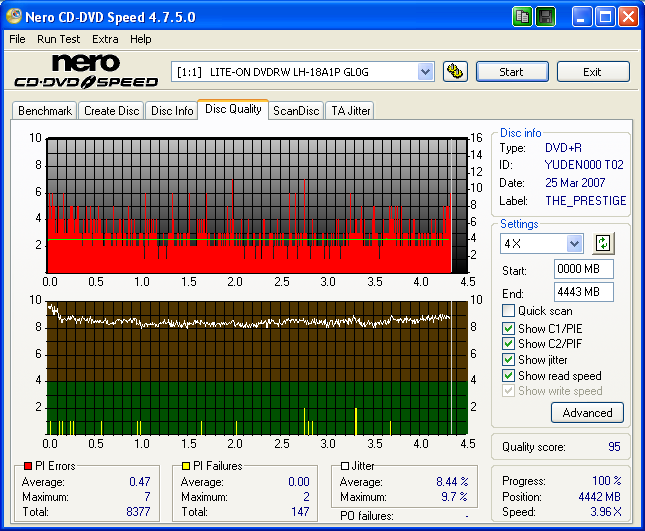
here the scan of the prestige. burnt @12x on the 8x+r TY(waisted another one before i got this one to burn) seeing that this was overburned pretty dog gone scan.
|
|
bigwill68
Suspended permanently
|
25. March 2007 @ 12:46 |
Link to this message
|
@cincyrob
Good spaces between the pif's and you kept the pie's low to..good job
well i'm here 4 more posts..my wife got me on a 007 mission..to track down Bond..JAMES..Bond..lol..

These did'nt do to hot..I think the pie's were kinds high..on both..well as long as it plays clear that's all that matter..

2 down 20 more to go and rip..lol
Done out of Here!
|
|
lundy1987
Newbie
|
25. March 2007 @ 14:08 |
Link to this message
|
|
Well im close to giving up and just buying a 1112D drive since theyre not that expensive...
iv looked at discs iv burnt a few weeks ago and the pi errors only go as high as about 50, but since i did a scan on a disc iv done more recently theyre always around 150 and i really dont know why...
iv updated firmware, cleaned the system, used a lense cleaner cd, tryed different software, and nothing seems to make a difference at all, so im officially stumped now :-(
|
|
lundy1987
Newbie
|
25. March 2007 @ 14:59 |
Link to this message
|
|
think il just leave the drive as it is now, i get the odd disc that will freeze but not that often, i meen.....what is it you should most look at...the pi errors or failures, becuase although my pi errors are reaching around 160....my failures dont really go over 2 at all, actually its unlikley that il get more than 1 spike that will hit the 2 mark...
so does that meen based on my other scans i posted my burns arent bad ones??
|
Moderator
1 product review
|
25. March 2007 @ 15:14 |
Link to this message
|
|
@bigwill
Those lumberjack plaid scans are burning my retinas. LOL
|
|
bigwill68
Suspended permanently
|
25. March 2007 @ 16:57 |
Link to this message
|
|
@LOCOENG
Ur silly you better wear some shades the next time around then..LOL
Done out of Here!
|
AfterDawn Addict
|
25. March 2007 @ 17:14 |
Link to this message
|
Originally posted by LOCOENG:
@bigwill
Those lumberjack plaid scans are burning my retinas. LOL
Now that's funny right there, I don't care who you are. hehehe.
@bigwilly,
NOT to offend your Nero scan decorating. LOL. YOu could pick something a little softer and more pleasing than the LUMBER JACK PLAID. hehehe. Nice scan anyway buddy. :)
@Lundy,
Try some other "quality" media just for p00-p00's and ha-ha's. I want to see how another disc does on your burner. :) Well assuming you have something else to burn. :) Heck even some "crappy" media for a reference.
I would like to see a scan on another drive as well. I don't think the Pioneer will give you a JITTER test. Do you have a Lite-ON or BENQ to scan with? Just trying something different. I think that you will find out that your jitter test is off for some reason but I don't know for sure.
To answer your question the PIE's and PIF's are just for reference anyway. As long as the PIE's spike is below 280 (100) and the PIF's spike is below 10 (4) you should be ok. I use the numbers in (###) for my highs. It doesn't mean that the disc is bad if the numbers go beyond that, all it does is give you somewhere to start. You've already said that you're having problems with playback.
With that said. What are your processes? You should NOT have playback problems with what you've showed me. cincyrob may have a legitimate point with the Verb DVD-R discs. Never discount a bad batch either. It sometimes happens even with the best media. :)
You have me perplexed up until now. More answers and maybe a cure for you. Keep the info coming and don't get discouraged. My buddy pieman was having problems with a Pioneer 111 and 112 but it turned out to be his mobo. Don't give up yet. :)
....gm
|
|
bigwill68
Suspended permanently
|
25. March 2007 @ 22:05 |
Link to this message
|
|
@greensman
Naw keep'in it bright so everybody can see..Lol naw i'll change it up here on the next scan..i do..hey thanks about my scans there 2 buddy..
O yea order a 50pack of ty's +r's 8x today from meritline..gonna see how those work out 4 for me..now
Done out of Here!
This message has been edited since posting. Last time this message was edited on 25. March 2007 @ 22:07
|
|
lundy1987
Newbie
|
26. March 2007 @ 08:22 |
Link to this message
|
Quote:
Originally posted by LOCOENG:
@bigwill
Those lumberjack plaid scans are burning my retinas. LOL
Now that's funny right there, I don't care who you are. hehehe.
@bigwilly,
NOT to offend your Nero scan decorating. LOL. YOu could pick something a little softer and more pleasing than the LUMBER JACK PLAID. hehehe. Nice scan anyway buddy. :)
@Lundy,
Try some other "quality" media just for p00-p00's and ha-ha's. I want to see how another disc does on your burner. :) Well assuming you have something else to burn. :) Heck even some "crappy" media for a reference.
I would like to see a scan on another drive as well. I don't think the Pioneer will give you a JITTER test. Do you have a Lite-ON or BENQ to scan with? Just trying something different. I think that you will find out that your jitter test is off for some reason but I don't know for sure.
To answer your question the PIE's and PIF's are just for reference anyway. As long as the PIE's spike is below 280 (100) and the PIF's spike is below 10 (4) you should be ok. I use the numbers in (###) for my highs. It doesn't mean that the disc is bad if the numbers go beyond that, all it does is give you somewhere to start. You've already said that you're having problems with playback.
With that said. What are your processes? You should NOT have playback problems with what you've showed me. cincyrob may have a legitimate point with the Verb DVD-R discs. Never discount a bad batch either. It sometimes happens even with the best media. :)
You have me perplexed up until now. More answers and maybe a cure for you. Keep the info coming and don't get discouraged. My buddy pieman was having problems with a Pioneer 111 and 112 but it turned out to be his mobo. Don't give up yet. :)
....gm
What do you meen below 280 (100)?? and 10 (4), my pi errors are hitting 150ish, so when tyou say under 280...is that under 280...or is 280....100....if u get me?
just didnt understand whats the numbers in brackets were for, yer possibly could be a bad batch, considering, the batch before this were a better burn, neva thought of that,
|
AfterDawn Addict
4 product reviews
|
26. March 2007 @ 08:43 |
Link to this message
|
|
your PIE's the max number you want to have is 280 or lower to have a readable disc. greensman was just saying with the 100pie's is what he likes to see. nothing higher than 100. and your PIF's you dont want them over 10 max also for a good readable disc... and the 4 max is what he shoots for for a good disc.
hopes that helps clear it up some.
if you are getting your pie's around 150, thats not bad, not real good but not bad... like he said try another media type and see what ya get.
|
AfterDawn Addict
|
26. March 2007 @ 09:34 |
Link to this message
|
|
Thanks rob you hit it right on the nail. :)
@Lundy,
Yeh rob said it. My tolerances are a little tighter than the initial article states on the PIE and PIF values. Not that anything higher than what I pick for values isn't good, it just isn't good enough for me. I have discs that have 200-250 PIE's and 10+ PIF's that still play but I don't trust them to last more than a year or so.
My methods and machine have really increased in quality the last year so my tolerances have too. :)
PLease take into consideration that most of the scans you see on this thread are done with a Lite-ON. Some are done with a BENQ and therefor the differences in quality score and PIF numbers are somewhat OFF. THey both scan very well but have different "qualifications" when it comes to PIE's and PIF's and therefore QS too. ;-)
I hope this makes some sense. :):)
.....gm
|
|
lundy1987
Newbie
|
26. March 2007 @ 11:20 |
Link to this message
|
Right, problem solved, and it was a simple answer lol.
well the disc u burnt off my dads pc ~(with the good results) was the same media as mine....BUT it was from a different batchy of discs, and up-on testing one of his batch on my pc....my max spike pi error, hits 60....and thats burnt at 26x too, havnt had one pi failure above 1 either...il post my scan in a min...
Thanx for all the help!!

This message has been edited since posting. Last time this message was edited on 26. March 2007 @ 11:53
|
AfterDawn Addict
|
26. March 2007 @ 12:22 |
Link to this message
|
@lundy,
No probs!!
Glad to see that you got everything worked out for now. If you can swing it try some of the DVD+R media from Verbatim, it's good stuff. Normally on sale somewhere too. You might even try the Sony DVD+R media as well and it's normally on sale too. :)
If you get the DVD+R stuff you might want to try some BUFFALO f/w on your Pioneer so it will auto book-type to DVD-ROM. Just something to try if you feel comfortable enough.
Please tell me that was a typo "26X". LOL. I know it was, just wanted the casual reader not to panic about a new 26X burner. hehehe.
btw you can left click the floppy disc icon on Nero CD/DVD Speed in the top right hand corner and save your scan that way too instead of capturing the image on the desk top. Just another way to do it. :)
...gm
|
AfterDawn Addict
|
27. March 2007 @ 08:22 |
Link to this message
|

another great scan for my BenQ and TYs DVD+R, 8x media!
|
|
bigwill68
Suspended permanently
|
27. March 2007 @ 14:27 |
Link to this message
|
|
@IHoe
Uncle ben got the job done ic there..good scan man..
Done out of Here!
|
AfterDawn Addict
|
27. March 2007 @ 14:53 |
Link to this message
|
|
|
|
bigwill68
Suspended permanently
|
27. March 2007 @ 19:30 |
Link to this message
|
|
@IHoe
What a collection and it keeps growing and growing..lol lot of my movies are on vhs..so later on I'm goin to write them down and go do them on dvd..to add to my collecion..alot work..but it will get done some day after I get my wife Bond collection 2gether first..lol
Done out of Here!
|
Senior Member
|
28. March 2007 @ 06:26 |
Link to this message
|
One of my better burns. But TY generally always burns great.
burned at 8x with Qsuite defaults.

This message has been edited since posting. Last time this message was edited on 28. March 2007 @ 06:28
|
AfterDawn Addict
|
28. March 2007 @ 08:07 |
Link to this message
|
|
seems that all my scans of YUDEN000T02s are always in the 98-99 score! My drive can't get enough of those! I am now stockpiling them up..... have over 400 in reserve now, and waiting for my next 100 coming next week!
|
AfterDawn Addict
4 product reviews
|
31. March 2007 @ 07:03 |
Link to this message
|
yup ya can tell good weather is here..lol
got a few scans here
this one i just did on a verb. been awhile since in burnt a non printable anything..lol
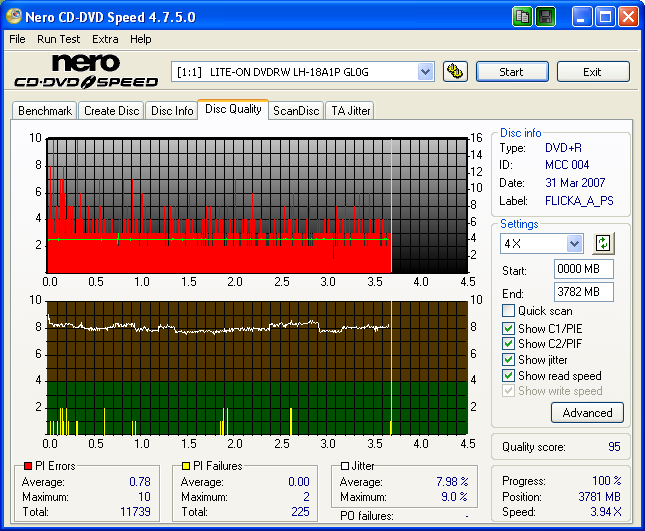
back to a printable. 8x+r maxell(mij)
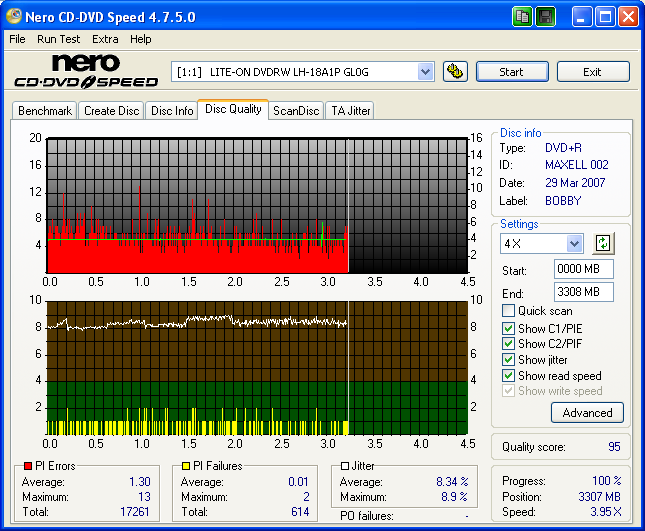
and this one i go these disc from a freind on here
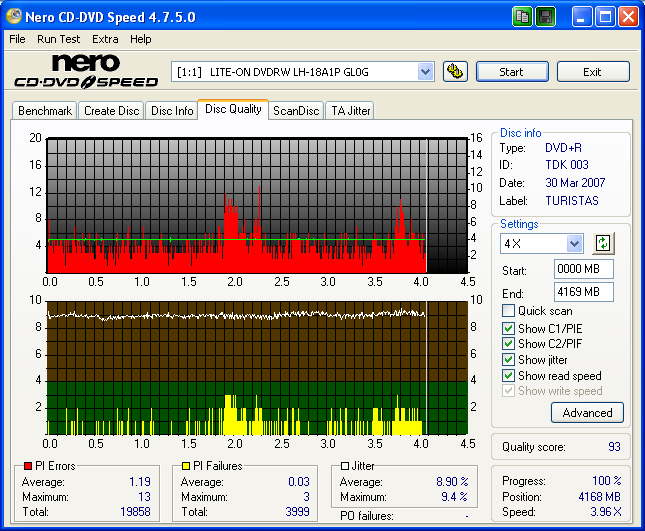
this was a pretty decent movie kinda like hostel
|
|
Advertisement
|
|
|
|
zebadee
Member
|
2. April 2007 @ 13:38 |
Link to this message
|
Hi ;-)
My latest adventure with Lite-On LH-20A1P @ 20x max.


|





