|
Silent Hill
|
|
Moderator
1 product review

|
4. September 2006 @ 17:39 |
 Link to this message

|
|
I hope so, I'll be looking towards the skies about thursday so I can be sure and catch it, I'd hate for it to land on my hard concrete driveway or in my pool. LOL
|
|
Advertisement
|
|
|
|
AfterDawn Addict
|
4. September 2006 @ 17:42 |
Link to this message
|
|
I promise to be careful, wouldn't want to put a hole in your roof either, I will just aim and hope it hit yours chimney. Whats a little dirt matter anyways.
|
|
gus738
Suspended due to non-functional email address

|
4. September 2006 @ 21:13 |
Link to this message

|
|
so is this getting to a point of conversation of shipping a item???
fyi i/o magic is one of the best drives i'v ever bought ... and i didnt ask for that opion , its not my dvd drive that causing error its someting in the pc , but that bout where i dont know .... pc is better in every way compared to my older one ,
|
AfterDawn Addict
|
5. September 2006 @ 03:57 |
Link to this message
|
|
yeah but the older one worked properly.
|
Moderator
1 product review
|
5. September 2006 @ 12:26 |
Link to this message

|
Quote:
fyi i/o magic is one of the best drives i'v ever bought
Either you've lucked out and got a BenQ or you haven't ever had a really good drive. Not trying to put down your drive or PC, but I/O really aren't much. I used mine for around 300 backups and it worked just fine...but I prefer the functionality of my BenQ and NEC, with bitsetting and QS and such that the I/O can't do.
How are your master/slave settings, correct?
|
|
gus738
Suspended due to non-functional email address
|
5. September 2006 @ 15:47 |
Link to this message
|
|
my i/o magic is slave as master cuz its the burner , and my sony dru530a is set as slave , both under the same ide cable .
i done several test, and i find it that the sony is a better reader then a burner and i/o magic well its better burner then reader , but standing at what as i/o magic being the only ultra dma 2 , i guess i dont have a choice ,
i'm not talking it in a bad way , im just saying that i/o magic never fails on me , as where some factory drives that dell or any other company sends , are crappier...
im like if i like the quality i stick to it , its like tayo youden that is the best , its not that expensive so why look for other media??? i feel like that on i/o magic ...
but for any meanings what brand you recommend for best dvd drives? i need best readers / burners
i really dont mind on price , its like the saying you get what you pay for ,
|
Moderator
1 product review
|
5. September 2006 @ 16:23 |
Link to this message
|
|
The drive at the end or your ide cable should be set to master, while the intermediately connected drive should be set to slave.
As for drives...
BenQ DW 1650/1655
NEC 3550
Pioneer 111D
If you want the best, get Plextor 716.
|
|
gus738
Suspended due to non-functional email address
|
5. September 2006 @ 16:34 |
Link to this message
|
|
i didnt quite fellow on the ide path lead , dont get me wrong but i'v been hearing bad/ some stuff small issues on that plextor , as where i'v havnt seen anyone complain on i/o magic....
but yea back to the cable set up? deviece 1 is slave and device 0 is master... master is i/o magic slave is sonydru530a ....
it has to be someting else ...
|
AfterDawn Addict
|
5. September 2006 @ 17:53 |
Link to this message
|
|
@gus738
If your pc is a Dell then look in your manual. Most Dell pcs set their jumpers to cable select and not master/slave on the IDE cable. And as LOCO pointed out, the end connected drive would be the master and the mid connecting drive the slave but both jumpers set as cable select!
|
|
gus738
Suspended due to non-functional email address
|
5. September 2006 @ 17:57 |
Link to this message
|
|
i think they were set as cs .. iduuno i just like putting ma/sl
so your saying to put the midle side of the ide as slave and the end side as master and the other end side to the m/b?
|
AfterDawn Addict
|
5. September 2006 @ 18:42 |
Link to this message
|
|
If you are running a Dell, then as garmoon states set them to CS. All Dell computer come through this way and like this setting. I have two Dells and this is how they have always been set even when drives change. Dells do not like M and S settings.
|
|
gus738
Suspended due to non-functional email address
|
5. September 2006 @ 18:48 |
Link to this message
|
|
cuz i have more dells and are set to ultra dma 2 , heck , see the funny thing is that i have another dell same m/b less powerful home edition insted of pro and it set to ultra dma 2, so theirs someting here on this one that is werid, i think its time to call dell ... i have a warranty for a reason lol , huh i should call
|
AfterDawn Addict
|
5. September 2006 @ 18:57 |
Link to this message
|
I have my drives set to CS and this is what InfoTool reads
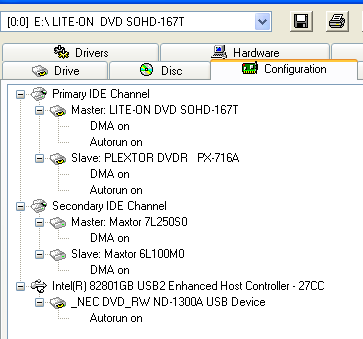
They will still come up as M and S but having that way means the bios will determine which DMA transfer is best.
|
|
gus738
Suspended due to non-functional email address
|
5. September 2006 @ 18:59 |
Link to this message
|
|
so what your sayin is that cs is always better because it will be based on better performace possibly even better then ultra dma 2 ./??
|
|
shiloh916
Newbie
|
5. September 2006 @ 23:15 |
Link to this message
|
|
The best program that works for me is dvd regionfree+css it copies all movies but you may use it with dvdshrink
Carl Mullinax
|
AfterDawn Addict
|
6. September 2006 @ 03:58 |
Link to this message
|
|
Your confusing jumper settings and DMA settings. Set the jumpers on both of your burners to CABLE SELECT. Install the burner that you want to use most often and attach the end of the IDE cable to it. The other drive goes into the middle connection. and the other end is plug in on the motherboard. Then go into device manager and set them to DMA as arniebear shows. Forget about all the slave/master stuff. Dude you got a Dell! CABLE SELECT ONLY!!!!!!
|
|
gus738
Suspended due to non-functional email address
|
6. September 2006 @ 15:33 |
Link to this message
|
k lol , its just that i have another exact dell and i can do fine with ultra dma 2 , i guess i wanted suggestion and i got it ,
ps : is it bad to have dell or you said it in a good way? or bad? lol just wonderin
oh can anyone notice a diffrense between original silent hill dvd and a backup with using anydvd+clonedvd2 with option as exact copy menus subs etc etc and coverted/conpress from DVD9 to DVD5?
my cuzen keeps on aruging thiers a noticeable diffrense, but im quite sure theirs not
|
AfterDawn Addict
|
6. September 2006 @ 16:02 |
Link to this message
|
Even if you set your jumpers to CS, you will still be in UDMA, that does not change. Jumper setting for CS just gives the bios the option of setting the M and S according to connection. Dell just makes their comps this way, why I don't know, but it is what works for them. I had one Dell and bought a second one, they work and they are affordable. You can tell them what you want in them. I have found that no matter what I do to my Dells it is hard to kill them, they keep on chugging and I have never had one problem with burning or software other than the dreaded Nero 7.
|
|
gus738
Suspended due to non-functional email address
|
6. September 2006 @ 16:05 |
Link to this message
|
|
haha so u like dell :P i have the xps line up ... i get it now , so cs sets it auto based on what of way i plug the ide cable , the middle would be mb slave and toip would be master ... someting like that ... intresting
yea i love dell its the best ....
as for the movie slient hill? what u think on what i siad?
|
AfterDawn Addict
|
6. September 2006 @ 16:22 |
Link to this message
|
|
Love my Dells, Had 3, God got one with lightning. It was the oldest so no big deal. Haven't really ever had a problem. I would still like to build my next.
|
|
Peedy1971
Suspended due to non-functional email address
|
28. September 2006 @ 10:48 |
Link to this message
|
I have also a problem with this movie (german dvd rc2):
First of all , after I inserted the disc in my DVDRW (BenQ), AnyDVD (6.0.7.0, and I tried an older one, 6.0.6.1) reported "disc is mastered incorrectly" and disabled itself for this disc. DVDDecrypter alone didn't even look at it - direct after starting and finding the DVDRW I got bombed by lots of error windows, starting with "ParseVTSM Runtime Exception in File VTS_2_0.ifo, Message: EAcces violation" anf followed by a large amount of "Access violation at adress [various addresses] in module 'DVDDecrypter.exe', Read of address [various addresses]".
Then I looked around here and got knowledge of RipIt4Me and gave it a try:
I 19:57:47: RipIt4Me Version 1.4.15.0
I 19:57:47: Starting 1-click Ripping Procedure at 19:57:44
I 19:57:47: Running Windows XP Service Pack 2
I 19:57:47: FixVTS version: 1.5.0.0 -- All OK
I 19:57:47: DVD Decrypter version: 3.5.4.0
I 19:57:47: DVD Shrink version 3.2.0.15
I 19:57:47:
I 19:57:47: Ripping mode: Full Rip
I 19:57:47: Main title(s):
I 19:57:47: Title 2 (VTS 2 PGCs 1) -- 2:00:11s -- 16:9
I 19:57:47: Remove Protected Cells = on
I 19:57:47: Remove Tiny Cells = on
I 19:57:47: Remove Useless Menu Cells = on
I 19:57:48: Remove Last VTS = on
I 19:57:48: Blank bogus VTS = on
I 19:57:48: Run FixVTS on full DVD = on
I 19:57:48: Rip JACKET_P folder = off
I 19:57:48: Copying original IFOs into target directory
I 19:57:52: Patching VTS_02_0.IFO
I 19:57:52: DVD Volume Label: Silent_Hill
I 19:57:52: Loading IFOs
I 19:57:52: Region code: 2
I 19:57:52: ERROR: video_ts.ifo declares 7 VTS, and I'm finding only 4 on the disc
I 19:57:54: Done opening IFOs
I 19:57:54: Retrieving sectors from DVD drive
I 19:57:54: CRC32 value = 0xA2F6223
I 19:57:54: Creating Protected Sector List (PSL) file
I 19:57:54: Done creating PSL file
I 19:57:54: Waiting for Decrypter to be ready
I 19:59:57: Done importing the PSL file, now starting ripping...
Here DVDDecrypter (latest version) got involved and prompted at first the error mentioned above, but then started ripping, although with LOTS of the little yellow warning signs:
I 19:57:54 DVD Decrypter Version 3.5.4.0 started!
I 19:57:54 Microsoft Windows XP Home Edition (5.1, Build 2600 : Service Pack 2)
I 19:57:54 Initialising SPTI...
I 19:57:54 Searching for SCSI / ATAPI devices...
I 19:57:55 Found 1 DVD+RW and 1 DVD±RW!
W 19:59:57 Protected Sectors List Imported Successfully!
W 19:59:57 39 areas have been marked as 'suspect'.
W 19:59:57 Dummy sectors will be inserted where necessary.
I 19:59:57 Operation Started!
I 19:59:57 Source Device: [0:0:0] BENQ DVD DD EW162I 47N9 (F:) (USB)
I 19:59:57 Source Media Type: DVD-ROM
I 19:59:58 Source Media Region Code: 2
I 19:59:58 Source Media Copyright Protection System Type: CSS/CPPM
I 19:59:58 Source Media Implementation Identifier: Sonic Scenarist 3.1
I 19:59:58 Destination Folder: C:\SILENT_HILL\
I 19:59:58 File Splitting: By File
I 19:59:58 Remove Structure Protection: No
I 19:59:58 Bad Sector Removal Method: Normal
I 19:59:58 Detect Mastering Errors: No
I 19:59:58 Multi Angle Processing: No
I 19:59:58 Remove Macrovision Protection: Yes
I 19:59:58 Stream Processing: No
I 19:59:58 Copying VIDEO_TS.IFO... (LBA: 308 - 315) - KEY: N/A
I 19:59:58 Copying VIDEO_TS.VOB... (LBA: 316 - 22754) - KEY: N/A
I 20:00:09 Copying VIDEO_TS.BUP... (LBA: 22771 - 22778) - KEY: N/A
I 20:00:09 Copying VTS_01_0.IFO... (LBA: 22779 - 22784) - KEY: N/A
I 20:00:10 Decrypting VTS_01_1.VOB... (LBA: 22785 - 34247) - KEY: C0 1D E0 4D 19
I 20:00:15 Copying VTS_01_0.BUP... (LBA: 3950000 - 3953999) - KEY: N/A
W 20:00:16 On-the-fly IFO/BUP file patching failed!
W 20:00:16 File Name: VTS_01_0.BUP
W 20:00:16 Size: 8.192.000 bytes
W 20:00:16 Reason: Invalid IFO / BUP file.
I 20:00:22 Copying VTS_02_0.IFO... (LBA: 34270 - 34273) - KEY: N/A
I 20:00:22 Decrypting VTS_02_0.VOB... (LBA: 34306 - 101662) - KEY: C0 1D E0 4D 1A
I 20:00:54 Decrypting VTS_02_1.VOB... (LBA: 3240702 - 3764981) - KEY: C0 1D E0 4D 1A
W 20:03:27 Failed to read Sector 3667536 in Protected Area (LBA: 3667343 - 3726882)
I 20:03:27 Cycling Tray after Bad Sectors...
W 20:03:31 Waiting for device to become ready...
I 20:03:38 Device ready!
I 20:03:38 Authenticating...
W 20:03:38 Inserting Dummy Sectors... (LBA: 3667536 - 3726882)
I 20:03:48 Extracting Sectors...
W 20:03:48 Sector 3726899 - Pack Header Not Found (0x44564456)
(lots of "Pack header not found" later:)
W 20:03:48 Sector 3726944 - Pack Header Not Found (0x000148F2)
I 20:04:02 Decrypting VTS_02_1.VOB... (LBA: 101663 - 625942) - KEY: C0 1D E0 4D 1A
W 20:04:10 Failed to read Sector 101856 in Protected Area (LBA: 101663 - 161202)
I 20:04:10 Cycling Tray after Bad Sectors...
W 20:04:14 Waiting for device to become ready...
I 20:04:21 Device ready!
I 20:04:21 Authenticating...
W 20:04:21 Inserting Dummy Sectors... (LBA: 101856 - 161202)
I 20:04:35 Extracting Sectors...
I 20:07:22 Decrypting VTS_02_1.VOB... (LBA: 3128540 - 3652819) - KEY: C0 1D E0 4D 1A
...
I 20:23:23 Decrypting VTS_02_7.VOB... (LBA: 3247105 - 3726882) - KEY: C0 1D E0 4D 1A
W 20:25:54 Failed to read Sector 3667536 in Protected Area (LBA: 3667343 - 3726882)
I 20:25:54 Cycling Tray after Bad Sectors...
W 20:25:58 Waiting for device to become ready...
I 20:26:05 Device ready!
I 20:26:05 Authenticating...
W 20:26:05 Inserting Dummy Sectors... (LBA: 3667536 - 3726882)
I 20:26:13 Extracting Sectors...
I 20:26:42 Getting decryption key from File: VTS_02_1.VOB...
W 20:26:42 File: VTS_02_8.VOB - Using decryption key from File: VTS_02_1.VOB
I 20:26:42 Decrypting VTS_02_8.VOB... (LBA: 4231560 - 4242213) - KEY: C0 1D E0 4D 1A
W 20:26:43 Failed to read Sector 4231560 in Protected Area (LBA: 3981831 - 4499999)
I 20:26:43 Cycling Tray after Bad Sectors...
W 20:26:47 Waiting for device to become ready...
I 20:26:54 Device ready!
I 20:26:54 Authenticating...
W 20:26:54 Inserting Dummy Sectors... (LBA: 4231560 - 4242213)
I 20:26:54 Extracting Sectors...
I 20:26:54 Copying VTS_02_0.BUP... (LBA: 3726899 - 3726934) - KEY: N/A
...
I 20:27:41 Copying VTS_03_0.BUP... (LBA: 3950000 - 3953999) - KEY: N/A
W 20:27:43 On-the-fly IFO/BUP file patching failed!
W 20:27:43 File Name: VTS_03_0.BUP
W 20:27:43 Size: 8.192.000 bytes
W 20:27:43 Reason: Invalid IFO / BUP file.
I 20:27:56 Copying VTS_04_0.IFO... (LBA: 3853276 - 3853282) - KEY: N/A
I 20:27:56 Decrypting VTS_04_1.VOB... (LBA: 3853283 - 3862645) - KEY: C0 1D E0 4D 1C
I 20:27:59 Copying VTS_04_0.BUP... (LBA: 3950000 - 3953999) - KEY: N/A
W 20:28:01 On-the-fly IFO/BUP file patching failed!
W 20:28:01 File Name: VTS_04_0.BUP
W 20:28:01 Size: 8.192.000 bytes
W 20:28:01 Reason: Invalid IFO / BUP file.
I 20:28:03 Copying VTS_05_0.IFO... (LBA: 4200818 - 4200892) - KEY: N/A
W 20:28:04 Failed to read Sector 4200818 in Protected Area (LBA: 3981831 - 4499999)
I 20:28:04 Cycling Tray after Bad Sectors...
W 20:28:09 Waiting for device to become ready...
I 20:28:15 Device ready!
I 20:28:16 Authenticating...
W 20:28:16 On-the-fly IFO/BUP file patching failed!
W 20:28:16 File Name: VTS_05_0.IFO
W 20:28:16 Size: 153.600 bytes
W 20:28:16 Reason: Invalid IFO / BUP file.
I 20:28:20 Operation Successfully Completed! - Duration: 00:28:22
I 20:28:20 Average Read Rate: 5.797 KB/s (4.2x) - Maximum Read Rate: 12.510 KB/s (9.0x)
I 20:28:20 Close Request Acknowledged
I 20:28:20 Closing Down...
I 20:28:20 Shutting down SPTI...
I 20:28:20 DVD Decrypter closed!
Switching back to RipIt4Me:
I 20:28:20: Done ripping ...
I 20:28:20: Decrypter ripping time: 00:30:26
I 20:28:20: Loading IFOs
I 20:28:20: DVD is region-free
I 20:28:27: ERROR: video_ts.ifo declares 7 VTS, and I'm finding only 5 on the disc
I 20:28:29: Scanning VTS 1 for BOVs
I 20:28:31: Scanning VTS 2 for BOVs
I 20:28:31: Scanning VTS 3 for BOVs
I 20:28:31: Scanning VTS 4 for BOVs
I 20:28:31: Scanning VTS 5 for BOVs
I 20:28:32: Scanning DVD Decrypter log for protected cells
I 20:28:32: VTS 2 PGC 4 Cell 1 is protected
I 20:28:32: VTS 2 PGC 3 Cell 1 is protected
I 20:28:32: Found 2 protected cells
I 20:28:32: Analysing DVD structure
I 20:28:32: MD = 400
I 20:28:32: MV = 4000
I 20:28:32: BOR = 1
I 20:28:32: BON = 1
I 20:28:32: REB = 1
I 20:28:32: BOS = 1
I 20:28:33:
I 20:28:33:
I 20:28:33: Analysis done
I 20:28:33: Checking for potential read-errors caused by scratches on the disc.
I 20:28:33: No abnormal read-error detected.
I 20:28:33: Removing protected cells and cleaning up cell commands
I 20:28:33: Looking for bogus VTS
I 20:28:33: Removing VTS 5
I 20:28:33: 1 bogus VTS removed
I 20:28:33: Running FixVTS to cleanup DVD
I 20:28:33: DVD is protected: Running FixVTS on the full DVD
I 20:29:19: Starting DVD Shrink
DVD-Shrink couldn't continue - failed to open VTS_2_0.VOB!!
And now I'm lost....
TARGA Notebook AMD XP 2600, 512 MB RAM, external BenQ 16x DVDRW, ATI Radeon 9600, Win XP Home, 60 GB
This message has been edited since posting. Last time this message was edited on 28. September 2006 @ 11:07
|
|
gus738
Suspended due to non-functional email address
|
28. September 2006 @ 10:51 |
Link to this message
|
did you tried using AnyDVD with clonedvd2? theirs a free trial ,
oh and i swtiched to cs and it just made things WORSER so i went ahead and called dell and they are building a new XPS 700 just for me :D
|
|
Peedy1971
Suspended due to non-functional email address
|
28. September 2006 @ 11:00 |
Link to this message
|
Ahem... AnyDVD disables itself directly after finding the DVD in one of the two DVDRWs I have (...disc mastered incorrectly!)
I think CloneDVD won't do much without a working AnyDVD....
TARGA Notebook AMD XP 2600, 512 MB RAM, external BenQ 16x DVDRW, ATI Radeon 9600, Win XP Home, 60 GB
|
|
gus738
Suspended due to non-functional email address
|
28. September 2006 @ 11:09 |
Link to this message
|
get an exchange dvd from store , or get a diffrent one , try disabling / uninstall/reinstall AnyDVD and try it with clone ...
|
|
Advertisement
|
|
|
Moderator
|
28. September 2006 @ 11:44 |
Link to this message
|
@Peedy1971
When you get to the FixVTS part if you haven't checked this try checking it - says something like 'clean menu files'. By default it's unchecked.
Another option is to set RipIt4Me to do movie only.
Looks like the German version may be a little trickier than the US version.
One more option for you - dvdfab decrypter & VobBlanker (free):
guide & links to dl
|







