|
Intel P4 vs AMD
|
|
|
brobear
Suspended permanently

|
11. February 2006 @ 02:23 |
 Link to this message

|
|
L8ter
The 920 Presler is a firebox. That said, it is manageable. For a dual core, (with my arm twisted double) I have to agree with Sophocles that the AMD is currently the best enthusiast CPU. I'd suggest a good cooling system and a well ventilated case if you're going with the 920 D. Asus makes a good board for the 920. No Hyper-Threading on the Pentium Ds till you get up in the high dollar range. The AMDs have Hyper-Transport on the lower end versions. Also the AMDs have more advanced media instruction. Add to that AMD has a better ability to handle memory. So with all the plus factors for AMD why go with a hot and less efficient Intel platform? The AMD is more OC friendly as well. The 920 definitely wouldn't be my choice for a custom build. I like the looks of the Opteron 175 Denmark. Since a custom will come in well under the price of a comparable retail PC, I wouldn't try to save too much on the processor.
|
|
Advertisement
|
 |
|
|
AfterDawn Addict
4 product reviews
|
11. February 2006 @ 03:43 |
Link to this message

|
|
Yep, agree with all that. 175 or X2.
|
AfterDawn Addict
1 product review
|
11. February 2006 @ 04:08 |
Link to this message
|
|
For those that are considering running a couple of raptrors in a RAID 0 consider this. Recent test have shown that the new Raptor WD1500ADFD 150GB 10,000 RPM is actually as fast or faster than two 74 gig Rapors in a RAID 0(I'm not sure I really believe this). Further more there are no speed gains to be had by placing two of those in a RAID 0 either. In my view the best bet is to get one of those for your main drive and then use another drive as a slave to store. The 36 gig and the 74 gig raptors were TCQ models and suffered from compatiblity with NCQ Hard disks but the new 150 gig raptor is a NCQ model just as my 250 gig seagate is so hoplefull the issue has been solved.
BTW, I can't say enough about this $60 Cooler Mater case I bought(no power supply). It's so roomy inside for a mid tower that mounting the mother board took less than 5 minutes to install (leave the power supply out until last). Usually when I buy a case they are always short on spacers but this one came with extras. The tooless desgin makes it easy to install the hard disk and DVD ROMS which just slide in and then are locked tight with a little sliding locking device. No screws installing PCI device either just socket them and lock them in. The only beef is fan noise, so get items with quiet fans.
" Please Read!!! Post your questions only in This Thread or they will go unanswered:
Help with development of BD RB: Donations at: http://www.jdobbs.com/. This message has been edited since posting. Last time this message was edited on 11. February 2006 @ 04:57
|
|
brobear
Suspended permanently
|
11. February 2006 @ 04:49 |
Link to this message

|
|
I've lived with noisy equipment for so long, it could sound like a small locomotive coming through and not bother me. ;)
|
AfterDawn Addict
1 product review
|
11. February 2006 @ 05:03 |
Link to this message
|
|
Another intersting point is that the front door on it is solid aluminum and about a quater inch thick, quite weighty for a door so I don't think that auto eject for DVD Roms is advisable, I've always hated the feature anyway because it places your drives in harms way, when it might open and you might be figiting around and accidently bump into it. I did that once with my sons PC and I knocked the tray right on to the floor. LOL
I was able to open the rom (needed ruberbands to hold parts in place) and I was able to repair it.
" Please Read!!! Post your questions only in This Thread or they will go unanswered:
Help with development of BD RB: Donations at: http://www.jdobbs.com/. This message has been edited since posting. Last time this message was edited on 11. February 2006 @ 05:56
|
AfterDawn Addict
4 product reviews
|
11. February 2006 @ 05:36 |
Link to this message
|
|
I had that problemish, but not with an optical drive, a USB cable coming out of the hub on my card reader. The plug is fine, but the socket isn't, and I don't really feel like going in there and sorting that out... Oh well, down to 6 then.
|
AfterDawn Addict
1 product review
|
11. February 2006 @ 06:22 |
Link to this message
|
|
One USB can run several items at once so you only really need a couple. I have 8 but I only use two. One for my wireless keyboard and mouse and one for mulit connector that has everything else hooked to it.
" Please Read!!! Post your questions only in This Thread or they will go unanswered:
Help with development of BD RB: Donations at: http://www.jdobbs.com/. |
|
brobear
Suspended permanently
|
11. February 2006 @ 07:13 |
Link to this message
|
AMD vs Intel, Building PCs
http://forums.afterdawn.com/thread_view.cfm/302283
The thread has been started as a place to discuss builds, lay out plans, discuss parts, get overclocking advice and the like. Users can ask about components. At no time though should the thread be requested to "dumb down". It's not intended to cater to novices with no knowledge of what it takes to build a PC. Everyone is welcome, but don't be offended if you don't understand everything or don't like the direction the thread may take.
This message has been edited since posting. Last time this message was edited on 11. February 2006 @ 07:14
|
AfterDawn Addict
1 product review
|
11. February 2006 @ 08:25 |
Link to this message
|
" Please Read!!! Post your questions only in This Thread or they will go unanswered:
Help with development of BD RB: Donations at: http://www.jdobbs.com/. |
AfterDawn Addict
4 product reviews
|
11. February 2006 @ 11:23 |
Link to this message
|
|
So that's it then? 74 pages and this thread is being left to die?
It was a valiant thread.
The thread is dead, long live the thread!
|
AfterDawn Addict
1 product review
|
11. February 2006 @ 11:44 |
Link to this message
|
|
LOL! Nobody said anything about leaving it to die we just saw a need for a thread that is dedicated to building and one where we don't have to explain why we're having discussions over the average users head.:)
" Please Read!!! Post your questions only in This Thread or they will go unanswered:
Help with development of BD RB: Donations at: http://www.jdobbs.com/. This message has been edited since posting. Last time this message was edited on 11. February 2006 @ 14:18
|
|
ScubaBud
AfterDawn Addict
|
11. February 2006 @ 16:19 |
Link to this message
|
|
|
AfterDawn Addict
1 product review
|
11. February 2006 @ 17:19 |
Link to this message
|
Sucbabud
Yes on the board, I'm thinking about buying one myself so that I can find a home for my venice core.
If you don't game then any decent video card will do for now.
You're buying higher than you need to, my Opteron is effectively an FX60 with a little more from overclocking for only $499.
http://www.newegg.com/Product/Product.asp?Item=N82E16819103584
I'm already using the memory so I'm biased. LOL
I just ordered the Raptor yesterday, you can find my post a few moves back.
I also have two Antec cases, a full tower and a black mid tower that's very much like the one you had the link for. But I just bought this one and it is far easier to work with than either of my Antec cases, has a completely tooless design, and it moves air from the front, back, and side. I've been looking at Lian LI cases but this is the easies case that I've ever worked with and I've worked with a lot.
http://www.newegg.com/Product/Product.asp?Item=N82E16811119075
brobear and I thought that we all needed a builders thread and here it is.
http://forums.afterdawn.com/thread_view.cfm/302283
" Please Read!!! Post your questions only in This Thread or they will go unanswered:
Help with development of BD RB: Donations at: http://www.jdobbs.com/. |
AfterDawn Addict
|
11. February 2006 @ 20:33 |
Link to this message
|
|
sammorris,
I don't know about you but I would rather have a complete failure of my motherboard than some niggling electronic anomally. Those kind of problems can have you talking to yourself, and getting answers! With the last one, (a socket 478) I set up the hard drive and installed XP Pro. It ran fine all the way through the install. Everything worked fine until about 30 mins or so went by. Then the sound stopped working when windows started and shut down. No big, I could live without that. After a couple of days, everytime I booted up the computer it would do a scandisk saying there was errors on the hard drive. After a couple of weeks it would no longer boot or if it did, I would wind up with the dreaded blue screen with a message about problems with the file allocation tables. I discovered what the problem was quite by accident rather than any technical prowess! I decided to try another hard drive so I re-formated the drive on that computer and removed it. I then put that still new drive into a customer computer where it refused to work at all. The system bios would not even see it. I ran kill disk and re-partitioned it and installed it in my present system and it works just fine and the bios now sees it. That's how I figured that the problem had to be a faulty IDE controller on the MB. When I had problems with the next drive I put in that ECS system, I installed a PCI IDE controller card in it and the problem went away. I sent the board back to Outpost for a full credit as this was the second replacement for the original. All in all it took about 4 months to get the full credit so I won't be using any ECS motherboards in the near future!
A side note to all of this. Since I still had a 3.0/800 prescott collecting dust, I was keeping my eye open for another MB. I happened to be at a place around the corner from me called PC Club. They were having a sale on Asus motherboards and I got this one for less than $100. Maybe I could have saved a few bucks by buying it on line but I was there, the price seemed right for the time so I bought it. It's now my test bed for anything I want to check out before I recomend something to my customers. For a P4 prescott, it's outstanding! I run the 3.0 at 3.60 with a 960 fsb and memory settings of 2 2 2 6 and it's as stable as a rock. It has both IDE and SATA that allow Raid 0 and Raid 1 function and outstanding flexabliity in it's frequency tuning so you can control every aspect when overclocking. It may not be the best but it's pretty damned good. If I ever find a 3.4/800 Northwood I may even upgrade it.
Sincerely,
theonejrs
GigaByte 990FXA-UD5 - AMD FX-8320 @4.0GHz @1.312v - Corsair H-60 liquid CPU Cooler - 4x4 GB GSkill RipJaws DDR3/1866 Cas8, 8-9-9-24 - Corsair 400-R Case - OCZ FATAL1TY 550 watt Modular PSU - Intel 330 120GB SATA III SSD - WD Black 500GB SATA III - WD black 1 TB Sata III - WD Black 500GB SATA II - 2 Asus DRW-24B1ST DVD-Burner - Sony 420W 5.1 PL-II Suround Sound - GigaByte GTX550/1GB 970 Mhz Video - Asus VE247H 23.6" HDMI 1080p Monitor
 This message has been edited since posting. Last time this message was edited on 11. February 2006 @ 20:33
|
Member
|
11. February 2006 @ 20:39 |
Link to this message
|
|
sophocles
I was looking at the raptor 150. there are 2. one see through.
am I missing somthing or is it you paymore just to have a glass window so to speak?
Also if i wanted to add a second raptor to my sysem is it to late after the install add one and run it in raid 1 or 0?
|
AfterDawn Addict
1 product review
|
11. February 2006 @ 21:46 |
Link to this message
|
" Please Read!!! Post your questions only in This Thread or they will go unanswered:
Help with development of BD RB: Donations at: http://www.jdobbs.com/. This message has been edited since posting. Last time this message was edited on 11. February 2006 @ 21:52
|
Member
|
11. February 2006 @ 22:05 |
Link to this message
|
|
if i wanted to add a second raptor to my sysTem is it to late after the install TO add one and run it in raid 1 or 0? I have the raptor 37 gig.
|
|
brobear
Suspended permanently
|
11. February 2006 @ 22:36 |
Link to this message
|
ScubaBud
Sophocles knows more about the AMD processors than I do. Things like that are so hard to say. LOL If I was going to spend a few more dollars on a CPU, I'd just step up to the Opteron 180. Bang for the buck, the 175 Sophocles has is probably the best bet.
AMD Opteron 180 Denmark 1GHz FSB 2 x 1MB L2 Cache Socket 939 Dual Core Processor - Retail
Model #: OSA180CDBOX
Item #: N82E16819103582 (Newegg)
$795.00
http://www.newegg.com/Product/Product.asp?Item=N82E16819103582
That step, 175 to 180, is 200MHz difference for about $300, you be the judge. Plus you can get it back if you OC the system. Good reason to spend a few more bucks on a well ventilated case, you'd want to OC either.
One thing I've noticed people doing and I don't quite get it; saving money on the case and power supply. Often it's with a single fan and an included power supply. To me that's like buildin a hot rod and puttin a tater in the tailpipe. If you're going to go for performance and do any OC(ing) you want a case with good ventilation. Some of the bells and whistles are nice as well on the upscale cases. Here's 2 I mentioned earlier that I like.
COOLER MASTER Stacker 810 RC-810-SKN1 Black Aluminum Bezel, SECC Chassis ATX Mid Tower
Computer Case - Retail
$165.00
http://www.newegg.com/Product/Product.asp?Item=N82E16811119093
Thermaltake XASER, Armor Series VA8000BWS Black Aluminum/Steel ATX Full Tower Computer Case
- Retail
Model #: VA8000BWS
Item #: N82E16811133154
$148.99-($123.99 after $25.00 Mail-In Rebate)
http://www.newegg.com/Product/Product.asp?Item=N82E16811133154
You'll need a power supply to go with one of those and what better than an Asus to feed the Asus board and those power hungry add-ons.
ASUS Atlas A-55GA ATX12V 2.0 550W Power Supply 100 - 240V - Retail
Model #: A-55GA
$129.99
http://www.newegg.com/Product/Product.asp?Item=N82E16817712003
I noticed you mentioned a raptor. Newegg has a good WD to go along with that for storage.
Western Digital Caviar SE16 WD4000KD 400GB 7200 RPM 16MB Cache Serial ATA150 Hard Drive -
OEM
$195.00
http://www.newegg.com/Product/Product.asp?Item=N82E16822144423
Sticking to SATA drives, you may want one of these:
PLEXTOR Beige (Black Face Included) 16X DVD+R 8X DVD+RW 6X DVD+R DL 16X DVD-R 4X DVD-RW 16X
DVD-ROM 48X CD-R 24X CD-RW 48X CD-ROM 8M Cache SATA DVD Burner - Retail
$119.99
http://www.newegg.com/Product/Product.asp?Item=N82E16827131351
And don't forget the little touches that make a difference:
Arctic Silver 5 Thermal Compound - OEM
Model #: ARCTIC SILVER 5
Item #: N82E16835100007
$5.99
http://www.newegg.com/Product/Product.asp?Item=N82E16835100007
Arctic Silver ACN-60ML (2-PC-SET) Thermal material Remover & Surface Purifier - OEM
(Or use alcohol)
$5.99
http://www.newegg.com/Product/Product.asp?Item=N82E16835100010
Just a few items from a build I'd like to do. Thought you might be interested, if you're getting ready to do a build.
Sophocles is right again, it would be a good idea to move these build segments to the new building PCs thread. But hey, we've been getting off topic so long here...
http://forums.afterdawn.com/thread_view.cfm/302283
|
|
brobear
Suspended permanently
|
11. February 2006 @ 22:56 |
Link to this message
|
baltekmi
Supply links to items you're talking about so we can check it out to see for ourselves. I noticed what you mean though. On the 150GB raptor, WD put a window on it for the curios at heart. Yes, you pay more for a pretty little window you may only get to look at before you install it. Unless a person has a clear case and the HD installed to where the window is visible, it wouldn't be of much use. Sophocles supplied some info earlier that RAID 0 is sort of redundant with the 150GB raptor. As for adding on, you can put a new drive in a RAID 0 configuration as long as it is identical to the one(s) already in use. Same for RAID 1. Remember, RAID 0 is for speed with data striping and RAID 1 is mirroring your data for a safety backup. A couple of 400GB WDs in RAID 1 would do the job for storage (if you ever needed that much in safe storage). ;)
As for your setup, you have to use the same model as the one you have. Newegg carries the WD360GD raptor. http://www.newegg.com/Product/Product.asp?Item=N82E16822144200 If it was me, I'd get the 150GB raptor and find another use for the little one. One of the reasons I never wanted a raptor before was due to the small size. Even the 74GB raptor is smaller than I like. Guess that's why they offer different sizes though, other people have different thoughts and needs.
This message has been edited since posting. Last time this message was edited on 11. February 2006 @ 23:33
|
|
brobear
Suspended permanently
|
11. February 2006 @ 23:16 |
Link to this message
|
theonejrs
http://www.starmicro.net/detail.aspx?ID=543
It may be a "pull" but the one I have is working well. $265 is a decent price for a 3.4GHz Northwood. I've seen them retail for $700. You can get the Extreme version with a 2MB cache for a mere $635 more ($900). Those are OEM type, not boxed factory items with a heatsink and fan.
By the way, StarMicro is in your part of the world, so delivery time shouldn't be too bad. I had to wait on a slow mule through the Great Plains for mine. ;)
This message has been edited since posting. Last time this message was edited on 11. February 2006 @ 23:42
|
AfterDawn Addict
4 product reviews
|
12. February 2006 @ 00:41 |
Link to this message
|
|
Did I imagine it or did I see that somehwere there was an LED disk drive? Was that the see-through raptor you mentioned? It would be quite cool to have some kind of light shining out of the disk drive, as that would show, but just a window isn't really advantageous in most cases, since you only see the drive's back, if that.
|
|
brobear
Suspended permanently
|
12. February 2006 @ 00:45 |
Link to this message
|
|
I saw no mention of LEDs. You can check the raptor out at Newegg or on the Western Digital website. Neweggs prices are cheaper than the WD store.
|
|
64026402
Senior Member
|
12. February 2006 @ 03:36 |
Link to this message
|
|
You might notice the life span of the Raptor server version is double the X version at 1.2 million hours. For a lower cost. Forget the window.
Raid 0 on a 150 sata controller has a max of 150 MBs so 2 raptors would gain quite a bit.
they max out at 88 MBs individually. It is to bad they limited the drives to the 150 standard.
I'm still waiting to afford better memory.
Donald
This message has been edited since posting. Last time this message was edited on 12. February 2006 @ 03:38
|
|
ScubaBud
AfterDawn Addict
|
12. February 2006 @ 04:05 |
Link to this message
|
Good morning :)
@ Brobear
Thanks for the suggestions.
I have most everything else I need other then what I mentioned in my previous post including OS, DVD Drives, Arctic 5, and even two PSU's that I am not using at the present time but they are both 450's. The case I use presently is doing a great job with keeping my O/Clocked Northwood cool as you can see below; again this is at Idle with just the web browser and Outlook 2003 open when I took it just now. (The Northwoods never had a heat issue to begin with.)
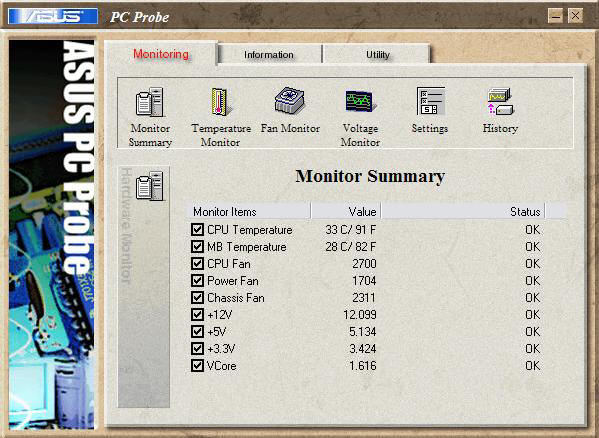
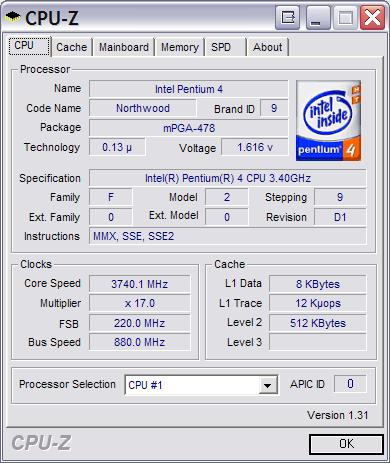
I have never purchased the fastest CPU or one that had more bells and whistles, (even my 3.4 Northwood was purchased after the Prescott?s were coming out with their 3.6 and 3.8 and Intel still had out their Extreme Edition.) For once I want to get the fastest CPU out there with the best of most of the major components including memory and a fast HDD. I don?t need two Raptor?s in Raid 0 since I use Drive Image 7.01 to backup my main PC daily and it can only happen off 1 HDD. And based on reviews the Western Digitial 150GB Raptor will do just fine.
I am moments away from purchasing some hardware for my new toy and I?m still doing a bit more research just before that happens so any other suggestions are more then welcome! :)
PS, since so much quality info has come out of this thread, I wish the title to it would also include something to allow building questions as well.
This message has been edited since posting. Last time this message was edited on 12. February 2006 @ 04:09
|
|
Advertisement
|
|
|
AfterDawn Addict
1 product review
|
12. February 2006 @ 04:27 |
Link to this message
|
Quote:
Raid 0 on a 150 sata controller has a max of 150 MBs so 2 raptors would gain quite a bit.
they max out at 88 MBs individually. It is to bad they limited the drives to the 150 standard.
I don't think that a RAID 0 can sufficiently saturate the SATA 150 standard. I've been hearing rumors and reading small articles that suggest that 150 gig raptor might be best left on it's own. Only testing and trying will tell. But what I'm going to do is uset the 150 for my master and hopefully my seagate as a slave.
" Please Read!!! Post your questions only in This Thread or they will go unanswered:
Help with development of BD RB: Donations at: http://www.jdobbs.com/. |


