|
Post your Nero cd/dvd speed quality scans here
|
|
AfterDawn Addict

|
1. December 2006 @ 06:14 |
 Link to this message

|
Well I did quick "Wiki" for the errors and I found that a C2 error is to do with readability...
C2 Error.
Also this is very useful...
C2 erro Guide.
So I spose it is C2 errors you want to avoid...
However, acording to this, it is impossible (well for us) to burn without C1 errors.
So, if you get C2 errors, then sumin has gone wrong ;-)
|
|
Advertisement
|
 |
|
|
AfterDawn Addict
4 product reviews
|
1. December 2006 @ 06:43 |
Link to this message

|
yes your right there ripper. i just found a awsome page at cdfreaks... breaks down the C1 and C2 errors... from what i understand from that page unless you have really bad C2 errors they wont show up on the Nero test. C2 errors are bad the ones we dont want.... as for the C1 errors every burn has these(CD's that is)they are actually good errors from the page i read. but you dont want the C1 error over 10 the average should be around 2.
here is the link to that page.
http://forum.cdfreaks.com/showthread.php?s=&threadid=75573
i also just did a scan of a cd i made my wife. Kenney Chesney i think it is.. its on a HP cd-r not bad at all. according to the numbers from the cdfreaks page.

gonna add that page to my favorites alot of info there
forgot to add. the test they did at cdfreaks was with Kprobe... i tried with kprobe(seeing thats for liteon drives) but didnt get the graph or anything they showed in that forum...gonna mess with Kprobe more to see if i did something wrong
This message has been edited since posting. Last time this message was edited on 1. December 2006 @ 06:51
|
AfterDawn Addict
|
1. December 2006 @ 06:57 |
Link to this message

|
|
Great find there cincy! Bookmarked that too; will give it a read once I finish my homework :P
|
Moderator
|
1. December 2006 @ 07:22 |
Link to this message
|
|
@Ripper
LOL - what the hell was I thinking :0) Definitely one of my blonde moments - dunh :)
Good find there cincyrob!
|
AfterDawn Addict
|
1. December 2006 @ 07:24 |
Link to this message
|
|
Aww Ok then, I'll let you off :-P
:-)
|
Moderator
|
1. December 2006 @ 07:37 |
Link to this message
|
|
Why thank you ripper :)
See what happens when you get old - you have more & more blonde moments - lol
|
AfterDawn Addict
|
1. December 2006 @ 07:42 |
Link to this message
|
Lol! That's OK then, I like this little phrase...
Quote:
Malteaser Moment - Brown on the outside, blonde on the inside ;-)
**(I'm far too sharp at the moment with my speedy little 15 yr old brain :P)!**
Hehehe :)
|
Moderator
|
1. December 2006 @ 08:17 |
Link to this message
|
Quote:
**(I'm far too sharp at the moment with my speedy little 15 yr old brain :P)!**
Ok rub in it now :p
All is good (after all you get better with age -lol)
Maybe I should get stop being lazy and see about scanning a cd. I'll think about it ;)
|
AfterDawn Addict
|
1. December 2006 @ 08:22 |
Link to this message
|
Quote:
(after all you get better with age -lol)
Fair enough ;-)
And yeah c'mon; get scanning! Lol. I would be, but no CD scanning support for LG either; best I can do are transfer tests. And also, I'd need to dig out some older disks... so... Lol :P
|
Moderator
|
1. December 2006 @ 08:40 |
Link to this message
|
|
ok I'll trudge myself out to the car and grab some cd's.
|
AfterDawn Addict
|
1. December 2006 @ 08:56 |
Link to this message
|
|
Good stuff! You put any labels on these too LOL :P
|
Moderator
|
1. December 2006 @ 09:11 |
Link to this message
|
|
Not doing to good on the cd's.
So far have tried a Hitachi Maxell, Taiyo Yuden and a CMC.
All are at least 5 years old - receive same error on all 'no additional sense information'
I know the Maxell and Taiyo still play in the player in the car - not sure on the CMC one.
Trying some newer ones now.
edit to add: Nope no labels on these :)
This message has been edited since posting. Last time this message was edited on 1. December 2006 @ 09:12
|
AfterDawn Addict
|
1. December 2006 @ 09:17 |
Link to this message
|
|
Did you try Kprobe?
Lol @ labels :)
|
Moderator
|
1. December 2006 @ 09:41 |
Link to this message
|
|
No I'll have to download it. May need too!
So far 5 and all the same thing - the older TDK made it to 97% and got the error.
Ok I'll try one from 2004 and maybe another drive.
|
AfterDawn Addict
|
1. December 2006 @ 10:22 |
Link to this message
|
|
Lol, you'll get there eventually! If cincy can do it, then you can too :D
:-)
|
|
Yulyo
Junior Member
|
1. December 2006 @ 10:59 |
Link to this message
|
Here you have a Traxdata (Ritek) DVD+R, recorded with LG exacttly 1year + 1 month = 1 nov 2005
great quality, don't you think?

|
AfterDawn Addict
|
1. December 2006 @ 11:06 |
Link to this message
|
|
No picture....
|
Moderator
|
1. December 2006 @ 11:07 |
Link to this message
|
@Yulyo
The image isn't coming up
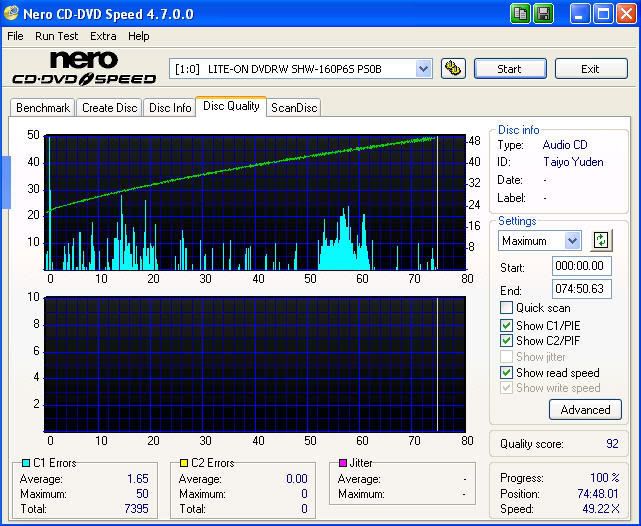
Finally success on a friggin cd scan - Fuji made by Taiyo - wasn't any more scratched up then the others (I don't take that good care of them)
Not as good as cincy's but at this point I'll take it :)
|
AfterDawn Addict
|
1. December 2006 @ 11:10 |
Link to this message
|
|
Looks OK to me binkie ;-)
|
AfterDawn Addict
4 product reviews
|
1. December 2006 @ 11:13 |
Link to this message
|
Originally posted by Ripper:
Lol, you'll get there eventually! If cincy can do it, then you can too :D
:-)
damn thats a stab if i ever felt one
|
AfterDawn Addict
|
1. December 2006 @ 11:29 |
Link to this message
|
|
Awww, was only a joke :-)
No offence intended! :)
|
Moderator
|
1. December 2006 @ 11:31 |
Link to this message
|
|
Yeah but a CMC disc beating a Taiyo - now that's ironic :)
|
AfterDawn Addict
4 product reviews
|
1. December 2006 @ 11:36 |
Link to this message
|
|
i know was just playing..lol
that not ironic that just flat out wrong. PERIOD
|
AfterDawn Addict
|
1. December 2006 @ 11:43 |
Link to this message
|
|
Lol I have to say too, plain WRONG ;-)
|
|
Advertisement
|
|
|
|
Yulyo
Junior Member
|
1. December 2006 @ 12:55 |
Link to this message
|
wtf is wrong with my scans uploads friends?
from my pc @ Opera everything works ok. i click on the image and a new page is opened. with the big photo.
here is my link.
http://img2.freeimagehosting.net/image.php?f821f15caa.jpg
pls let me know exactly what i have to put between [img]xxx[img]
or give me another server to upload the images
thank you
This message has been edited since posting. Last time this message was edited on 1. December 2006 @ 12:57
|





