|
Post your Nero cd/dvd speed quality scans here
|
|
Moderator
1 product review

|
19. April 2007 @ 05:26 |
Link to this message

|
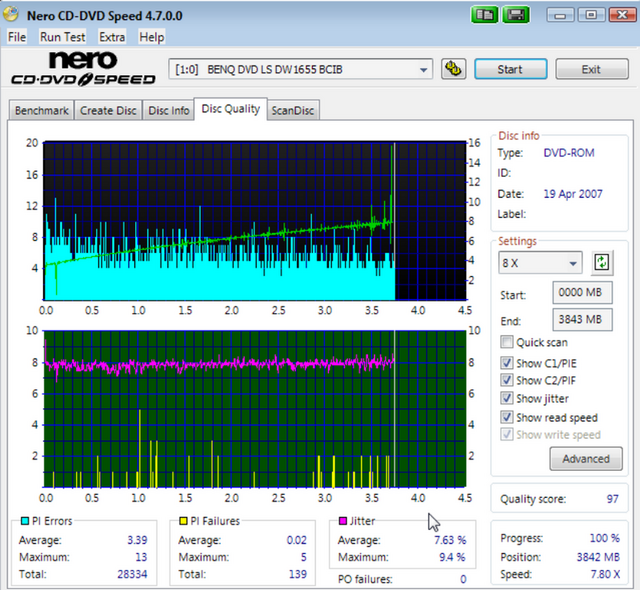
I don't know why, but CD Speed has stopped ID'ing my media...these are TY02's. I've noticed it hasn't been right since I started using DVD-Rebuilder, but this one required no compression so it was a rip and burn.
|
|
Advertisement

|
|
|
|
AfterDawn Addict
|
19. April 2007 @ 05:36 |
Link to this message
|
Whadup LOCO??
Try this for the newest version of Nero CD/DVD Speed. :)
LINK to what you need.....lol
YOu know except for that one spike of 5 that scan has 99 written all over it. :) Nice scan there buddy.
...gm
|
AfterDawn Addict
4 product reviews
|
19. April 2007 @ 05:51 |
Link to this message
|
|
yes a very good scan loco. getting closer to that 100 pif make arent ya
|
Moderator
1 product review
|
19. April 2007 @ 07:56 |
Link to this message

|
Tried this on a whim....TY02 burned on the fly with Imgburn at 8X.
I 11:01:09 Operation Started!
I 11:01:09 Building Image Tree...
I 11:01:09 Checking Directory Depth...
I 11:01:09 Calculating Totals...
I 11:01:09 Preparing Image...
I 11:01:13 Checking Path Length...
I 11:01:13 Image Size: 4,631,132,160 bytes
I 11:01:13 Image Sectors: 2,261,295
I 11:01:13 Operation Successfully Completed! - Duration: 00:00:04
I 11:01:16 Operation Started!
I 11:01:16 Building Image Tree...
I 11:01:16 Checking Directory Depth...
I 11:01:17 Calculating Totals...
I 11:01:17 Preparing Image...
I 11:01:17 Checking Path Length...
I 11:01:17 Image Size: 4,631,132,160 bytes
I 11:01:17 Image Sectors: 2,261,295
I 11:01:18 Operation Successfully Completed! - Duration: 00:00:01
I 11:01:18 Operation Started!
I 11:01:18 Source File: -==/\/[BUILD IMAGE]\/\==-
I 11:01:18 Source File Sectors: 2,261,295 (MODE1/2048)
I 11:01:18 Source File Size: 4,631,132,160 bytes
I 11:01:18 Source File Application Identifier: IMGBURN - THE ULTIMATE IMAGE BURNER! (C) 2006 LIGHTNING UK!
I 11:01:18 Source File Implementation Identifier: ImgBurn
I 11:01:18 Source File File System(s): ISO9660, UDF (1.02)
I 11:01:18 Destination Device: [1:0:0] BENQ DVD LS DW1655 BCIB (E:) (ATA)
I 11:01:18 Destination Media Type: DVD+R (Disc ID: YUDEN000-T02-00) (Speeds: 2.4x, 4x, 8x)
I 11:01:18 Destination Media Sectors: 2,295,104
I 11:01:18 Write Mode: DVD
I 11:01:18 Write Type: DAO
I 11:01:18 Write Speed: 8x
I 11:01:18 Link Size: Auto
I 11:01:18 Test Mode: No
I 11:01:18 BURN-Proof: Enabled
I 11:01:19 Filling Buffer...
I 11:01:22 Writing LeadIn...
I 11:01:41 Writing Image...
I 11:09:56 Synchronising Cache...
I 11:09:57 Closing Track...
I 11:10:01 Finalising Disc...
I 11:10:22 Image MD5: 455488338507bd5f2f3dbd57cacd926b
I 11:10:25 Operation Successfully Completed! - Duration: 00:09:04
I 11:10:25 Average Write Rate: 9,155 KB/s (6.6x) - Maximum Write Rate: 11,290 KB/s (8.2x)
I 11:10:25 Cycling Tray before Verify...
W 11:10:35 Waiting for device to become ready...
I 11:10:43 Device Ready!
I 11:10:43 Operation Started!
I 11:10:43 Source Device: [1:0:0] BENQ DVD LS DW1655 BCIB (E:) (ATA)
I 11:10:43 Source Media Type: DVD+R (Book Type: DVD-ROM) (Disc ID: YUDEN000-T02-00) (Speeds: 2.4x, 4x, 8x)
I 11:10:43 Image File: -==/\/[BUILD IMAGE]\/\==-
I 11:10:43 Image File Sectors: 2,261,295 (MODE1/2048)
I 11:10:43 Image File Size: 4,631,132,160 bytes
I 11:10:43 Image File Application Identifier: IMGBURN - THE ULTIMATE IMAGE BURNER! (C) 2006 LIGHTNING UK!
I 11:10:43 Image File Implementation Identifier: ImgBurn
I 11:10:43 Image File File System(s): ISO9660, UDF (1.02)
I 11:10:44 Verifying Sectors...
I 11:18:26 Device MD5: 455488338507bd5f2f3dbd57cacd926b
I 11:18:26 Image MD5: 455488338507bd5f2f3dbd57cacd926b
I 11:18:32 Operation Successfully Completed! - Duration: 00:07:42
I 11:18:32 Average Verify Rate: 9,789 KB/s (7.1x) - Maximum Verify Rate: 12,645 KB/s (9.1x)
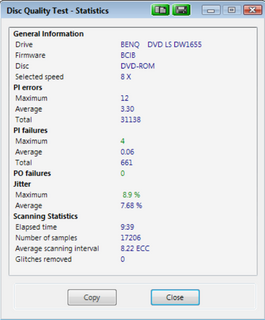
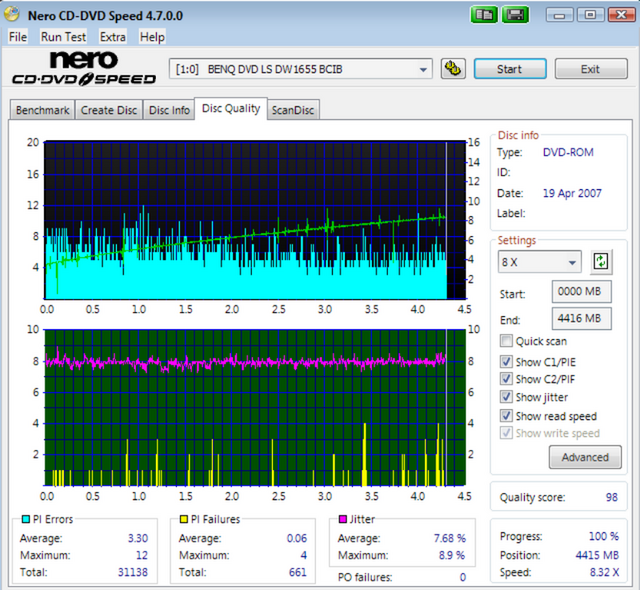
Turned out pretty good if you ask me.
|
AfterDawn Addict
|
19. April 2007 @ 08:04 |
 Link to this message
|
|
NOT to bad for a choo-choo driver...hehehe. Really that's dang good there locoeng........ :) Try that new version of CD/DVD Speed and see if you get more info in your scans. :P
....gm
|
Senior Member
|
20. April 2007 @ 03:02 |
Link to this message

|
i figure this would be the best place to ask.i know its not a quality scan. here goes. i have 2 of the same data discs one will back up the other wont. question is why is the green area so much different if they are identical discs.why is the read test and c1/c2-pi/po test grayed out on the bad one? the progress,position and speed are different?
good disc

bad disc

thanks
|
AfterDawn Addict
|
20. April 2007 @ 03:22 |
Link to this message
|
|
@born2ride,
That is odd. Are you sure that both discs finished the process? And they are the exact same data and backup? I haven't done very many of these tests but when they are done they normally show 100% completed, you waited until the test was done right and didn't take a snap shot during the test? Just checking here. I will do some more research and get back with you.
Sorry not very helpful. Maybe cincyrob will add something when he wakes up. LOL.
....gm
|
AfterDawn Addict
4 product reviews
|
20. April 2007 @ 03:36 |
Link to this message
|
|
easy answer here.. the test isnt finished on either disc.... look at the position on the disc's. the good one progress so far is only at 17.1% and only 456mb position on the disc read. and the bad disc progress is at 77.1% and 2057 mb
so the good disc is about a 1/4 of the way finished testing and the bad disc is 3/4 finished
|
AfterDawn Addict
|
20. April 2007 @ 03:39 |
Link to this message
|
|
Lookimg at the first one it shows as 17.1% progress and the second as 77.1% progress...maybe they didnt finish the scan
|
Senior Member
|
20. April 2007 @ 04:02 |
Link to this message
|
|
thanks all
i think the bad one froze it was taking forever
The good one i thought was done. how can i tell if the disc is done? i must be missing it! first time using this feature can you tell.lol
i will retest both tonight and post
EDIT;surface scan reads 100% on one and the other one add up to 100% so i thought is was done
This message has been edited since posting. Last time this message was edited on 20. April 2007 @ 05:26
|
AfterDawn Addict
|
20. April 2007 @ 04:09 |
Link to this message
|
|
Where is says/indicates progress. That should be at 99.9% or 100% to indicate that it's finished. ON the DQ test it indicates 99.9% before you X-out the stat results. Then is shows 100% not really sure with the ScanDisc, haven't done enough to remember. Man I'm useless this morning. LOL.
....gm
|
AfterDawn Addict
4 product reviews
|
20. April 2007 @ 08:15 |
Link to this message
|
|
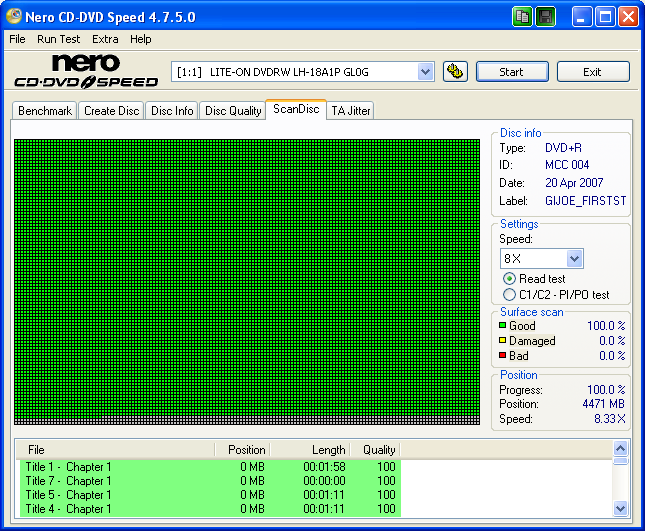
where it shows 100% on that scan it is showing what has been scaned so far and it is 100% good no bad sectors on it so far. and the other shows 97.1% good and .02% damaged and 2.1%bad. and thats of what has been scaned so far.i'll do one here in a few mins and show what one looks like finished alnog with the quality scan.. it was agreat scan well still is i had a 98 on it with only 19 PIF's i accidently deleted it before i could save it. so i redid it and got a 95 on it with a total of 24 pif's
|
AfterDawn Addict
4 product reviews
|
20. April 2007 @ 08:46 |
Link to this message
|
heres the 98/95 scan i got when i redid it. still very nice
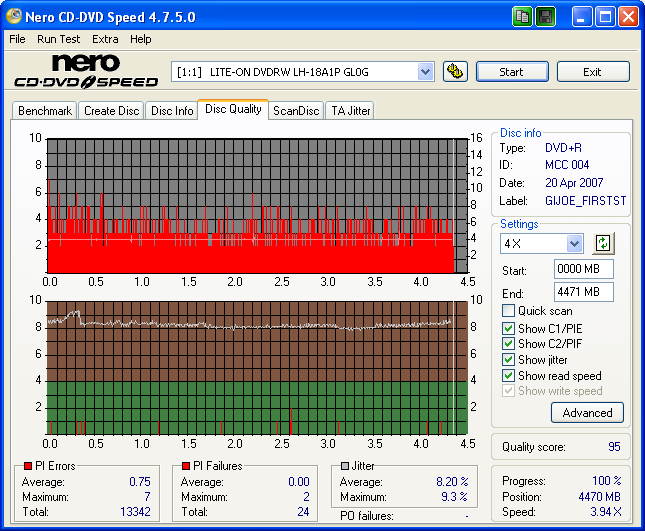
and here is the surface scan of it and what one will loko like when finished.. and what you want it to look like.
|
AfterDawn Addict
|
20. April 2007 @ 09:25 |
Link to this message
|
|
Excellent there cincyrob!!! That sucks about your 'deleting' the 98 with 19 PIF's. LOL. I did that once with a 6 or 8 PIF scan. I think that I told you about it. Silly, silly, silly. LOL.
...gm
|
Senior Member
|
20. April 2007 @ 10:19 |
Link to this message
|
|
cincyrob
what the time frame it takes to complete the scan disc?
does the drive speed matter. 4x scan or 16x scan?
|
AfterDawn Addict
4 product reviews
|
20. April 2007 @ 11:40 |
Link to this message
|
|
4x is the best results i think. and it takes about 5-10 mins i gues maybe more some less never really timed it
|
Senior Member
|
20. April 2007 @ 18:56 |
Link to this message
|
How about this as a DL scan? I dont think it's that bad since it's a Ritek burned on a LiteOn.
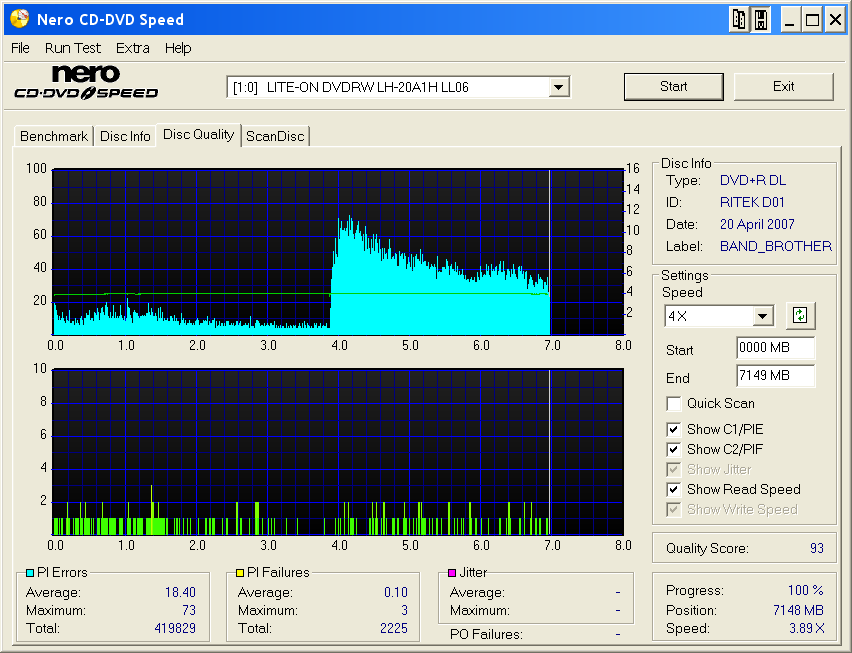
Still have questions about the layer break, seems wierd.
|
Senior Member
|
20. April 2007 @ 19:00 |
Link to this message
|
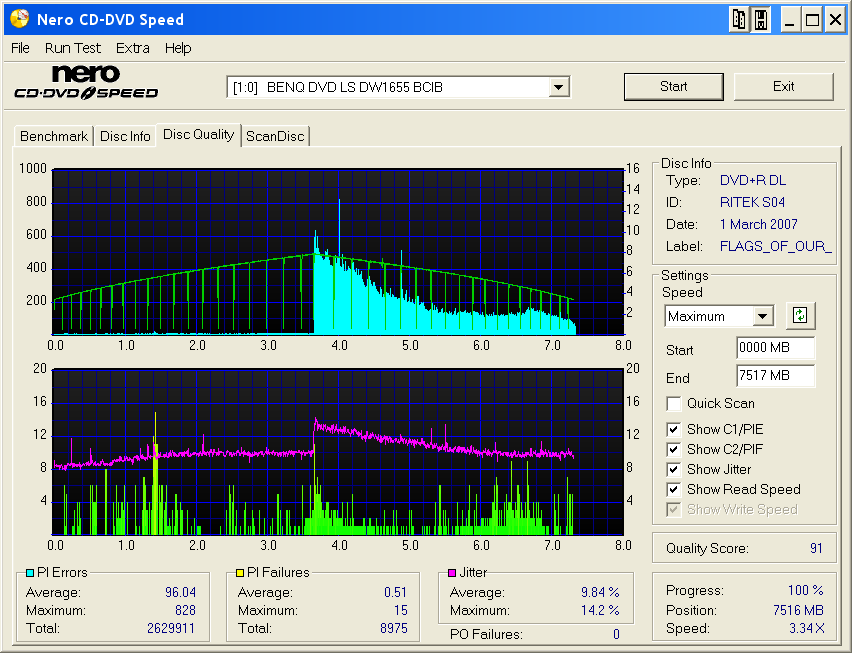
Here's another DL, but burned on an Benq;
|
Senior Member
|
20. April 2007 @ 19:04 |
Link to this message
|
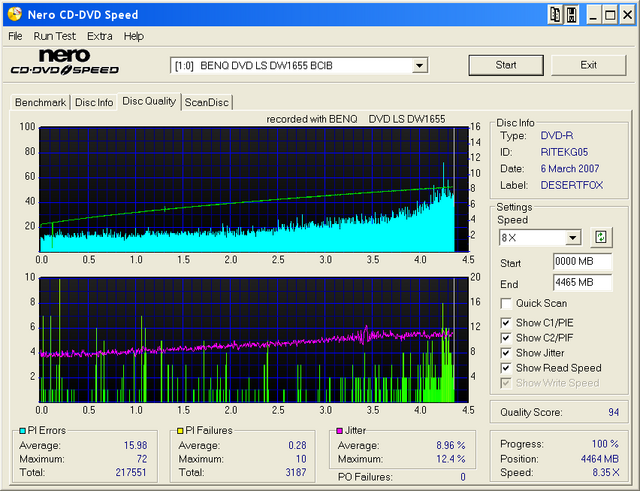
Here's a single layer. Also burned & scanned on a Benq.
This message has been edited since posting. Last time this message was edited on 20. April 2007 @ 19:07
|
Senior Member
|
20. April 2007 @ 19:10 |
Link to this message
|
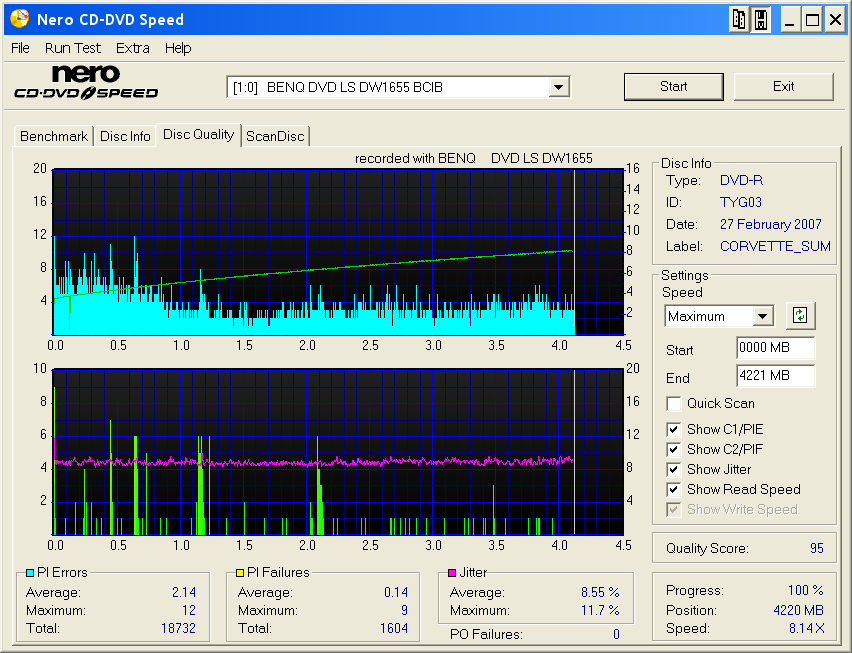
And here's another single layer. Benq burn and scan, TY media.
|
AfterDawn Addict
4 product reviews
|
21. April 2007 @ 02:41 |
Link to this message
|
|
i dont know to much about DL's but i dont think they should have that high of average on the second layer.i know theyget the spike at the breal but i dont hink they should stay so high.. there is alot of spike in all the burns, if ya take out those spike they would be awsome scans... i take it they all play fine. thats the main thing there
|
Senior Member
|
21. April 2007 @ 03:10 |
Link to this message
|
redid scan on both discs. i got the good one to finish

the bad one froze or was moving so slow i stopped it pretty much same spot.
to sum it all up that why i could not back up dvd.
|
AfterDawn Addict
4 product reviews
|
21. April 2007 @ 03:27 |
Link to this message
|
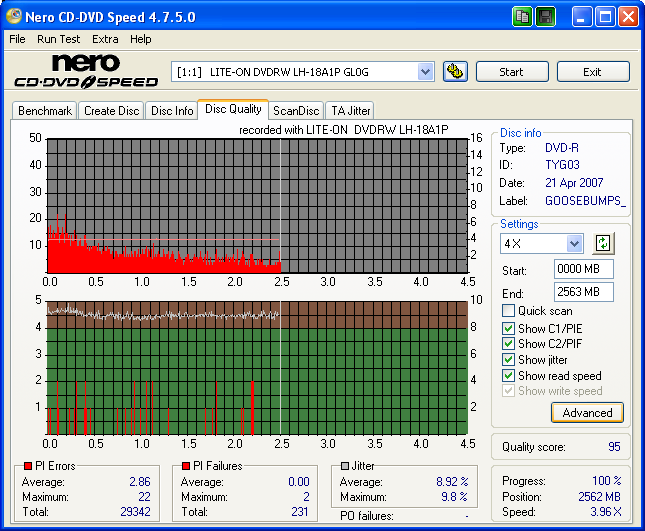
here a scan of a short movie for my son. on a TYG03.
@born2ride
now thats what its supose to look like.. and that second one it stoped cause is was to bad and wasnt able to read the disc anymore
|
AfterDawn Addict
4 product reviews
|
21. April 2007 @ 04:52 |
Link to this message
|
heres something odd.. im i the middle of a burn actually at 51% im useing a MIJ maxell 8x+r hub printable.it stops burning and ejects the disc then re inserts the disc and starts burning again???im useing my trusty AnyDVD and clonedvd2 as far as i know the thing is burning from where it left off???i'll find out when its done.. ill post the scan of itif its playable
|
|
Advertisement
|
|
|
Senior Member
|
21. April 2007 @ 05:03 |
Link to this message
|
Here's another DL scan:

If anyone knows how to reduce the spikes in the second layer, I'd appreciate knowing how. The spikes occur with 3 dif. burners (Sony DRU-800a, Benq DW1655, Lite-On LH-20A) on 2 dif. comps, with 2 or 3 types/speeds of media, mainly Ritek and Verbatum (sure wish TY would come out with some DLs!) I don't have any scans of the Verbs now, I'll track one down & see what I get.
On a different matter, I was given some Imation +Rs by my brother for a project and thinking they were going to be crap (he has know idea of what good media is) but wanting to know how bad, I scanned them and they coded out as RICOHJPNs! Score!
|






