|
The (new) Official PC building thread!
|
|
AfterDawn Addict
4 product reviews

|
26. May 2008 @ 19:13 |
 Link to this message

|
The simpler way, is to buy the case that comes with quiet fans pre-fitted, the NZXT Lexa Blackline. As for the CPU temp, 45C is regarded as 'good' for a processor at full load (these temps aren't idle). As for the Scythe fan it's pretty decent, but unless you use a fan controller, the PC isn't going to be very quiet.
You could of course settle for the good middleground and get the SFF21E instead of the SFF21F. That's a quiet fan that still pushes a good amount of air.
Off this topic, I decided to go hell for leather with silencing my main PC, see my latest blog entry for details.


|
|
Advertisement

|
|
|
|
|
mrk44
Suspended due to non-functional email address
|
26. May 2008 @ 19:23 |
Link to this message

|
But isnt the SFF21E just a fan by itself? What would I use it on? And do you mean use the fan controller on the SCZP-1000 that i wanted? Because frostytech says that the only thing quieter than it is a solid block of aluminum.
For the Lexa Blackline, your talking about this one right? I might actually get that now that I think about it and see the price. Thanks.
|
AfterDawn Addict
4 product reviews
|
26. May 2008 @ 19:26 |
Link to this message
|
|
Lol I didn't mean only use the fan, I meant use it in place of the SFF21F if you're using an Ultra-120 heatsink.
For the case, yes I am. The stock cooling might not feel like it's doing much, but it gets the job done, and gets it done quietly as well.
|
|
mrk44
Suspended due to non-functional email address
|
26. May 2008 @ 19:40 |
Link to this message

|
|
Ok, well i guess I got the case down.
Just one more thing......After the TRU, what is your second choice for a hsf?? One that would not need me to buy another fan or anything (because I'm not sure how to mount it on to the heatsink)?
|
AfterDawn Addict
4 product reviews
|
26. May 2008 @ 19:49 |
Link to this message
|
|
The heatsink comes with the instructions for attaching the fan - it's pretty easy to do, but a little fiddly.
Attaching a high-end CPU cooler is a much more complex task.
|
|
mrk44
Suspended due to non-functional email address
|
26. May 2008 @ 20:41 |
Link to this message
|
Originally posted by sammorris:
The heatsink comes with the instructions for attaching the fan - it's pretty easy to do, but a little fiddly.
Attaching a high-end CPU cooler is a much more complex task.
Isn't the TRU a high-end cooler and expensive??
I need something cheaper. I am also worried about the size of some coolers. Is the blackline big enough to support, say, a Tuniq Tower or a Thermaltake CL-P0114?
Can anybody suggest another hsf?? I heard yateloons are really good, but impossible to get.
|
AfterDawn Addict
4 product reviews
|
26. May 2008 @ 21:03 |
Link to this message
|
|
Yate Loon make fans, not heatsinks.
The Thermalright Ultra coolers are cheaper than the Tuniqs where I've looked, and are better than the Thermaltakes. I use one in an NZXT Lexa, so I can confirm it fits.
|
|
mrk44
Suspended due to non-functional email address
|
26. May 2008 @ 23:00 |
Link to this message
|
This is really off topic, but do you know a good component to get at Best Buy that is around $110. I have gift cards and want to save a little money on this build. How is this WD Hard Drive for $100 (here)?
|
AfterDawn Addict
|
26. May 2008 @ 23:03 |
Link to this message
|
mrk44,
Quote:
Which case are you talking about? The Mystique? The full-length doors are not much of a problem for me and I would never put coffee on the top. I'm screwed if it spills.
Not on top of it, on the desk in front of the computer. I'm crazy (just ask greensman LOL!!), but I'm not that crazy! LOL!! I have a standard 5 ft desk that's 30" deep and the computer can't sit too far back because of the drapes so I put my coffee cup right in front of the computer. There's only a space about 6" to put it in so a full door for me, is out.
I saw Mort81's post where he mentioned the AF7-Pro cooler. The Arctic Freezer 7 Pro is an excellent cooler. I think this thread goes a bit overboard when it comes to CPU cooling. My E6750 runs nice and cool overclocked from 2.66GHz to 3.55GHz and temperatures have never been an issue. Unless you plan on an extreme overclock, a Freezer 7 should be just fine. More often than not when the temps get too high, it has more to do with the ability of the case's ventilation than the ability of the CPU cooler!
For guys like Mort, NuckNFuts and anyone wanting to go with a real Extreme OC, I can see them, or for someone like Sam that wants a silent PC, but about 90% of the time you really don't need to spend that much money. It just isn't worth it or necessary! Before I catch all kinds of Hell, yes it will run cooler, but just to lower my idle temp from 27-29C idle and 53C max at full load with OCCT makes no sense to me at all. At max temps I'm still almost 20C below the point that throttling even kicks in at my max temp! I'm not going to do much improving on these temps!

It's been on constantly for the last 12 hours or so! Depending on the price at the time, I can get 2 to 3 Freezer 7 Pros for the cost of 1 TRUE. I can't even fit one in my case unless I remove the side cover fan, something I'm not willing to do. The TRUE is a great cooler if you need it, but overkill to me, if you don't! I've had "heaters" with both the 3.0 Prescot and a 3.2 Presler Dual core and have never needed more than a Zalman 9500 for the Prescot at 3.84GHz! The Presler, also at 3.84GHz had a Freezer 7 pro installed after the Zalman peed on my MB. I use the Freezer series for every build I do, including overclocks with no problems with temps!
As far as the case ventilation on the Lexa Blackline, it has very good airflow and I will add a Silverstone FM83 80mm fan to the top running at minimum speed, and if I need more airflow, I'll just turn up the control that comes with it that mounts in any case slot in the back of the computer. I also read all 78 reviews of the Blackline at Newegg and not one person complained about cooling problems with it! One guy did complain about the filters cutting down the airflow, but you'll have to ask Sam about that one!
Best Regards,
Russ
GigaByte 990FXA-UD5 - AMD FX-8320 @4.0GHz @1.312v - Corsair H-60 liquid CPU Cooler - 4x4 GB GSkill RipJaws DDR3/1866 Cas8, 8-9-9-24 - Corsair 400-R Case - OCZ FATAL1TY 550 watt Modular PSU - Intel 330 120GB SATA III SSD - WD Black 500GB SATA III - WD black 1 TB Sata III - WD Black 500GB SATA II - 2 Asus DRW-24B1ST DVD-Burner - Sony 420W 5.1 PL-II Suround Sound - GigaByte GTX550/1GB 970 Mhz Video - Asus VE247H 23.6" HDMI 1080p Monitor
 |
|
mrk44
Suspended due to non-functional email address
|
26. May 2008 @ 23:11 |
Link to this message
|
theonejrs:
I would go with the Artic Freezer 7 Pro, but I don't know if it's quiet, which is what I want in my hsf. Is it loud, or do you think i can live with its noise?
For my case, I decided to go with the CM Cosmos. I can get one for $99.99 and I read EVERYWHERE that it is one of the quietest cases you can get. All I have to do is replace the 120mm fans in the back with some better ones that have better airflow. Can you recommend any quiet ones?
Thanks.
The build I have come up with so far is EXTREMELY cheap. Comes up to less than $1100, w/ a P5E X38 AND Q9450, COSMOS Case, Dominator 2GB RAM, and other stuff. AMAZING!!!
This message has been edited since posting. Last time this message was edited on 26. May 2008 @ 23:12
|
AfterDawn Addict
|
26. May 2008 @ 23:33 |
Link to this message
|
mrk44,
Quote:
I would go with the Artic Freezer 7 Pro, but I don't know if it's quiet, which is what I want in my hsf.
It's very quiet. Much quieter than a Zalman 9500LED! The only time I ever hear it is when running OCCT, and you really have to listen for it. Replacement fans are cheap and it takes no tools and about a minute to change and you don't have to remove the cooler to change one!
Russ
GigaByte 990FXA-UD5 - AMD FX-8320 @4.0GHz @1.312v - Corsair H-60 liquid CPU Cooler - 4x4 GB GSkill RipJaws DDR3/1866 Cas8, 8-9-9-24 - Corsair 400-R Case - OCZ FATAL1TY 550 watt Modular PSU - Intel 330 120GB SATA III SSD - WD Black 500GB SATA III - WD black 1 TB Sata III - WD Black 500GB SATA II - 2 Asus DRW-24B1ST DVD-Burner - Sony 420W 5.1 PL-II Suround Sound - GigaByte GTX550/1GB 970 Mhz Video - Asus VE247H 23.6" HDMI 1080p Monitor
|
|
mrk44
Suspended due to non-functional email address
|
26. May 2008 @ 23:48 |
Link to this message
|
Originally posted by theonejrs:
Replacement fans are cheap and it takes no tools and about a minute to change and you don't have to remove the cooler to change one!
Yeah, then I think I will get an arctic freezer 7 pro. I won't get the COSMOS 1000 and I'll switch back to the Lexa Blackline. I hope this turns out to be quiet.....
theonejrs and sammorris:You guys said me that I wouldn't need to change the case fans on the Lexa because they are already quiet with good airflow, right?. But the reviews say that they do not move much air. Do you think I should change them??
This message has been edited since posting. Last time this message was edited on 27. May 2008 @ 00:09
|
AfterDawn Addict
2 product reviews
|
27. May 2008 @ 00:04 |
Link to this message
|
|
The Freezer 7 Pro takes 92mm fans, not 120. I'm still gonna say go with the Xigmatek cooler if you are on a Budget. It seriously much better than a Freezer 7 Pro, I know I've used two in the past. The Freezer 7 Pro is an excellent cooler, don't get me wrong, but the Xigmatek almost matches the Performance of a TRUE!
Russ, there is a big temp difference between running an OCed Dual core and an overclocked Quad Core. I guess since he is getting a Q9450 it will be less of a problem.
|
|
mrk44
Suspended due to non-functional email address
|
27. May 2008 @ 00:11 |
Link to this message
|
|
abuzar: If I get the Xigmatek, which fan should I use to replace the one it came with to make it quieter? And isn't it quite big?
This message has been edited since posting. Last time this message was edited on 27. May 2008 @ 00:11
|
AfterDawn Addict
6 product reviews
|
27. May 2008 @ 00:12 |
Link to this message
|
mrk44,
I just dl'ed the manual for the P5E. it has 2 chassis fan headers on the mobo which can be controlled through Q-fan in the bios. you can set them at 60%, 70%, 80% or 90% or you can disable Q-fan and run them at 100%. no need for a fan controller for two fans anyway.
Rig #1 Asus Rampage Formula Mobo, Intel Core2Quad Q9450 CPU @ 3.55ghz, 2gb Corsair DDR2 1066 Dominator Ram @ 5-5-5-15, TR Ultra 120 Extreme w/ Scythe 9 blade 110 cfm 120mm Fan HSF, HIS Radeon 512mb HD3850 IceQ TurboX GPU, Corsair 620HX P/S, CM Stacker 830 Evo Case, Rig #2 Asus P5W DH Deluxe Mobo, Intel C2D E6600 CPU @ 3.6ghz, 2gb Corsair XMS2 DDR2 800 Ram @ 4-4-4-12-2t, Zalman CNPS9500LED HSF, Sapphire Radeon X850XT PE GPU, Corsair 620HX P/S, Cooler Master Mystique Case, Viewsonic 20.1" Widescreen Digital LCD Monitor, Klipsch Promedia Ultra 5.1 THX Desktop Speakers, http://valid.x86-secret.com/show_oc.php?id=348351 http://valid.x86-secret.com/show_oc.php?id=236435 |
AfterDawn Addict
2 product reviews
|
27. May 2008 @ 00:35 |
Link to this message
|
It's as big as the TRUE, but it doesn't matter, your case will fit it fine. I've heard this fan is pretty quiet(Scythe S-FLEX SFF21F).
http://www.newegg.com/Product/Product.as...scythe%2bSFF21F
WAY too expensive for my taste though. I would ask around and see what fan gives you best silence for the price. I would just get a decent cheap fan that moves a lot of air and then just turn down the speed till it's quiet.
Why don't you try using the stock fan? If it's too noisy for you THEN think about getting a new fan.
|
AfterDawn Addict
|
27. May 2008 @ 00:36 |
Link to this message
|
mrk44,
Quote:
Can you recommend any quiet and efficient 120 mm replacement fans with really good airflow? I need it for the CM COSMOS that I mentioned in the previous post.
All I ever recommend is two silverstones. The 80mm I linked to before and the FM121. No need to run them very fast! at 800 rpm they will outperform most fans. I run mine at 1400 rpm and move about 75 CFM out the back of the case. They are capable of 110 CFM, but the noise would drive you out at the max 2400 rpm. No need to ever run them that fast though! They are way quieter than the stock Cooler Master fan that came with my case and move lots of air! Realistically if you had to run them fast enough to be annoying, there's a problem that would be there with any case fan! I haven't found any other fan that moves as much air for a given rpm! Not in an 800 rpm usable range anyway. First fans I've had in years that have lasted without fuss past the 1 year warranty! LOL!!
Highly Recommended!
FM121 or FM121-B
http://www.newegg.com/Product/Product.aspx?Item=N82E16811999344
Russ
GigaByte 990FXA-UD5 - AMD FX-8320 @4.0GHz @1.312v - Corsair H-60 liquid CPU Cooler - 4x4 GB GSkill RipJaws DDR3/1866 Cas8, 8-9-9-24 - Corsair 400-R Case - OCZ FATAL1TY 550 watt Modular PSU - Intel 330 120GB SATA III SSD - WD Black 500GB SATA III - WD black 1 TB Sata III - WD Black 500GB SATA II - 2 Asus DRW-24B1ST DVD-Burner - Sony 420W 5.1 PL-II Suround Sound - GigaByte GTX550/1GB 970 Mhz Video - Asus VE247H 23.6" HDMI 1080p Monitor
|
AfterDawn Addict
2 product reviews
|
27. May 2008 @ 00:40 |
Link to this message
|
|
You guys and your quiet PCs! I take my stock fans and run them at 100 percent, no need for fan controllers!
Only reason I would get a new fan was if I wanted a fan to move MORE air.
|
AfterDawn Addict
6 product reviews
|
27. May 2008 @ 00:48 |
Link to this message
|
one disadvantage with the silverstones is that you have to use the included speed controller. more wires and too much clutter for me.
you know me, I don't like clutter and just one reason I like the corsair 620HX modular psu.
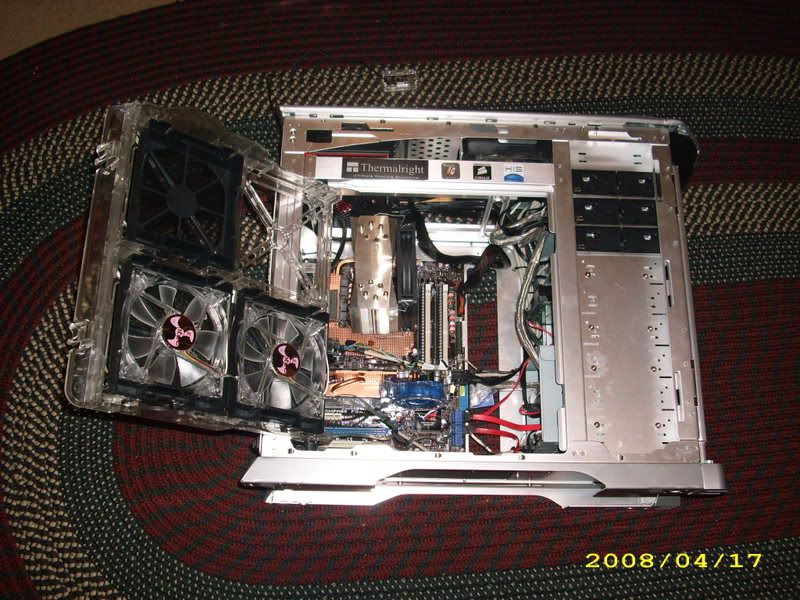
the scythe SFF21F can be had for less money if you shop around. here is one example http://www.svc.com/sy-fan-sff21e.html
Rig #1 Asus Rampage Formula Mobo, Intel Core2Quad Q9450 CPU @ 3.55ghz, 2gb Corsair DDR2 1066 Dominator Ram @ 5-5-5-15, TR Ultra 120 Extreme w/ Scythe 9 blade 110 cfm 120mm Fan HSF, HIS Radeon 512mb HD3850 IceQ TurboX GPU, Corsair 620HX P/S, CM Stacker 830 Evo Case, Rig #2 Asus P5W DH Deluxe Mobo, Intel C2D E6600 CPU @ 3.6ghz, 2gb Corsair XMS2 DDR2 800 Ram @ 4-4-4-12-2t, Zalman CNPS9500LED HSF, Sapphire Radeon X850XT PE GPU, Corsair 620HX P/S, Cooler Master Mystique Case, Viewsonic 20.1" Widescreen Digital LCD Monitor, Klipsch Promedia Ultra 5.1 THX Desktop Speakers, http://valid.x86-secret.com/show_oc.php?id=348351 http://valid.x86-secret.com/show_oc.php?id=236435This message has been edited since posting. Last time this message was edited on 27. May 2008 @ 00:57
|
|
mrk44
Suspended due to non-functional email address
|
27. May 2008 @ 01:13 |
Link to this message
|
Mort
Thanks for that info about the two fan headers on the P5E. Two questions though: How do I use the headers, and is Q-Fan already in the BIOS or do I have to flash it or something??
Abuzar
I looked up the Xigmatek HDT-S1283 on frostytech and the stock fan can run at 1000 RPM with noise level at 35 dBA while keeping at 19C above ambient, AMAZING! Maybe I won't need a replacement fan.....
http://www.frostytech.com/articleview.cfm?articleid=2233&page=5
theonejrs
Disregard that quote in my earlier post. I decided to go with the lexa blackline. The only problem I have with it is that people say the case fans don't blow much air, but they are silent. I don't know what to do with that because both you and sammorris said that the fans that it comes with are just fine with airflow and noise.
This message has been edited since posting. Last time this message was edited on 27. May 2008 @ 01:13
|
AfterDawn Addict
2 product reviews
|
27. May 2008 @ 01:30 |
Link to this message
|
|
Fan headers are just a place where your fan plugs in. There is no special way to use them, just plug them in!
Seriously, use the stock fan first. This way you can save some money if you like it.
|
AfterDawn Addict
|
27. May 2008 @ 06:15 |
Link to this message
|
Mort81,
Quote:
one disadvantage with the silverstones is that you have to use the included speed controller. more wires and too much clutter for me.
I have to disagree! Unless Silverstone has changed them since I last bought some the cable from the controller to the fan is plenty long enough to go from my top 5.25 bay, mounted in a Bay blank, down the front and under the MB to the fan in the rear with no problem. It's almost invisible. You can run the fan from the MB headers and control it with the bios, but you do have to use the controller or it won't work right. If you remember, I did that with mine but I had to change it back after I installed the Enzotech NB cooler as there was much more heat being pulled out of the MB than with the stock cooler and it just didn't work as well as before.
The yellow speed wire on the 120 is also long enough to run under the MB to the fan header, so it all looks very neat. I'm a bit of a slob when it comes to my room, but I'm a bit of a neat freak when it comes to my computers. Witness the AMD 64x2 4800+ I posted pics of! It's super neat! You can't see the wires for the most part and even the flat IDE cable is almost invisible and isn't in the airflow! If you didn't know one was there, you wouldn't even notice it!
It's my "Trademark"! I love it when my Customers Ohh and Ahh when I first show them what the inside of their new computer looks like! If I didn't get at least a "Wow" out of them, I would be very disappointed! LOL!! Looks like you are about as bad as I am when it comes to neat builds. Very nice Pic! You get a "Wow" from me on that one. I have to pick on one tiny thing! When the hell is Thermalright going to wake uo and put a proper fan mount on the damn cooler? Those stupid clips look like crap! Just a little plastic mount for a 120 for God's sake! Metal would be nicer, but plastic's cheaper. Maybe a mount something like the Freezer series uses. Screw the fan to the mount and snap it on the cooler. Simple, and very cheap to make. Sam was using Twist Ties with his! ARGH.....! You guys should complain to Thermalright! Enough people complain and they might just do something about it, but if no one complains they won't do a thing! Write a review on Newegg! Most of the manufacturer's watch those reviews, and promptly answer if there's a complaint, so get to Bitching! LOL!!
Best Regards,
Russ
GigaByte 990FXA-UD5 - AMD FX-8320 @4.0GHz @1.312v - Corsair H-60 liquid CPU Cooler - 4x4 GB GSkill RipJaws DDR3/1866 Cas8, 8-9-9-24 - Corsair 400-R Case - OCZ FATAL1TY 550 watt Modular PSU - Intel 330 120GB SATA III SSD - WD Black 500GB SATA III - WD black 1 TB Sata III - WD Black 500GB SATA II - 2 Asus DRW-24B1ST DVD-Burner - Sony 420W 5.1 PL-II Suround Sound - GigaByte GTX550/1GB 970 Mhz Video - Asus VE247H 23.6" HDMI 1080p Monitor
|
AfterDawn Addict
4 product reviews
|
27. May 2008 @ 08:25 |
Link to this message
|
You shouldn't need to change the fans on the Lexa Blackline, they don't push that much air, but they push enough air. I've run a high performance gaming PC with these fans in use before, and cooling was never an issue.
As for the 100 dollar hard drive at best buy, I don't see why not, that's about ten dollars more than you'll pay for it at newegg.
With regard to fan controllers, the Gigabyte boards have two fan connectors that are automatically controlled to give you lower speeds than the Asus boards will allow (Asus ones only go down to 50%)
Theone: Yeah, the metal clips are irritating, but the fact that I was using a cable tie was merely laziness at doing the job properly. Didn't fancy spending 10 minutes attaching a fan when the heatsink was on and ready to go!
|
AfterDawn Addict
2 product reviews
|
27. May 2008 @ 09:03 |
Link to this message
|
|
Russ, can I see some pics? I love seeing neat computers for some reason lol. Maybe it's because that's how I want my computer to look but it never turns out that way.
|
|
Advertisement
|
|
|
AfterDawn Addict
4 product reviews
|
27. May 2008 @ 09:48 |
Link to this message
|
well no problems all weekend(other than no sound)
my temps have been the same all weekend also. i have ran dvd-rebuild a bunch of times. actually running right now.temps is only 57c.
49-51c at idle cpu itself is 30c idle 39c right now with rebuilder runnning.
heres a shot at everest. this is with dvd-rebuilder running
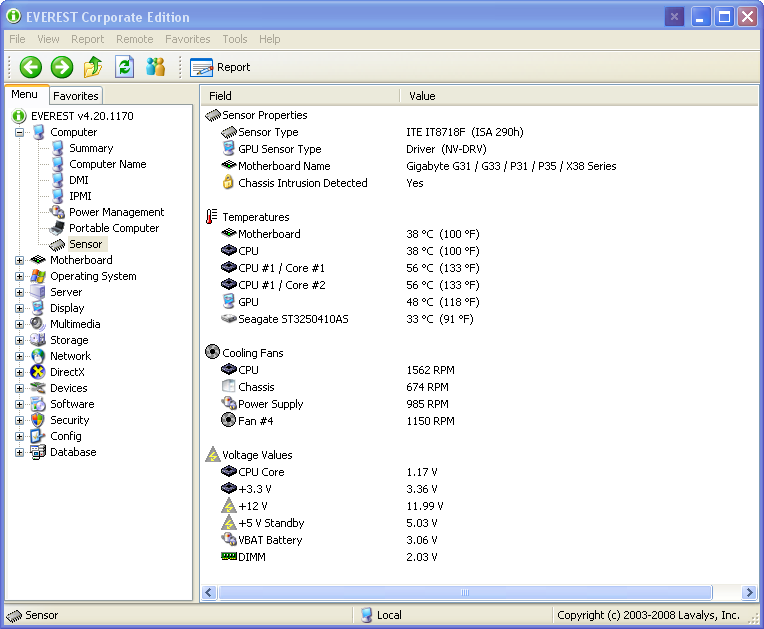
andi have the mem runnning in auto right now seeing there is no OC. so the volts are lower than the 2.2v
|


