|
How to: Update Eurovox Max V with Kuro 18.04.08 (R.I.P 28/11/2008)
|
|
Please note that the forum rules have changed. Posting of new codes is no longer allowed. See this thread for more information.
|
|
kristovl
Newbie

|
30. April 2008 @ 17:33 |
 Link to this message

|
Hello anone that can help. I just updated my brothers box with the correct null modem 9 pin cable and a usb adapter and his is a eurovox blue and it worked fine. They have a slightly newer laptop than i do and there's run off vista rather than mine which is on xp. I however have a eurovax maxV (black) and i have tried to do the same but i can only use COM3 and i cannot get past the 'waiting fo response' stage before downloading. Any help please?
|
|
Advertisement
|
 |
|
|
AfterDawn Addict
2 product reviews
|
30. April 2008 @ 17:39 |
Link to this message

|
|
This message has been edited since posting. Last time this message was edited on 30. April 2008 @ 17:41
|
Senior Member
|
1. May 2008 @ 05:29 |
Link to this message

|
Originally posted by kristovl:
Hello anone that can help. I just updated my brothers box with the correct null modem 9 pin cable and a usb adapter and his is a eurovox blue and it worked fine. They have a slightly newer laptop than i do and there's run off vista rather than mine which is on xp. I however have a eurovax maxV (black) and i have tried to do the same but i can only use COM3 and i cannot get past the 'waiting fo response' stage before downloading. Any help please?
There are some posts on the other pages of this thread that will probably be of some use to you.
Whatever you say, say nothing when you talk about you know what for if you know who might hear you, you know what youll get. Youll be sent off to you know where for you would not know how long. Maybe I could search through the threads so you dont have to ??
|
|
spursrule
Newbie
|
1. May 2008 @ 11:34 |
Link to this message
|
|
hello there you clever people out there,
i have a euro-vox .tv box is there a download i can put on it so idont have to keep putting the codes in please, my other boxes are ok but this one is my mates , i have tried thre down loads red blue and euromax but they dont work ,have you any ideas out there ,
many thanks , my heros,
( yes i am begging on my knees as i write this )
|
|
murphj11
Junior Member
|
1. May 2008 @ 14:23 |
Link to this message
|
Originally posted by HiTeck:
Originally posted by murphj11:
Originally posted by karljd:
Originally posted by banchod:
hello all,
please please can someone tell me what firmware should i be using for my eurovox max Bluebox Clone?. I have this file UFL_Max_BLUE_21_04_08.exe
will this WORK?????.
thanks
allready answered here http://forums.afterdawn.com/thread_view.cfm/162/647037
Hi dudes,
Can anyone tell me the fastest way to find out what class of eurovox box i have.....i bought it in october 2007......any suggestions?
Jamesy
Have a look to see if you have a clone or not first here
http://www.irelandeurovox.com/eurovoxclones.htm
Then to tell what box you have here,
http://www.freewebs.com/tempfix/redorblue.htm
Thanks man but my eurovox box isnt like either of these so i am no closer to the truth......maybe "I cant handle the truth".....thanks anywaY
Jamesy
|
|
westbrom
Suspended due to non-functional email address
|
1. May 2008 @ 14:35 |
Link to this message
|
put v4oooapi bin file into a digi vox and when i do a scan the channels are bad and scrambled. can anyone tell me if its the right bin file to autoupdate and how to install channels so they update through the menu
|
Member
|
1. May 2008 @ 14:43 |
Link to this message
|
Originally posted by HiTeck:
Hill you have not typed anything?
hi hiteck i did type a reply last night but it was in the middle of other posts so thats probably why you didnt see it i dont why that happened i am only in so i havent tried to download the new firmware i will let you all know how i get on ,i know i have the right cable thanks
|
AfterDawn Addict
2 product reviews
|
1. May 2008 @ 17:35 |
Link to this message
|
Originally posted by hill16:
Originally posted by HiTeck:
Hill you have not typed anything?
hi hiteck i did type a reply last night but it was in the middle of other posts so thats probably why you didnt see it i dont why that happened i am only in so i havent tried to download the new firmware i will let you all know how i get on ,i know i have the right cable thanks
Ok Hill,
Good luck with it and all the best!
|
AfterDawn Addict
2 product reviews
|
1. May 2008 @ 18:35 |
Link to this message
|
|
|
|
murphj11
Junior Member
|
2. May 2008 @ 09:48 |
Link to this message
|
Originally posted by HiTeck:
murphj11:
Quote:
Thanks man but my eurovox box isnt like either of these so i am no closer to the truth......maybe "I cant handle the truth".....thanks anywaY
Jamesy
Iss this your box? If so try this firmware,
http://www.mediafire.com/?xynenwxvyjy/
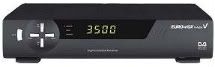
Thats the one okay.....can you i.d it for me....is it a clone dya think??.....Thanks for the reply
Jamesy
|
|
cnotnhere
Newbie
|
2. May 2008 @ 13:36 |
Link to this message
|
just patched my box with the new firmware , i'm in north co dub on CH**US and things are working fine , once you save your channel list before updating you should have no probs , a big thanks to all on here for all the support available to us
|
AfterDawn Addict
2 product reviews
|
2. May 2008 @ 13:47 |
Link to this message
|
Originally posted by murphj11:
Originally posted by HiTeck:
murphj11:
Quote:
Thanks man but my eurovox box isnt like either of these so i am no closer to the truth......maybe "I cant handle the truth".....thanks anywaY
Jamesy
Iss this your box? If so try this firmware,
http://www.mediafire.com/?xynenwxvyjy/
Thats the one okay.....can you i.d it for me....is it a clone dya think??.....Thanks for the reply
Jamesy
Have a look here thanks to panasonic
Explains how to tell the difference in great detail.
http://forums.afterdawn.com/thread_view.cfm/659486#4004192
Although not sure on the firmware compatibility with a clone!!! If yours Is an original after reading this link I would advise you to download the firmware link already posted in my previous post also on pg1 by SG8, If it is a clone I am not aware of any so far proven safe firmware! Unless anyone would like add to this.
This message has been edited since posting. Last time this message was edited on 2. May 2008 @ 14:05
|
|
leopard16
Junior Member
|
2. May 2008 @ 17:57 |
Link to this message
|
Just flashed eurovox 2008, thanks alot to the software writters, you are techno monsters & your input is really appreciated. Thanks also to the helpful guys who make it easy for not very techie people like me, scouser,SG8 etc...I have read through alot of the threads & you guys get asked the same stuff so often, you really have alot of patience !! Anyway, thanks alot & just to say to all read through the thread, it`s all there & it`s all pretty easy..if i can do it, ANYONE can !! Thanks alot guys
|
|
delbert69
Newbie
|
4. May 2008 @ 06:02 |
Link to this message
|
Hi everyone i done the update on my eurovox when it came available. it all worked fine until i had a power cut. when the electric came back i had to wait over an hour to get the channels back. It all worked fine until this week i lost all the channels again. do i need to reinstall, the only thing i didnt do is reset the box to factory. Would that cause this problem. any help on sorting it is much appreciated cheers
|
Member
|
4. May 2008 @ 12:25 |
Link to this message
|
Originally posted by SG8:
Updating Eurovox Max V with Kuro 18.04.08 UPDATED (software now works with Chorus as well)
1. Hook up your Eurovox to your PC using a null modem cable. (9 pin female to 9 pin female). Null Modem Cable must be used, looks the same as a standard RS232 lead but it is wired differently.
2. Run the Kuro Unified Flash Loader (download it here: http://www.mediafire.com/?xynenwxvyjy )
2a (Optional step: Press the Upload button to save your channel set up favourites etc as they currently are) Save this to a folder on your PC for use later.
3. Click on the 'download' button at the top of the screen.
4. The program will say 'Version 2.10 detected' and restart your Eurovox, it will then go through the downloading process, when finished it
will display 'Downloading is successful' .
5 . Press the Menu button on your remote, and then go into 'Config' menu and select 'Clear Data'
6. It will then ask for your PIN (default is 0000)
7.Then select 'Factory Default'
8. It will then ask you to select the symbol rate (I use 6.887 as I am on NThell Dublin).not sure if this matters at this stage though.
9. Press OK when 'Reset to Factory Default Settings' comes up
10. It will then say 'Wait to Factory Settings' and will then start to do a Full Power Scan (using the Symbol rate you selected earlier or you can change the symbol rate here)
11. It will then search through for channels, Go and make a cup of tea while it works away, do not interrupt it until it finishes.
12. It wil then exit to allow you to view your programs, but the code being updated message will probably come up for a while,
13. Put the box onto Sky Sports and go make another cup of tea. It may only take a few mins but again do not interrupt it (even if you think it is not working!)
14. Sky Sports will come up and all your channels will be back and you won't have to manually enter your codes anymore.
15. If you did the optional step at 2a, then browse to where you saved your file (CDF file) and click download in the lower box on the Kuro program, and it will reload your favourites etc. as
you originally had them.
hi sg8 i am trying to download the new software but it is saying receiver not detected i know i have the right cable a guy i know had the same cable and no prob for him what am i doing wrong should the box be on or off
|
Member
|
4. May 2008 @ 12:27 |
Link to this message
|
Originally posted by SG8:
Updating Eurovox Max V with Kuro 18.04.08 UPDATED (software now works with Chorus as well)
1. Hook up your Eurovox to your PC using a null modem cable. (9 pin female to 9 pin female). Null Modem Cable must be used, looks the same as a standard RS232 lead but it is wired differently.
2. Run the Kuro Unified Flash Loader (download it here: http://www.mediafire.com/?xynenwxvyjy )
2a (Optional step: Press the Upload button to save your channel set up favourites etc as they currently are) Save this to a folder on your PC for use later.
3. Click on the 'download' button at the top of the screen.
4. The program will say 'Version 2.10 detected' and restart your Eurovox, it will then go through the downloading process, when finished it
will display 'Downloading is successful' .
5 . Press the Menu button on your remote, and then go into 'Config' menu and select 'Clear Data'
6. It will then ask for your PIN (default is 0000)
7.Then select 'Factory Default'
8. It will then ask you to select the symbol rate (I use 6.887 as I am on NThell Dublin).not sure if this matters at this stage though.
9. Press OK when 'Reset to Factory Default Settings' comes up
10. It will then say 'Wait to Factory Settings' and will then start to do a Full Power Scan (using the Symbol rate you selected earlier or you can change the symbol rate here)
11. It will then search through for channels, Go and make a cup of tea while it works away, do not interrupt it until it finishes.
12. It wil then exit to allow you to view your programs, but the code being updated message will probably come up for a while,
13. Put the box onto Sky Sports and go make another cup of tea. It may only take a few mins but again do not interrupt it (even if you think it is not working!)
14. Sky Sports will come up and all your channels will be back and you won't have to manually enter your codes anymore.
15. If you did the optional step at 2a, then browse to where you saved your file (CDF file) and click download in the lower box on the Kuro program, and it will reload your favourites etc. as
you originally had them.
hi sg8 i am trying to download the new software but it is saying receiver not detected i know i have the right cable a guy i know had the same cable and no prob for him what am i doing wrong should the box be on or off
|
|
nmheroes
Junior Member
|
4. May 2008 @ 13:45 |
Link to this message
|
Originally posted by spursrule:
hello there you clever people out there,
i have a euro-vox .tv box is there a download i can put on it so idont have to keep putting the codes in please, my other boxes are ok but this one is my mates , i have tried thre down loads red blue and euromax but they dont work ,have you any ideas out there ,
many thanks , my heros,
( yes i am begging on my knees as i write this )
I take it that you have this box:
http://img405.imageshack.us/img405/6526/eurovox2qb2.jpg
This is the Euro-Vox V.2. I have asked the question about whether there is a software fix here:
http://forums.afterdawn.com/thread_view.cfm/652320
Am still awaiting a response.
Can anyone help ?
NMH
|
AfterDawn Addict
2 product reviews
|
4. May 2008 @ 18:13 |
Link to this message
|
Originally posted by nmheroes:
Originally posted by spursrule:
hello there you clever people out there,
i have a euro-vox .tv box is there a download i can put on it so idont have to keep putting the codes in please, my other boxes are ok but this one is my mates , i have tried thre down loads red blue and euromax but they dont work ,have you any ideas out there ,
many thanks , my heros,
( yes i am begging on my knees as i write this )
I take it that you have this box:
http://img405.imageshack.us/img405/6526/eurovox2qb2.jpg
This is the Euro-Vox V.2. I have asked the question about whether there is a software fix here:
http://forums.afterdawn.com/thread_view.cfm/652320
Am still awaiting a response.
Can anyone help ?
NMH
Install this toolbar http://bigmaq.ourtoolbar.com/
Once installed at the top of your screen just under your address bar they will be a pull down box which says Update/Fixes, In there click the eurovox 1+2, In there you will see the firmware by sunrise dated 14-04-08,
That is your firmware, Good luck!
|
|
seanmac30
Newbie
|
5. May 2008 @ 14:10 |
Link to this message
|
Originally posted by seanmac30:
Hi,
Have had my eurovox max V 2008 for 3 months and this is my first firmware upgrade. I followed SG8's advise and got myself a correct null modem serial lead from maplins (code L71BT). I have downloaded the flash loader and managed to upload my favourites (cfd) file to my computer. Sound so far! Then I clicked on download and got the message 'Version 2.10 detected' in a message box with a start button. I then clicked on start and I get a progress bar saying 'Sending...0%' and it has not moved on from this for the last 20 minutes. On the Eurovox it is flashing 'dnld' but it doesn't seem to be downloading. As fas as I can make out, there is no problem with the lead or the com port as I have been able to upload my favourites file to my computer. Can't see a problem like this after searching the forum. Has anyone got any bright ideas please.
Don't suppose anyone else has had this problem and found a solution in the meantime. I'm still not getting past the 'Sending...0%' stage. Tried all the firmware posted in this thread.
|
AfterDawn Addict
|
5. May 2008 @ 21:19 |
Link to this message
|
|
Sorry your post got overlooked Sean , Make sure you have the b0x on STANDBY before updating
|
AfterDawn Addict
|
5. May 2008 @ 21:22 |
Link to this message
|
Originally posted by spursrule:
hello there you clever people out there,
i have a euro-vox .tv box is there a download i can put on it so idont have to keep putting the codes in please, my other boxes are ok but this one is my mates , i have tried thre down loads red blue and euromax but they dont work ,have you any ideas out there ,
many thanks , my heros,
( yes i am begging on my knees as i write this )
Sorry your post also got overlooked
First you need to find out if its a 06/07 or 08 model then we can direct you to the right version update
|
Senior Member
|
6. May 2008 @ 06:48 |
Link to this message
|
Originally posted by hill16:
hi sg8 i am trying to download the new software but it is saying receiver not detected i know i have the right cable a guy i know had the same cable and no prob for him what am i doing wrong should the box be on or off
That sounds like a problem with your ports to me, but I could be wrong!, have you tried on another computer? or have you updated any boxes on the computer you are trying it on?
Whatever you say, say nothing when you talk about you know what for if you know who might hear you, you know what youll get. Youll be sent off to you know where for you would not know how long. Maybe I could search through the threads so you dont have to ??
|
Member
|
6. May 2008 @ 14:33 |
Link to this message
|
Originally posted by SG8:
Originally posted by hill16:
hi sg8 i am trying to download the new software but it is saying receiver not detected i know i have the right cable a guy i know had the same cable and no prob for him what am i doing wrong should the box be on or off
That sounds like a problem with your ports to me, but I could be wrong!, have you tried on another computer? or have you updated any boxes on the computer you are trying it on?
thanks for the reply sg8 will bring the computer to a comp shop and see if they can sort it out will bring my box to another comp to get the software downloaded in the meantime will let you know how i get on
|
AfterDawn Addict
2 product reviews
|
6. May 2008 @ 18:49 |
Link to this message
|
Originally posted by hill16:
Originally posted by SG8:
Originally posted by hill16:
hi sg8 i am trying to download the new software but it is saying receiver not detected i know i have the right cable a guy i know had the same cable and no prob for him what am i doing wrong should the box be on or off
That sounds like a problem with your ports to me, but I could be wrong!, have you tried on another computer? or have you updated any boxes on the computer you are trying it on?
thanks for the reply sg8 will bring the computer to a comp shop and see if they can sort it out will bring my box to another comp to get the software downloaded in the meantime will let you know how i get on
Hi Hill,
Before taking your computer to the shop try reading through this first it may help,
http://forums.afterdawn.com/thread_view.cfm/9/653745#3997335 read all the way down,
or here thanks to gman.
http://forums.afterdawn.com/thread_view.cfm/6/653745#3986464
There are quite a few people on here having trouble getting there computer to find the box and most of the time its a simple settings adjustment in device manager. Also try plugging your cable into other usb ports this may also work,
All the best!
|
|
Advertisement
|
|
|
AfterDawn Addict
|
6. May 2008 @ 22:02 |
Link to this message
|
|
hill .. Are you sure its a Eur0vox Max V 2008 model ?
|



