|
How to: Update Eurovox Max V with Kuro 18.04.08 (R.I.P 28/11/2008)
|
|
Please note that the forum rules have changed. Posting of new codes is no longer allowed. See this thread for more information.
|
|
killiano
Newbie

|
7. May 2008 @ 04:23 |
 Link to this message

|
Originally posted by sc0user:
Try a hard boot reset. Unplug the EV, hit download on the UFL, wait a few seconds and then plug it back in again. It may take a few attempts.
If the bootloader is corrupt you may need to jtag it. But try as I said above first.
Thanks sc0user, this worked. All up and running again.
|
|
Advertisement
|
|
|
|
|
spursrule
Newbie
|
7. May 2008 @ 12:16 |
Link to this message
|
|
hello there is there a down load for a euro-vox i think it is a old one the
ok /menu button is round and you have 4 buttons in a circle around it ,left two are vol and the right two are channels. two the left is a power button and a exit button.
hope one of you clever boys can help me out .
|
|
glic83
Member
2 product reviews

|
7. May 2008 @ 12:22 |
Link to this message

|
id say have a read through the threads first as you havent given any real informtion on the box how long ago did you get it?is it a red,blue or a V?is it real or a clone
|
|
spursrule
Newbie
|
7. May 2008 @ 14:17 |
Link to this message
|
hello there , i have tried all the codes for red blue and v but none work , were the diamond is for the buttons on mine its a circlewith a ok button in middle putting in manaul codes work ok , i just thought there mite be a down load for it , how can i tell if it ainta proper one .
hope you can help
|
Senior Member
|
7. May 2008 @ 22:47 |
Link to this message
|
Originally posted by spursrule:
hello there , i have tried all the codes for red blue and v but none work , were the diamond is for the buttons on mine its a circlewith a ok button in middle putting in manaul codes work ok , i just thought there mite be a down load for it , how can i tell if it ainta proper one .
hope you can help
well if you gave us a description of the box properly then we can help for starters is it the box all black or is it all black with siver front on it or is it all silver that would be a nice start then we could figure out what we are dealing with post your reply when you get back on and someone will help you easy enough you prob have ev 1 or 2 but then again it could be a blue box (2006) or even a blue clone then it goes red box (2007) and last of all black (2008)
|
AfterDawn Addict
2 product reviews
|
8. May 2008 @ 06:25 |
Link to this message

|
Originally posted by tempo2006:
Originally posted by spursrule:
hello there , i have tried all the codes for red blue and v but none work , were the diamond is for the buttons on mine its a circlewith a ok button in middle putting in manaul codes work ok , i just thought there mite be a down load for it , how can i tell if it ainta proper one .
hope you can help
well if you gave us a description of the box properly then we can help for starters is it the box all black or is it all black with siver front on it or is it all silver that would be a nice start then we could figure out what we are dealing with post your reply when you get back on and someone will help you easy enough you prob have ev 1 or 2 but then again it could be a blue box (2006) or even a blue clone then it goes red box (2007) and last of all black (2008)
spursrule
As per your discription does your box look like this,
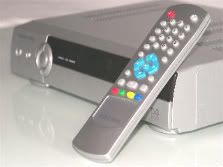
If so it is an eurovox 1 or 2,
If yours has 1 scart lead then its the eurovox 1, If it has 2 scart leads then its the eurovox 2.
Im unaware that there was a clone of this version nor a firmware upgrade to fix the auto roll for a clone but that doesnt mean there isnt, Probably better off asking in here if there was any clones made off this particular box. Can any one confim this?
Also there is a autoroll fix for the 1 and 2 if it is a genuine box which is present in the bigmaq toolbar availible here,.
http://bigmaq.ourtoolbar.com/
This message has been edited since posting. Last time this message was edited on 8. May 2008 @ 06:32
|
|
seanmac30
Newbie
|
8. May 2008 @ 12:05 |
Link to this message
|
Originally posted by Celtic71:
Sorry your post got overlooked Sean , Make sure you have the b0x on STANDBY before updating
Thanks for the suggestion but alas it didn't work. This is frustrating :-(
|
|
hiflyer
Inactive
|
8. May 2008 @ 15:52 |
Link to this message
|
Guys,
I have followed all these instructions to the word. Last night i had to enter in the new codes fro N*L dublin and guess what they're gone again. I though this exercise was suppose to stop us having to do all this code entering. My black eurovox says v1.7 after i carried out all the instructions. Does anybody really know the fix for this? I notice some of you guys are getting pissed off with people looking for codes and saying upgrade your firmware.
HELP!!
|
AfterDawn Addict
|
8. May 2008 @ 16:08 |
Link to this message
|
Originally posted by hiflyer:
Guys,
I have followed all these instructions to the word. Last night i had to enter in the new codes fro N*L dublin and guess what they're gone again. I though this exercise was suppose to stop us having to do all this code entering. My black eurovox says v1.7 after i carried out all the instructions. Does anybody really know the fix for this? I notice some of you guys are getting pissed off with people looking for codes and saying upgrade your firmware.
HELP!!
no code change today or yesterday go to system info and see what date is on the box second down s/w ver
|
|
seanmac30
Newbie
|
8. May 2008 @ 17:31 |
Link to this message
|
Originally posted by seanmac30:
Hi,
Have had my eurovox max V 2008 for 3 months and this is my first firmware upgrade. I followed SG8's advise and got myself a correct null modem serial lead from maplins (code L71BT). I have downloaded the flash loader and managed to upload my favourites (cfd) file to my computer. Sound so far! Then I clicked on download and got the message 'Version 2.10 detected' in a message box with a start button. I then clicked on start and I get a progress bar saying 'Sending...0%' and it has not moved on from this for the last 20 minutes. On the Eurovox it is flashing 'dnld' but it doesn't seem to be downloading. As fasr as I can make out, there is no problem with the lead or the com port as I have been able to upload my favourites file to my computer. Can't see a problem like this after searching the forum. Has anyone got any bright ideas please.
Right here's the deal. I think it is my computer rather than my box. I have tried to reflash a firend's 'The Box' tonight and I get exactly the same problem. I can upload my favs to the computer but for some reason I cannot download/. One-way traffic. I have optimised the bit rate on my port but that is as far my knowledge goes with regard to the serial ports. If you know of anything I can try then I am all ears. I'm going to try and trackdown another computer over the weekend with a 9-pin serial port. Just wondering could I use a RS-232 PCMCIA I/O Card Serial 9-Pin Cardbus on my missus' old laptop. Would that work or do I need a true serial port?
Any advise guys?
Cheers
|
|
beliol
Junior Member
|
9. May 2008 @ 09:50 |
Link to this message
|
I had this problem. Get yourself a Serial to USB adapter. Available in Maplins. Should fix your problem. If COM ports are bugging ya, go here for my little walk-through...
|
|
manster75
Junior Member
|
10. May 2008 @ 05:33 |
Link to this message
|
Ok
- Got myself a usb cable
- connected to eurovox
- congured the usb port to show COM1
One last check before I start updating my eurovox clone.
This is the correct firmware to use isn't it???
My main worry is that this will kill my box.
|
AfterDawn Addict
|
10. May 2008 @ 05:36 |
Link to this message
|
Originally posted by manster75:
Ok
- Got myself a usb cable
- connected to eurovox
- congured the usb port to show COM1
One last check before I start updating my eurovox clone.
This is the correct firmware to use isn't it???
My main worry is that this will kill my box.
which eurovox? which box?
|
|
manster75
Junior Member
|
10. May 2008 @ 05:40 |
Link to this message
|
Its a cloned eurovox says Euro-vox max on the front panel.
|
AfterDawn Addict
|
10. May 2008 @ 05:42 |
Link to this message
|
|
|
manster75
Junior Member
|
10. May 2008 @ 05:48 |
Link to this message
|
apologies for the confusion. It's a black box with a silver front panel and it is definitely a clone. It says Eurovox max on the front.
|
AfterDawn Addict
|
10. May 2008 @ 05:50 |
Link to this message
|
Originally posted by manster75:
apologies for the confusion. It's a black box with a silver front panel and it is definitely a clone. It says Eurovox max on the front.
well then are you using that firmware i just posted
|
|
manster75
Junior Member
|
10. May 2008 @ 05:53 |
Link to this message
|
|
yes I am. One step closer now. Here goes nothing...time to start the update. Thanks for ur help.
|
|
leanne79
Newbie
|
10. May 2008 @ 08:57 |
Link to this message
|
HI guys..
Having a nightmare with my eurovox max v 2008 box.... it isn't a clone, and it is also not a problem with the service provider.
I flashed the box in April when things went a bit hectic, and everthing was fine, then 4 days ago i switched the box on only for it to say 'no signal'.... so i flashed the box again and scanned for channels.... the Tp stays at 0:00... and when i choose to update channels it says no transponder to scan.... i have set the symbol rate to all available ones and each time it is the same... i get nothing...the quality bar on the user installation page jumps from anything from 5% to 27%...
any ideas what i can do to fix this or is the box ready for the bin??
many thanks in advance
|
|
seanmac30
Newbie
|
10. May 2008 @ 09:10 |
Link to this message
|
Originally posted by seanmac30:
Originally posted by seanmac30:
Hi,
Have had my eurovox max V 2008 for 3 months and this is my first firmware upgrade. I followed SG8's advise and got myself a correct null modem serial lead from maplins (code L71BT). I have downloaded the flash loader and managed to upload my favourites (cfd) file to my computer. Sound so far! Then I clicked on download and got the message 'Version 2.10 detected' in a message box with a start button. I then clicked on start and I get a progress bar saying 'Sending...0%' and it has not moved on from this for the last 20 minutes. On the Eurovox it is flashing 'dnld' but it doesn't seem to be downloading. As fasr as I can make out, there is no problem with the lead or the com port as I have been able to upload my favourites file to my computer. Can't see a problem like this after searching the forum. Has anyone got any bright ideas please.
Right here's the deal. I think it is my computer rather than my box. I have tried to reflash a firend's 'The Box' tonight and I get exactly the same problem. I can upload my favs to the computer but for some reason I cannot download/. One-way traffic. I have optimised the bit rate on my port but that is as far my knowledge goes with regard to the serial ports. If you know of anything I can try then I am all ears. I'm going to try and trackdown another computer over the weekend with a 9-pin serial port. Just wondering could I use a RS-232 PCMCIA I/O Card Serial 9-Pin Cardbus on my missus' old laptop. Would that work or do I need a true serial port?
Any advise guys?
Cheers
Hallelujah!! Used a different computer and a bit of fumbling with com ports and I got the bloody thing to flash. Thanks to the contributors who tried to help me. It was the stupid serial port. Probably a faulty pin. Anyway sorted now
|
AfterDawn Addict
2 product reviews
|
10. May 2008 @ 10:01 |
Link to this message
|
Originally posted by leanne79:
HI guys..
Having a nightmare with my eurovox max v 2008 box.... it isn't a clone, and it is also not a problem with the service provider.
I flashed the box in April when things went a bit hectic, and everthing was fine, then 4 days ago i switched the box on only for it to say 'no signal'.... so i flashed the box again and scanned for channels.... the Tp stays at 0:00... and when i choose to update channels it says no transponder to scan.... i have set the symbol rate to all available ones and each time it is the same... i get nothing...the quality bar on the user installation page jumps from anything from 5% to 27%...
any ideas what i can do to fix this or is the box ready for the bin??
many thanks in advance[/quote
]
Have you checked you cable in an original box which your provider would have given to you when you subscribed just to see if the problems not with your connection feed.
|
|
leanne79
Newbie
|
10. May 2008 @ 10:06 |
Link to this message
|
yep i did that... it works fine... have just flashed with old firmware and am rescanning now but it isn't picking anything up again, so am at a loss now!
cheers for the reply
|
AfterDawn Addict
|
10. May 2008 @ 10:10 |
Link to this message
|
Originally posted by leanne79:
yep i did that... it works fine... have just flashed with old firmware and am rescanning now but it isn't picking anything up again, so am at a loss now!
cheers for the reply
Have you tried to flash it with the 28/04/08 firmware for MaxVs, I know it was specifically designed for boxes with the 8% problem, but I have seen it cure your problem also.
|
AfterDawn Addict
2 product reviews
|
10. May 2008 @ 10:11 |
Link to this message
|
Originally posted by leanne79:
yep i did that... it works fine... have just flashed with old firmware and am rescanning now but it isn't picking anything up again, so am at a loss now!
cheers for the reply
I know you said you have used all availible symbol rates, but which ones have you used and where abouts are you?
|
|
Advertisement
|
|
|
|
leanne79
Newbie
|
10. May 2008 @ 10:13 |
Link to this message
|
|
I tried the update for the 8% signal problem the other night but that didn't work... i have scanned on 6.887 6.952... and there is one other which i can't remember off the top of my head.... am in the runcoirn area of cheshire... the symbol rate for here is 6.887... ex Nthell
|


