|
How to: Update Eurovox Max V with Kuro 18.04.08 (R.I.P 28/11/2008)
|
|
Please note that the forum rules have changed. Posting of new codes is no longer allowed. See this thread for more information.
|
AfterDawn Addict

|
28. April 2008 @ 16:51 |
Link to this message

|
Originally posted by ger34:
Thanks Karljd,worked a treat.Have 65 channels in Kildare area with ch**us but missing the likes of E4,More 4,some of the Sly movie channels,and bbc 3 and 4 are pixilating.Would you have channel list for this area?
these are alll i have to hand for newbridge and naas i no the frequencies vary a lot in kildare
ch@rus newbridge
324
340
348
356
364
372
386.750
394.750
410.750
418.750
418.750
444
452
460
Ch@rus naas323.000
338.000
346.000
354.000
362.000
370.000
385.000
393.000
409.000
417.000
442.000
450.000
458.000
|
|
Advertisement

|
|
|
|
|
duke101
Junior Member
|
28. April 2008 @ 16:59 |
 Link to this message

|
Originally posted by manny_v:
Originally posted by HiTeck:
Originally posted by manny_v:
Originally posted by HiTeck:
Originally posted by manny_v:
Originally posted by HiTeck:
Originally posted by manny_v:
I am trying to update the eur@v@x m@x V with the latest UFL_Kuro image with the autoroll fix. However I have some problems.
Using a laptop with a 9pin serial connection. When I start the UFL it by default starts to look for COM4. My machine only has COM1 available.
On selecting DOWNLOAD - I get a START button and on selecting this I get the following message:
thanks hitech that info helped me out no end thanks again
"The receiver was not detected"
"If you want to download the firmware in the boot mode, click OK button below and AC power on your receiver"
COM Port settings:
COM1 COM2 COM3 COM4 (You can select one of these)
I have a Serial cable supplied with the Eur@v@x, so I have assumed it is a NULL modem cable.
So can I follow the instruction above and will it detect the box on a newly selected COM port? Or do you think that it is a serial cable but not NULL modem?
Help much appreciated.
Thanks
If you got your cable with the box its very likley that its a null modem cable and this is fine for the job.
Right click My Computer
go to device manager
press the + at the side of com/ports
right click your com port then properties
in port settings click advance then assign it to com-p the ufl is searching for.
GMAN/HITECK
Thanks for your help. I went to the advance settings in Dev Mgr and it allows me to select only COM1 or COM2 - it says COM3 and COM4 are in use.
Any ideas how to free up COM4?
Thanks
again click the + at the side of ports coms
on com 4- right click-- props---advance---change to 1
then go back to the other and place as 4.
Hiteck
Thanks very much. Managed to get COM4 assigned. Downloaded UFL_Kuro and is now doing a Powerscan.
I will let you know if there is a problem. Otherwise thanks for your help.
This forum is the real deal....
Glad to help , I hope it goes well for you! fingers crossed :)
All scanned juts need to arrange.
As a tip to anyone else - follow Hitecks advice and also check for any applications that may be using the port (COM4). I also found an old application (either old Palm or Nokia application) that was capturing the port. Close any application in your taskbar to ensure there are no conflicts
Thanks again.
|
|
ughnessie
Newbie
|
28. April 2008 @ 17:20 |
Link to this message
|
|
great information..its worked for me iv just updated my EURI VOX MAX V 08 and it worked great....i have ntl uk and the symbol rate was 6.952 thats the only 1 that worked for me the other was ireland i think...just trying to save time as i waited about 20 mins then had to do it all again as it had not found anythimg....
thanks again...great work ppl :-)
|
Newbie
|
28. April 2008 @ 17:32 |
Link to this message

|
|
Thanks again Karljd
|
|
glic83
Member
2 product reviews
|
28. April 2008 @ 18:12 |
Link to this message
|
anyone in limerick?as i said earlier sorting out my friend box for him tonight but im only getting 107 tv channels im missing the like of bbc and itv and channel 4
|
AfterDawn Addict
|
28. April 2008 @ 18:27 |
Link to this message
|
Originally posted by glic83:
anyone in limerick?as i said earlier sorting out my friend box for him tonight but im only getting 107 tv channels im missing the like of bbc and itv and channel 4
Bet you wish you stuck to Dreambox now :) Only joking I presume its Ch**us cable they are on? Press menu, installation, user installation and post the frequencies you see. I may be able to fill in the blanks for you.
|
|
glic83
Member
2 product reviews
|
28. April 2008 @ 18:40 |
Link to this message
|
think i have it right gettin 137 channels sounds about right doesnt it? i had to do a few manual scans,he ordered the box himself and it came ready to go but when they went down he hadnt a clue how to fix it
|
AfterDawn Addict
|
28. April 2008 @ 18:48 |
Link to this message
|
|
Spot on glic, seems like you picked a bad night with Ch**us going down in some areas.
|
|
DayWatch
Newbie
|
28. April 2008 @ 18:54 |
Link to this message
|
|
SG8.............Thanks for the prompt reply on the previous page, if only all tech support was this good the world would be a better place. Heheh.
|
|
glic83
Member
2 product reviews
|
28. April 2008 @ 19:05 |
Link to this message
|
Originally posted by sc0user:
Spot on glic, seems like you picked a bad night with Ch**us going down in some areas.
hope the chorus going down earlier was just down to the roms being slow to update and not a sign of things to come ill stick to my trusty dreambox and box-t,have it sorted for him now so happy days
|
Senior Member
|
29. April 2008 @ 03:30 |
Link to this message
|
Originally posted by robof:
Ps Another question, how do you get onto somebodys sig?
The 'sig' is the signature at the end of the persons post, so to get into it, you just click on any link there at the very bottom of their post.
Whatever you say, say nothing when you talk about you know what for if you know who might hear you, you know what youll get. Youll be sent off to you know where for you would not know how long. Maybe I could search through the threads so you dont have to ??
|
|
arny321
Newbie
|
29. April 2008 @ 11:32 |
Link to this message
|
Hi all having probs loading latest firmware for blue box just keeps saying firmware not fit for your reciever ,deffinate it is a blue box and checked it is not a clone any help advise would be gratfull
|
AfterDawn Addict
2 product reviews
|
29. April 2008 @ 12:12 |
Link to this message
|
Originally posted by arny321:
Hi all having probs loading latest firmware for blue box just keeps saying firmware not fit for your reciever ,deffinate it is a blue box and checked it is not a clone any help advise would be gratfull
What firmware are you using , Also how do you know your box is blue and for what reason isnt it a clone?
|
|
arny321
Newbie
|
29. April 2008 @ 12:25 |
Link to this message
|
hi i have the original box it came in plus i hav checked from this forum just to confirm it is a blue box also chcked it is not a clone firmware version is 2.10
|
AfterDawn Addict
2 product reviews
|
29. April 2008 @ 14:29 |
Link to this message
|
Originally posted by arny321:
hi i have the original box it came in plus i hav checked from this forum just to confirm it is a blue box also chcked it is not a clone firmware version is 2.10
Click the link for the blue box firmware under my sig and try that,
|
|
walshyy11
Junior Member
|
29. April 2008 @ 17:25 |
Link to this message
|
PLEASE HELPPPPPPPPPP!!!!!!
i have a black eurovox max v which i got from a fella for 250. it was workin sweet then i had to start gettin codes off this website. then all of a sudden it started saying no signal....search for signal. so i was told to down load eurovx max v kuro final 18/4/08 and get a null cable. so i have done all of that and i have down loaded the sodtware onto the box. i was then told to restore facoty settings and do a search which i have done. i was told that the channels would appear on the screen in a list format and then to go to skysports and it would work, but i am getting no channels qfter search. i have been tryin for four hours now and nothin.....
|
AfterDawn Addict
2 product reviews
|
29. April 2008 @ 17:33 |
Link to this message
|
Originally posted by walshyy11:
PLEASE HELPPPPPPPPPP!!!!!!
i have a black eurovox max v which i got from a fella for 250. it was workin sweet then i had to start gettin codes off this website. then all of a sudden it started saying no signal....search for signal. so i was told to down load eurovx max v kuro final 18/4/08 and get a null cable. so i have done all of that and i have down loaded the sodtware onto the box. i was then told to restore facoty settings and do a search which i have done. i was told that the channels would appear on the screen in a list format and then to go to skysports and it would work, but i am getting no channels qfter search. i have been tryin for four hours now and nothin.....
When you did a factory reset which symbol rate did you use and where abouts are you?
|
|
walshyy11
Junior Member
|
29. April 2008 @ 17:37 |
Link to this message
|
|
i did the factory reset and just did the search???? i am in dublin wit chorus
|
AfterDawn Addict
2 product reviews
|
29. April 2008 @ 17:45 |
Link to this message
|
Go to,
Menu
Across to instalations then pull down to,
User instalation then press ok,
type in 0000
then press yellow
An image will come up like this,
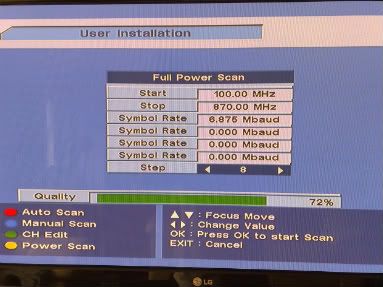
When you get to this point type in the top symbol rate box 6.875, Where it says start =100.00mhz, then stop 870.00mhz and then
press power scan by pressing yellow. or ok to scan.
This message has been edited since posting. Last time this message was edited on 29. April 2008 @ 17:57
|
|
walshyy11
Junior Member
|
29. April 2008 @ 17:54 |
Link to this message
|
thanks mate when i get to that screen i loose the yellow button and only have the red one there so i have put i 6.885 and pressed ok for the search which it is doing now but its goin through the channel im on 71 out of 770 and still nothin it just says TP:000, although on some channels as it scans the level and quality are green on 98%????
|
AfterDawn Addict
2 product reviews
|
29. April 2008 @ 17:56 |
Link to this message
|
|
look up again I have updated it it is 6875 NOT 6885 then press ok to start scan but as I say check my post again as I have made a few changes.
you may have to refresh your pg by pressing F5
This message has been edited since posting. Last time this message was edited on 29. April 2008 @ 18:02
|
|
walshyy11
Junior Member
|
29. April 2008 @ 18:01 |
Link to this message
|
thank yes i got that it searchin now,,, are the channels supposed apper in a list as they are found throughout the search cos there is still nothin commin up on the search it just says TP:000, although on some channels as it scans the level and quality are green on 98% ??????
|
AfterDawn Addict
2 product reviews
|
29. April 2008 @ 18:05 |
Link to this message
|
|
Did you put in 6875 because in your post above you said you typed in 6885!
|
|
walshyy11
Junior Member
|
29. April 2008 @ 18:07 |
Link to this message
|
yes its 6875 searchin now and nothin is commin up on channel 267 now and still tp:000
|
|
Advertisement
|
|
|
|
1shaddow1
Member
|
29. April 2008 @ 18:08 |
Link to this message
|
Originally posted by walshyy11:
thank yes i got that it searchin now,,, are the channels supposed apper in a list as they are found throughout the search cos there is still nothin commin up on the search it just says TP:000, although on some channels as it scans the level and quality are green on 98% ??????
as i said am no expert but jus to let ya know, when i scan for channels i only ever get 80-82%, i would guess its not like adsl.
adsl matters how far away you are from the main terminal.
cable is not the same from my knowledge so am guessing that something is not right with ya setup.
|


